• 中文版
  • BM
  • News
  • Deals
  • Reviews
    • First Impressions
    • Hands-on
    • Comparisons
  • Tech
    • Mobile
    • Computers
    • Cameras
    • Wearables
    • Audio
    • Drones
  • Telco
    • Celcom
    • Digi
    • Maxis
    • Time
    • Tune Talk
    • U Mobile
    • Unifi
    • Yes
  • Cars
  • Contribute
  • Jobs
Menu
  • 中文版
  • BM
  • News
  • Deals
  • Reviews
    • First Impressions
    • Hands-on
    • Comparisons
  • Tech
    • Mobile
    • Computers
    • Cameras
    • Wearables
    • Audio
    • Drones
  • Telco
    • Celcom
    • Digi
    • Maxis
    • Time
    • Tune Talk
    • U Mobile
    • Unifi
    • Yes
  • Cars
  • Contribute
  • Jobs
Search
  • Tech
    • News
    • Mobile
    • Computers
    • Cameras
    • Wearables
    • Audio
    • Drones
  • Telco
    • Celcom
    • Digi
    • Maxis
    • Time
    • U Mobile
    • Unifi
    • Yes
  • Reviews
    • First Impressions
    • Hands-on
    • Comparisons
  • Buyer’s Guide
  • Opinions
  • Digital Life
  • Video
  • Deals
  • How-To
  • Cars
  • Bahasa Melayu
  • EV
  • Contribute
  • Advertise
Menu
  • Tech
    • News
    • Mobile
    • Computers
    • Cameras
    • Wearables
    • Audio
    • Drones
  • Telco
    • Celcom
    • Digi
    • Maxis
    • Time
    • U Mobile
    • Unifi
    • Yes
  • Reviews
    • First Impressions
    • Hands-on
    • Comparisons
  • Buyer’s Guide
  • Opinions
  • Digital Life
  • Video
  • Deals
  • How-To
  • Cars
  • Bahasa Melayu
  • EV
  • Contribute
  • Advertise
Search
Close
Home Digital Life

GXBank has made it easier to add favourite accounts for fund transfers

  • BY Alexander Wong
  • 29 July 2024
  • 11:10 am
  • Comment
Share on FacebookShare on Twitter

GXBank has recently updated its app, improving how you can save bank or eWallet accounts to your favourite list. This makes adding new and recent transactions to your favourite list super easy. Once saved, you can send money instantly to your favourite recipients in just a few taps.
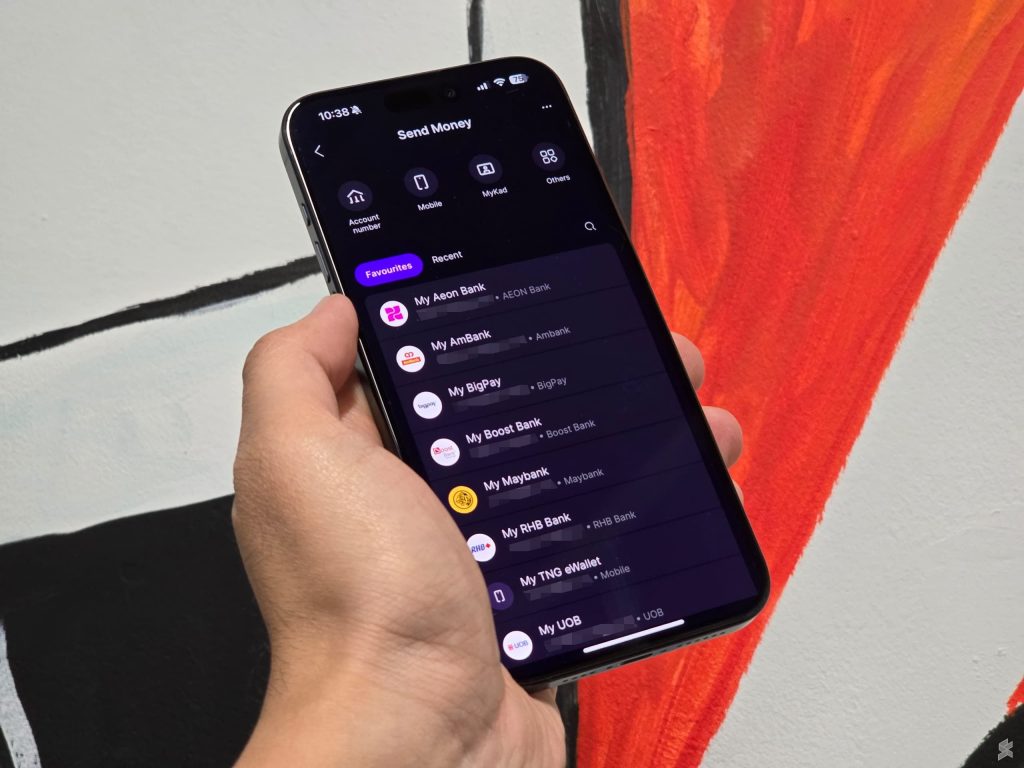
To get this new feature, just update your GXBank app to the latest version from the Apple App Store and the Google Play Store. On the latest version, the Send Money section which is accessible from the main panel on the home screen has been revised to display your favourites and recent transactions.

GXBank users can add up to 20 favourite recipients, while the recent tab will show up to 10 accounts of your recent fund transfers.

How to add an account to Favourites on GXBank?
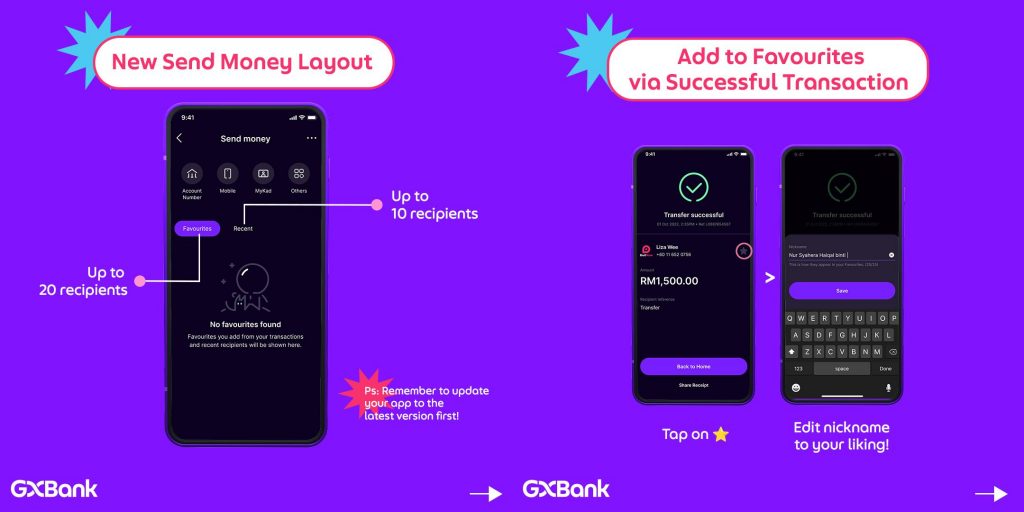
If you’ve just completed a fund transfer, you can just tap on the star icon on the right side of the “Transfer successful” page to add to your favourite. For easy reference, you can add a nickname or personalised label for the particular account or recipient.

Alternatively, you can save your past fund transfers as a favourite account. On the Send Money page, just tap the “Recent” tab and then tap the star icon to save it as a favourite. You can also customise the name for easy reference.

Take note that selfie verification will be required when you save an account to your favourite list.
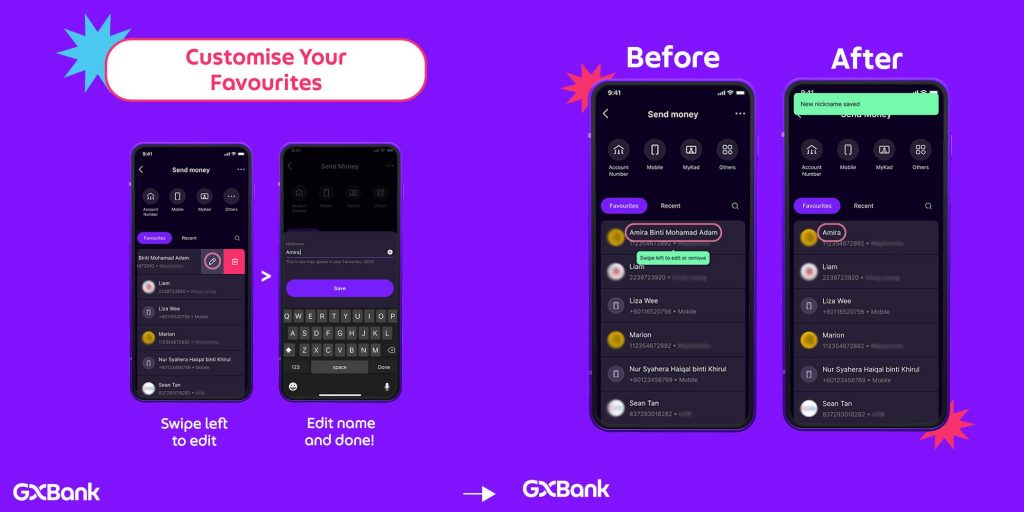
After a favourite recipient or account has been saved, you can edit or delete the listing by swiping left on the favourite item. With the customised name, you can get a shorter nickname for easy reference instead of showing the full registered name of the bank account.

GXBank allows users to send money with a DuitNow ID (e.g. IC number, mobile number, passport, business reg number) or with bank account number. Besides normal fund transfers to a bank account, you can also perform transfers to other banks for credit card and loan payments.

[ SOURCE ]

Tags: digital bankGXBankGXBank Transfer
Alexander Wong

Alexander Wong

POPULAR

GXBank has made it easier to add favourite accounts for fund transfers

July 29, 2024
Rear view of the OPPO Find X9 Ultra in Tundra Umber standing vertically on a stone surface with a lush green bokeh background. The device features an eco-friendly vegan leather back with a classic stitching design , vertically oriented Hasselblad and OPPO logos , and a large circular Master Lens camera module with a bronze-toned knurled ring.

Clearing Every Expectation: How the OPPO Find X9 Ultra Redefines the Modern Flagship Experience

April 16, 2026

Volvo EX30 owners affected by recall told not to charge above 70% following two fire incidents in Thailand

May 19, 2026

SoyaCincau x Dongfeng Pop Up EV Clinic: Track Edition 2026: Chase a podium or cruise with friends; we’re opening the grid to everyone

May 13, 2026
BYD Inokom Visit - May 2026

BYD is here to stay in Malaysia: CKD with Sime Motors set to happen soon?

May 18, 2026

SoyaCincau x Dongfeng: We’re taking over Sepang for Malaysia’s biggest EV Track Day for 2026

May 8, 2026

Copyright © 2025 · SoyaCincau.com
Mind Blow Sdn Bhd (1076827-P)

  • ADVERTISE
  • DISCLAIMER

Copyright © 2026 · SoyaCincau.com – Mind Blow Sdn Bhd (1076827-P)

  • ADVERTISE
  • DISCLAIMER