• 中文版
  • BM
  • News
  • Deals
  • Reviews
    • First Impressions
    • Hands-on
    • Comparisons
  • Tech
    • Mobile
    • Computers
    • Cameras
    • Wearables
    • Audio
    • Drones
  • Telco
    • Celcom
    • Digi
    • Maxis
    • Time
    • Tune Talk
    • U Mobile
    • Unifi
    • Yes
  • Cars
  • Contribute
  • Jobs
Menu
  • 中文版
  • BM
  • News
  • Deals
  • Reviews
    • First Impressions
    • Hands-on
    • Comparisons
  • Tech
    • Mobile
    • Computers
    • Cameras
    • Wearables
    • Audio
    • Drones
  • Telco
    • Celcom
    • Digi
    • Maxis
    • Time
    • Tune Talk
    • U Mobile
    • Unifi
    • Yes
  • Cars
  • Contribute
  • Jobs
Search
  • Tech
    • News
    • Mobile
    • Computers
    • Cameras
    • Wearables
    • Audio
    • Drones
  • Telco
    • Celcom
    • Digi
    • Maxis
    • Time
    • U Mobile
    • Unifi
    • Yes
  • Reviews
    • First Impressions
    • Hands-on
    • Comparisons
  • Buyer’s Guide
  • Opinions
  • Digital Life
  • Video
  • Deals
  • How-To
  • Cars
  • Bahasa Melayu
  • EV
  • Contribute
  • Advertise
Menu
  • Tech
    • News
    • Mobile
    • Computers
    • Cameras
    • Wearables
    • Audio
    • Drones
  • Telco
    • Celcom
    • Digi
    • Maxis
    • Time
    • U Mobile
    • Unifi
    • Yes
  • Reviews
    • First Impressions
    • Hands-on
    • Comparisons
  • Buyer’s Guide
  • Opinions
  • Digital Life
  • Video
  • Deals
  • How-To
  • Cars
  • Bahasa Melayu
  • EV
  • Contribute
  • Advertise
Search
Close
Home Digital Life Apps

You can use your Android device as a webcam on Windows 11

  • BY Sharil Abdul Rahman
  • 4 March 2024
  • 2:05 pm
  • Comment
Share on FacebookShare on Twitter

Microsoft is currently testing a new feature for Phone Link in Windows 11 via the Insider Channels. Connected Android phones can now be used as webcams for any Windows machine. Some of the abilities include being able to switch between front and back cameras, pausing the stream during interruptions, and even using the phone’s camera filters. The code for this feature was previously discovered late last year.

Right now, the feature is only active for Windows 11 Insider Channel – the beta testing platform for Microsoft’s operating system. The feature is baked into the Phone Link application that allows remote control of Android phones by Windows, so no additional software is needed to enable it.

Setting the camera up is easy. Users need to go to Settings > Bluetooth & devices > Mobile devices choose “Manage devices” and allow your PC to access your Android phone. In the Phone Link app, choose the option that says, “Use as a connected camera” and the phone’s cameras can be accessed.

What makes this feature great is that it is not limited to phones – Android tablets can also be used as a webcam, as long as the device is running Android version 9.0 and up.
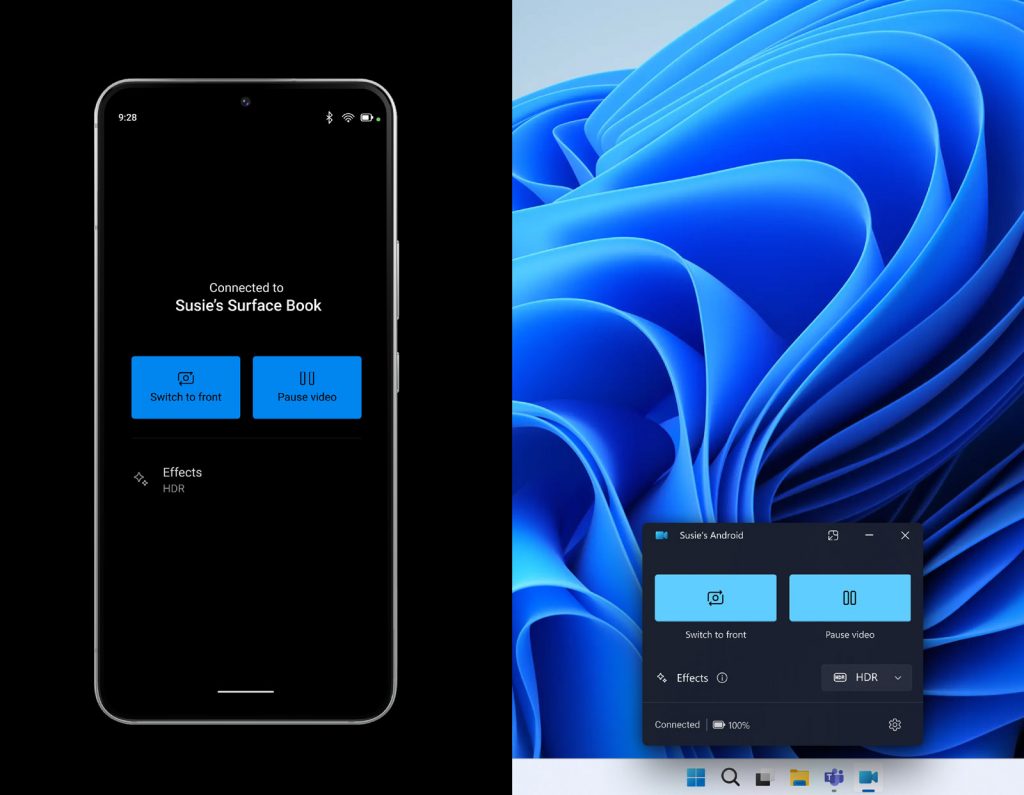
Microsoft said the feature is gradually being rolled out across all Insider Channel users, and the computer will get a Cross Device Experience Host update in the Microsoft Store, which needs to be installed for the feature to work.

It is still unclear when this feature will be rolled out for the public, but this feature would be a welcome one for those looking for a better webcam experience than what is onboard most laptops on the market.

[SOURCE]

Tags: AndroidmicrosoftMicrosoft MalaysiaMobilePhone Linkwebcam
Sharil Abdul Rahman

Sharil Abdul Rahman

POPULAR

You can use your Android device as a webcam on Windows 11

March 4, 2024

Malaysia to review EV policy amid concerns over strict rules affecting BYD CKD operations in Tanjung Malim

April 17, 2026
vivo V70 FE 200MP camera phone in Malaysia - Best value alternative for phones under RM2,000

High-Resolution Meets High-Endurance: A Closer Look at the vivo V70 FE

April 10, 2026

Zeekr 8X: Premium 900V PHEV SUV, up to triple-motor setup and 0–100km/h in 2.96s

April 20, 2026
Apple Tap To Pay on iPhone Malaysia

Apple’s Tap to Pay on iPhone is now in Malaysia

April 22, 2026

Malaysia’s EV policy and the BYD debate: Are affordable EVs at risk? | Let’s Talk About #140

April 19, 2026

Copyright © 2025 · SoyaCincau.com
Mind Blow Sdn Bhd (1076827-P)

  • ADVERTISE
  • DISCLAIMER

Copyright © 2026 · SoyaCincau.com – Mind Blow Sdn Bhd (1076827-P)

  • ADVERTISE
  • DISCLAIMER