
• 中文版
  • BM
  • News
  • Deals
  • Reviews
    • First Impressions
    • Hands-on
    • Comparisons
  • Tech
    • Mobile
    • Computers
    • Cameras
    • Wearables
    • Audio
    • Drones
  • Telco
    • Celcom
    • Digi
    • Maxis
    • Time
    • Tune Talk
    • U Mobile
    • Unifi
    • Yes
  • Cars
  • Contribute
  • Jobs
Menu
  • 中文版
  • BM
  • News
  • Deals
  • Reviews
    • First Impressions
    • Hands-on
    • Comparisons
  • Tech
    • Mobile
    • Computers
    • Cameras
    • Wearables
    • Audio
    • Drones
  • Telco
    • Celcom
    • Digi
    • Maxis
    • Time
    • Tune Talk
    • U Mobile
    • Unifi
    • Yes
  • Cars
  • Contribute
  • Jobs
Search
  • Tech
    • News
    • Mobile
    • Computers
    • Cameras
    • Wearables
    • Audio
    • Drones
  • Telco
    • Celcom
    • Digi
    • Maxis
    • Time
    • U Mobile
    • Unifi
    • Yes
  • Reviews
    • First Impressions
    • Hands-on
    • Comparisons
  • Buyer’s Guide
  • Opinions
  • Digital Life
  • Video
  • Deals
  • How-To
  • Cars
  • Bahasa Melayu
  • EV
  • Contribute
  • Advertise
Menu
  • Tech
    • News
    • Mobile
    • Computers
    • Cameras
    • Wearables
    • Audio
    • Drones
  • Telco
    • Celcom
    • Digi
    • Maxis
    • Time
    • U Mobile
    • Unifi
    • Yes
  • Reviews
    • First Impressions
    • Hands-on
    • Comparisons
  • Buyer’s Guide
  • Opinions
  • Digital Life
  • Video
  • Deals
  • How-To
  • Cars
  • Bahasa Melayu
  • EV
  • Contribute
  • Advertise
Search
Close
Home Digital Life

AirAsia Virtual Allstar is now available on WhatsApp

  • BY Alexander Wong
  • 28 July 2020
  • 2:38 pm
  • Comment
Share on FacebookShare on Twitter

Here’s a new way to contact AirAsia on your smartphone. The low-cost carrier has launched its WhatsApp hotline number which you can use to get flight updates, make changes or to follow up on refunds.

The WhatsApp hotline works like the current AirAsia Virtual Allstar (AVA) bot that’s available on Facebook, AirAsia.com and the mobile app. To get started, just add +60 11-3516 5078 on your phone or click on this link. You can start the conversation by saying “Hi” and you’ll be greeted by a menu option which you can navigate by entering the respective numbers.
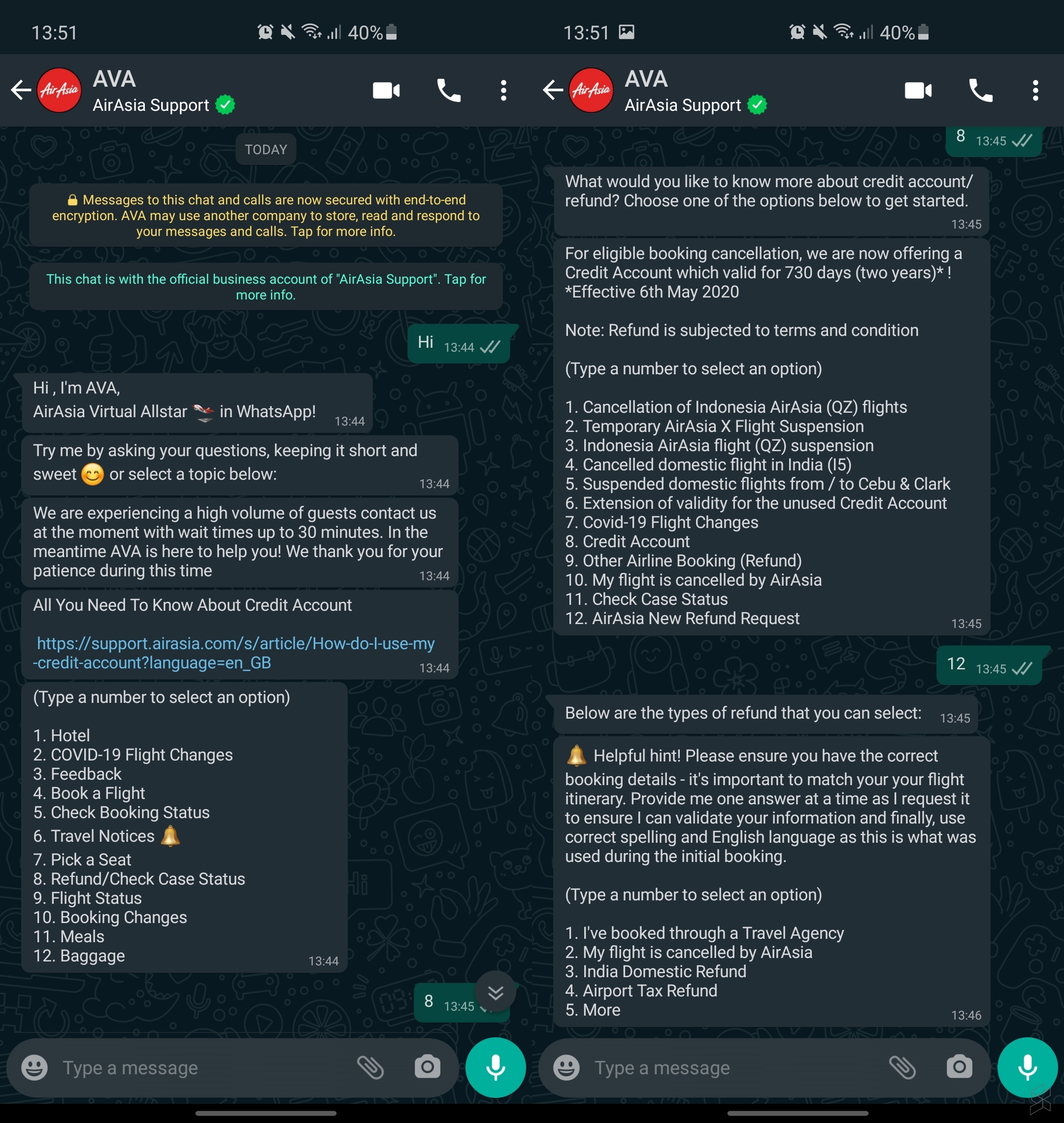
With AVA, you can use it to submit feedback, check on your booking status, view travel notices and to follow up on existing refund and case status. If you’re making changes to an existing booking, you’ll need to standby your flight’s booking number or PNR.

The AVA bot is able to answer queries in 11 languages which include English, Bahasa Malaysia, Thai, Bahasa Indonesia, Vietnamese, Korean, Tagalog, Hindi, Japanese, Simplified Chinese and Traditional Chinese. You can view the AVA guide here.


Tags: AirAsiaAirlinesAVAWhatsapp
Alexander Wong

Alexander Wong

POPULAR

AirAsia Virtual Allstar is now available on WhatsApp

July 28, 2020
BYD Tech Discovery KL

MITI’s CBU EV ruling will wipe out current EV lineup from BYD, iCaur, Mini, Smart, Toyota, and more

May 7, 2026
Proton Saga Cross AMA02 by Theottle

Proton Saga Cross AMA02 to begin production in October?

May 4, 2026

TNG eWallet to disable auto-reload for debit cards from 13 May 2026

April 30, 2026

YouTube Premium Lite now in Malaysia: Ad-free viewing from RM12.90/month

May 4, 2026

MITI increases minimum CBU EV price to RM300K? Imported EVs with 240hp and below not allowed?

May 6, 2026

Copyright © 2025 · SoyaCincau.com
Mind Blow Sdn Bhd (1076827-P)

  • ADVERTISE
  • DISCLAIMER

Copyright © 2026 · SoyaCincau.com – Mind Blow Sdn Bhd (1076827-P)

  • ADVERTISE
  • DISCLAIMER





