• 中文版
  • BM
  • News
  • Deals
  • Reviews
    • First Impressions
    • Hands-on
    • Comparisons
  • Tech
    • Mobile
    • Computers
    • Cameras
    • Wearables
    • Audio
    • Drones
  • Telco
    • Celcom
    • Digi
    • Maxis
    • Time
    • Tune Talk
    • U Mobile
    • Unifi
    • Yes
  • Cars
  • Contribute
  • Jobs
Menu
  • 中文版
  • BM
  • News
  • Deals
  • Reviews
    • First Impressions
    • Hands-on
    • Comparisons
  • Tech
    • Mobile
    • Computers
    • Cameras
    • Wearables
    • Audio
    • Drones
  • Telco
    • Celcom
    • Digi
    • Maxis
    • Time
    • Tune Talk
    • U Mobile
    • Unifi
    • Yes
  • Cars
  • Contribute
  • Jobs
Search
  • Tech
    • News
    • Mobile
    • Computers
    • Cameras
    • Wearables
    • Audio
    • Drones
  • Telco
    • Celcom
    • Digi
    • Maxis
    • Time
    • U Mobile
    • Unifi
    • Yes
  • Reviews
    • First Impressions
    • Hands-on
    • Comparisons
  • Buyer’s Guide
  • Opinions
  • Digital Life
  • Video
  • Deals
  • How-To
  • Cars
  • Bahasa Melayu
  • EV
  • Contribute
  • Advertise
Menu
  • Tech
    • News
    • Mobile
    • Computers
    • Cameras
    • Wearables
    • Audio
    • Drones
  • Telco
    • Celcom
    • Digi
    • Maxis
    • Time
    • U Mobile
    • Unifi
    • Yes
  • Reviews
    • First Impressions
    • Hands-on
    • Comparisons
  • Buyer’s Guide
  • Opinions
  • Digital Life
  • Video
  • Deals
  • How-To
  • Cars
  • Bahasa Melayu
  • EV
  • Contribute
  • Advertise
Search
Close
Home News

Here’s how you can check your Unifi Turbo upgrade status

  • BY Alexander Wong
  • 30 November 2018
  • 10:46 pm
  • Comment
Share on FacebookShare on Twitter
Check Unifi Turbo

When TM announced its Unifi Turbo upgrade, they did mention that the speed upgrade will be rolled out in stages. Some customers have gotten it earlier while others are still waiting for their connection to get Turbo-ed.

Previously, TM introduced a page where customers can check if they are eligible for Unifi Turbo upgrade. Unfortunately, it couldn’t cope with the sheer traffic and TM was forced to disable the search function. Now, there’s an easier way to check and it will also inform you when your Turbo upgrade is coming.
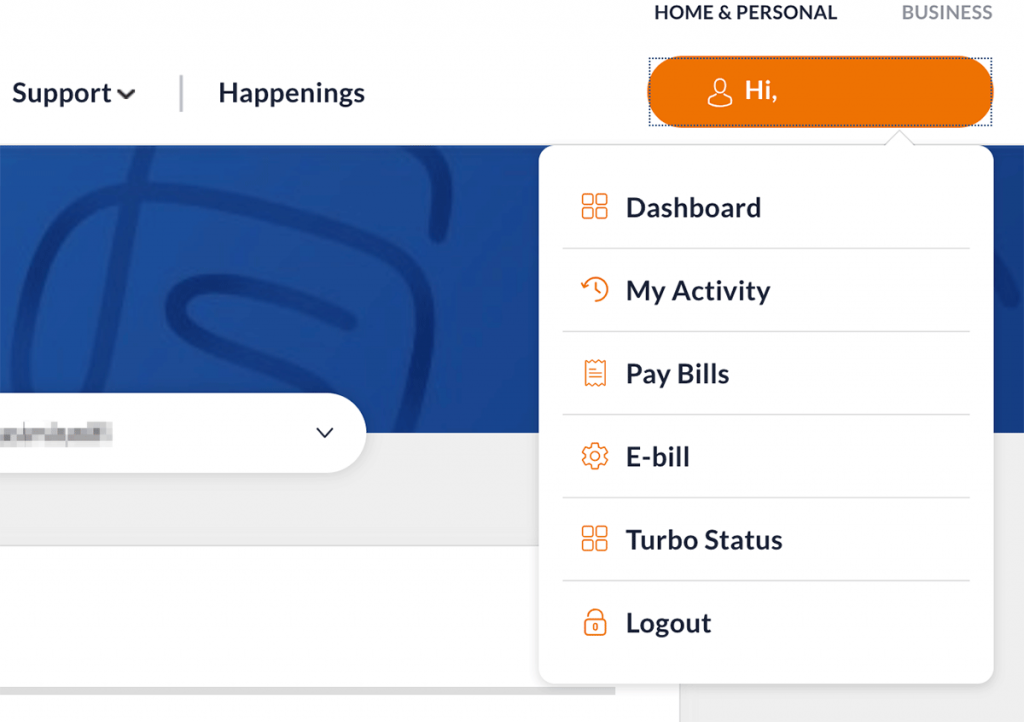
To find out if you’re eligible and what speeds you’re getting, you can login to your Unifi self-care account at unifi.com.my. From the top right menu button, click on Turbo Status. 
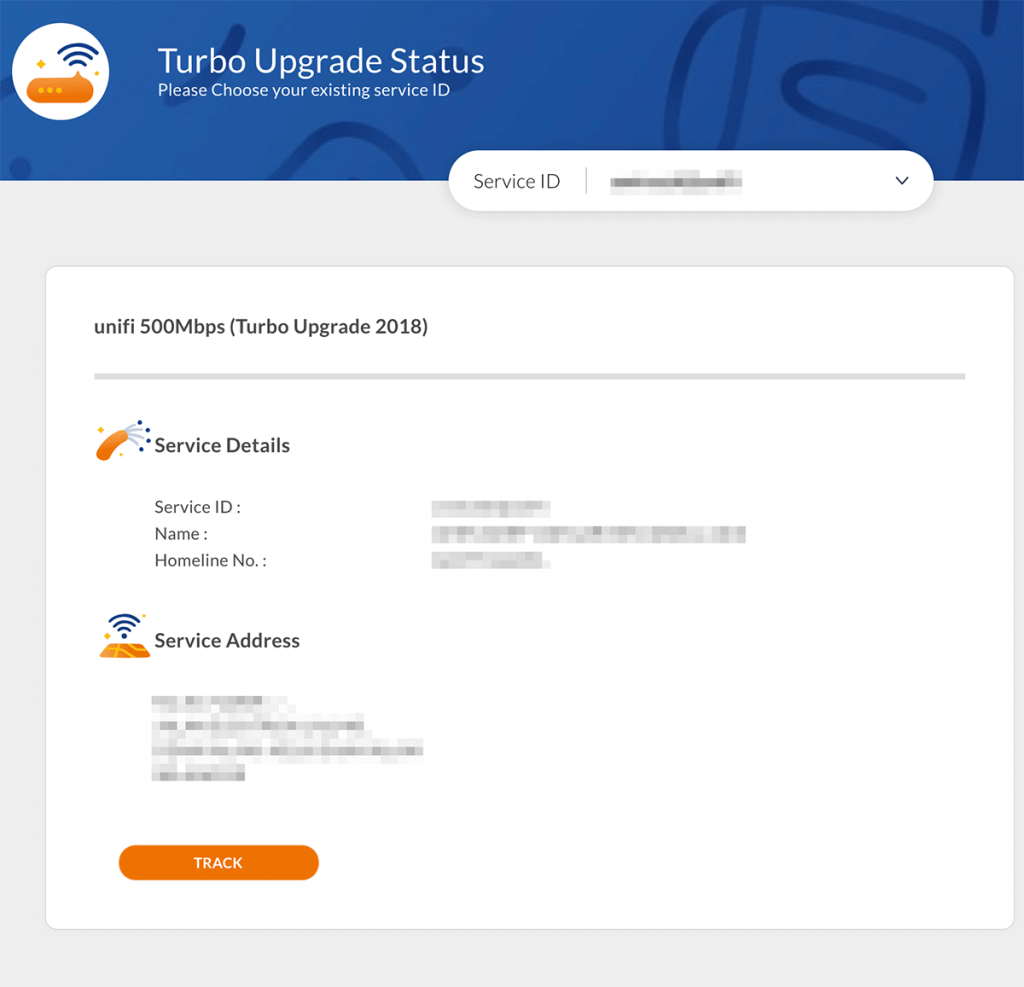
Once you’re in, will see your current package. If you’re eligible for Turbo upgrade, it will display your upcoming plan package and an expected date for the upgrade underneath your service address. 

Similar to the previous checker, the upgrade time frame is pretty broad and it would have been better if TM can narrow down the upgrade to a specific month. 

If you don’t have a self-care account, you can register an account easily with your registered IC and Unifi fixed line number. You can get started on the main Unifi website and click on the padlock icon on the top right. 

Got the Turbo upgrade but not enjoying full speeds? You might be eligible for a free modem replacement.


Tags: TMUnifi
Alexander Wong

Alexander Wong

POPULAR

Upgraded To a New Phone? Cool. But When Was the Last Time you Upgraded your Shaver?

November 10, 2025

5 Reasons Every Home Should Have a Smart Security System

November 11, 2025

Solar ATAP: The new solar programme for consumers will only start in 2026

December 2, 2025

Here’s how you can check your Unifi Turbo upgrade status

November 30, 2018
Perodua QV-E EV

Perodua QV-E is now official: Electric sportback with 201hp, 445km NEDC range, priced at RM80k not inclusive of battery subscription

December 1, 2025

GrabRewards is now GrabCoins: Now with even more ways to earn and save

November 17, 2025

Copyright © 2025 · SoyaCincau.com
Mind Blow Sdn Bhd (1076827-P)

  • ADVERTISE
  • DISCLAIMER

Copyright © 2025 · SoyaCincau.com – Mind Blow Sdn Bhd (1076827-P)

  • ADVERTISE
  • DISCLAIMER