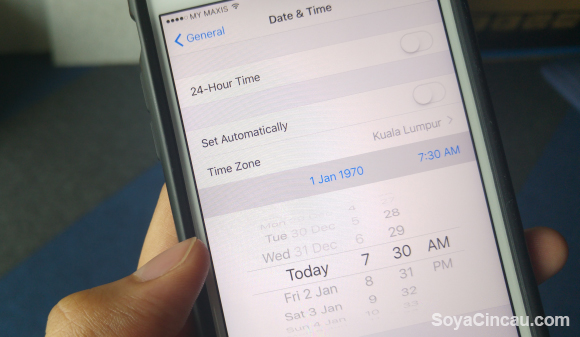
Oh dear, we have another iPhone bug on our hands. If you haven’t been too busy with the Lunar New Year, you probably would have noticed that there is a new iPhone exploit going around that people can abuse to brick your iPhone by simply setting the date to 1st January 1970.
Yup, you can brick an iPhone by changing its date.
Apparently, the discovery of this bug was thanks to YouTuber Zach Straley, who demonstrates in his video linked above what he thinks is the “fastest” way to brick an iPhone.
All you need to do is head into your iPhone’s general settings and switch the date manually to 1st January 1970. It will take a lot of scrolling thanks to Apple’s brilliant manual date setting implementation but you’ll get there eventually.
Once that’s done simply restart the device and it will be stuck in a bootloop.
While some have suggested that the only way to fix this particular problem is to send your phone in for repairs/a swap, JerryRigEverything has a simpler, more DIY solution.
What he did was simply unscrew the back plate of the iPhone, lift it up and disconnect the battery powering the device. After a short 30 second wait, simply reconnect the battery and power on your phone. Disconnecting the battery resets the time and date so your iPhone should be good as new.
Why does this happen? Well, the explanation is rather simple actually: Midnight on 1st January 1970 marks the start of what is known as the Unix time system — a simple system that programmers use to represent date and time based on how many seconds had elapsed since that January 1st, 1970.
Here’s a video by Tom Scott detailing why this problem happens and how it is related to the Unix time code.
In a nutshell, setting the date to 1st January 1970 basically resets the Unix timestamp to zero, and because the phone (or somewhere in the programming code) will do a simple check upon startup (like a battery time calculation), setting the date before January 1st, 1970 (or the Unix epoch) causing an integer underflow.
Since you can’t store negative numbers in this format, the number in the 64-bit processor wraps around to its maximum value — a date that is 20 times longer than the expected lifespan of the universe. As you can imagine, your little iPhone may run into some problems displaying that date. I can’t even display that date in my head.
The result? A crash.
It goes without saying that we do not encourage you to try this out on your iPhone and will not be responsible for any bricking of any iPhones. Do so at your own risk. We also do not encourage you to mess with your buddy’s iPhone otherwise, his/her iPhone may not be the only thing breaking.
That said, it does seem rather silly that Apple allowed a bug like this to go through though it is worth mentioning that it only affects 64-bit iOS devices that are running iOS 8 and above. In any case, as JerryRigEverything suggests, the next time you want to go time travelling, bring an Android device.
But hey, at least there is a fix, right?
[SOURCE]