Yesterday we addressed the big ruckus that’s been going around regarding the Samsung Galaxy Note5‘s S Pen “design flaw” – we use that phrase loosely, as the Korean manufacturers realised the problem but it was probably too late to rectify the problem, due to it being too late in the process. So does printing a disclaimer save them from the backlash?
As far as we’re concerned, when you fork out RM 2,699 for a phablet, you’re expecting something that has stood up to vigorous testing. How far along were they before they finally realised? Was putting up that 25th page in the user manual adequate? What actually causes the S Pen functionality to go bust? We aren’t entirely sure about the first two questions but we’ll help answer the third in this article.
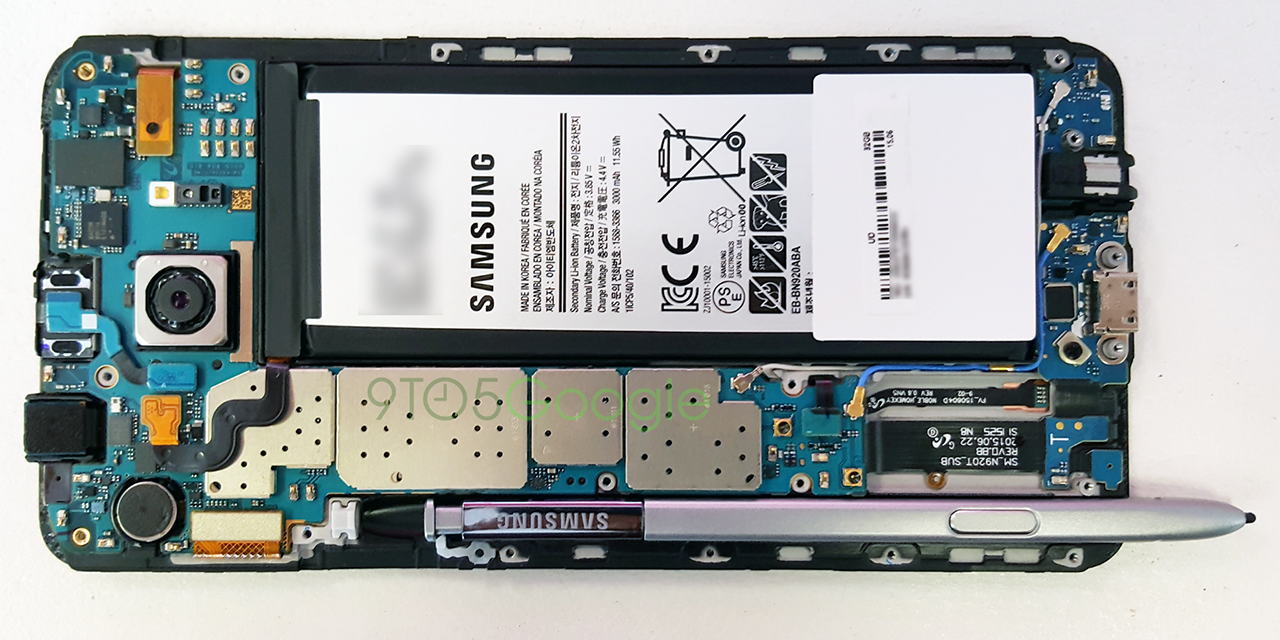
Blessed to have the guys from 9to5google and uBreakiFix who’ve dived into this whole mess by showing what it looks like on the inside of the Note5 when the S Pen inserted the wrong way. Looking closer at the photo, you’ll see levers that jut out in the silo: one controls S Pen detection and functionality, while the other secures the stylus from falling out the silo.
The former/lever 1 sits in between the middle and the end of the silo, under the primary logic board angled upwards on the right of the S Pen; without this lever, you’ll lose two features – Screen-off memo and Air Command. However, lever 1 doesn’t cause the S Pen to get stuck – that’s caused by lever 2. Located a little further up the silo, towards the end is the lever that will be the doom of your stylus.
An intricate writing tool of sorts, it’s designed to have two small cutouts near the writing end that holds it in firmly when slotted correctly, writing tip first. A positive design but here’s the deal – if it’s placed backwards or click side first, you’ll see it getting hitched after passing the second lever. Once you’re in this deep, you’re probably not getting it out, considering the lack of space following this mishap.
If you’re lucky enough to get the backward S Pen passed the second lever, you’re gonna have to get past the first lever again. Removing the Samsung stylus after this could likely damage the other plastic lever that’s mounted inside an internal part soldered to the main board. Thin in nature, this plastic lever gives you the S Pen detection capability, thus making you disable S Pen Detection to get the stylus to work (that is if you’ve managed to get it out in the first place) – killing the two aforementioned features, delivering a bleak Note5 writing experience.
Sympathising with current and future owners of the Galaxy Note5, all we can do is advise everyone to avoid this scenario (as unrealistic as it is) and don’t try to replicate this problem at all, you’ll regret even trying to do so. We’ve yet to see if Samsung will buckle from the feedback, probably offering some sort of replacement program, or have a software alert when the silo detects backwards insertion.
Still excited about the Samsung Galaxy Note5? Read all about it here.
[ SOURCE ]
Honor Malaysia has expanded the 600 series line-up with the launch of the new 600S…
Besides its recent upgrade at Johor Premium Outlets, DC Handal has turned on a new…
The latest Meta AI-powered smart glasses from Ray-Ban and Oakley are officially coming to Malaysia.…
TQ Wuling has officially launched the new TQ Wuling Porta EV in Malaysia. The new…
Apple has introduced its fourth-generation Apple TV 4K, its first major hardware refresh since 2022.…
Apple has finally introduced its second-generation HomePod mini, six years after the original compact smart…
This website uses cookies.