
• 中文版
  • BM
  • News
  • Deals
  • Reviews
    • First Impressions
    • Hands-on
    • Comparisons
  • Tech
    • Mobile
    • Computers
    • Cameras
    • Wearables
    • Audio
    • Drones
  • Telco
    • Celcom
    • Digi
    • Maxis
    • Time
    • Tune Talk
    • U Mobile
    • Unifi
    • Yes
  • Cars
  • Contribute
  • Jobs
Menu
  • 中文版
  • BM
  • News
  • Deals
  • Reviews
    • First Impressions
    • Hands-on
    • Comparisons
  • Tech
    • Mobile
    • Computers
    • Cameras
    • Wearables
    • Audio
    • Drones
  • Telco
    • Celcom
    • Digi
    • Maxis
    • Time
    • Tune Talk
    • U Mobile
    • Unifi
    • Yes
  • Cars
  • Contribute
  • Jobs
Search
  • Tech
    • News
    • Mobile
    • Computers
    • Cameras
    • Wearables
    • Audio
    • Drones
  • Telco
    • Celcom
    • Digi
    • Maxis
    • Time
    • U Mobile
    • Unifi
    • Yes
  • Reviews
    • First Impressions
    • Hands-on
    • Comparisons
  • Buyer’s Guide
  • Opinions
  • Digital Life
  • Video
  • Deals
  • How-To
  • Cars
  • Bahasa Melayu
  • EV
  • Contribute
  • Advertise
Menu
  • Tech
    • News
    • Mobile
    • Computers
    • Cameras
    • Wearables
    • Audio
    • Drones
  • Telco
    • Celcom
    • Digi
    • Maxis
    • Time
    • U Mobile
    • Unifi
    • Yes
  • Reviews
    • First Impressions
    • Hands-on
    • Comparisons
  • Buyer’s Guide
  • Opinions
  • Digital Life
  • Video
  • Deals
  • How-To
  • Cars
  • Bahasa Melayu
  • EV
  • Contribute
  • Advertise
Search
Close
Home Digital Life

Gmail now lets you undo your sent mail with Undo Send

  • BY Sirap Bandung
  • 24 June 2015
  • 12:47 pm
  • Comment
Share on FacebookShare on Twitter

gmail undo _1

At long last after spending six years in development, Gmail’s Undo Send feature is finally available to the masses. The vast majority of us have already felt the horror of accidentally sending a mail with typos, the wrong person’s name or even when its unfinished and the new feature is set to change that.

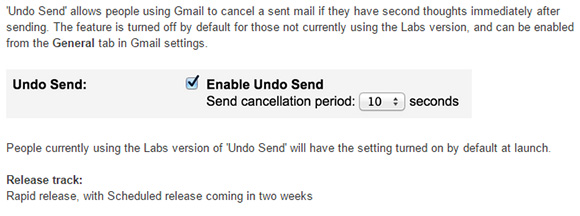
The function allows you to “unsend” an email for up to 30 seconds where it holds the mail for you after you hit the send button; so you have time to react incase you change your mind. The Undo Send feature is currently available only for desktop but we will be getting it for mobile in the near future.
Gmail undo

To activate it yourself, head on to your Gmail settings under the General tab and enable it. You can then pick between 5 to 30 seconds of delay time for Gmail to hold on to your mail. Its a very handy feature to have, we just wish it had come out sooner.


[VIA][SOURCE]

Tags: appsGmailgmail undo sendgooglegoogle gmail undo sendundo send
Sirap Bandung

Sirap Bandung

[email protected]

POPULAR

Gmail now lets you undo your sent mail with Undo Send

June 24, 2015

BYD Atto 3 RWD confirmed for Malaysia: 0-100 in 5.5s, 308hp, 510km of range

June 2, 2026

The Best Camera is the One You Have with You; The OPPO Find X9 Ultra Wants to be Your Only One

May 6, 2026

Malaysia Passport with 10-year validity will cost you RM350

June 4, 2026

DEAL: MacBook Neo now going for as low as RM2,174

June 3, 2026

U Mobile ULTRA5G: Fast 5G That Actually Works Indoors

May 29, 2026

Copyright © 2025 · SoyaCincau.com
Mind Blow Sdn Bhd (1076827-P)

  • ADVERTISE
  • DISCLAIMER

Copyright © 2026 · SoyaCincau.com – Mind Blow Sdn Bhd (1076827-P)

  • ADVERTISE
  • DISCLAIMER




