• 中文版
  • BM
  • News
  • Deals
  • Reviews
    • First Impressions
    • Hands-on
    • Comparisons
  • Tech
    • Mobile
    • Computers
    • Cameras
    • Wearables
    • Audio
    • Drones
  • Telco
    • Celcom
    • Digi
    • Maxis
    • Time
    • Tune Talk
    • U Mobile
    • Unifi
    • Yes
  • Cars
  • Contribute
  • Jobs
Menu
  • 中文版
  • BM
  • News
  • Deals
  • Reviews
    • First Impressions
    • Hands-on
    • Comparisons
  • Tech
    • Mobile
    • Computers
    • Cameras
    • Wearables
    • Audio
    • Drones
  • Telco
    • Celcom
    • Digi
    • Maxis
    • Time
    • Tune Talk
    • U Mobile
    • Unifi
    • Yes
  • Cars
  • Contribute
  • Jobs
Search
  • Tech
    • News
    • Mobile
    • Computers
    • Cameras
    • Wearables
    • Audio
    • Drones
  • Telco
    • Celcom
    • Digi
    • Maxis
    • Time
    • U Mobile
    • Unifi
    • Yes
  • Reviews
    • First Impressions
    • Hands-on
    • Comparisons
  • Buyer’s Guide
  • Opinions
  • Digital Life
  • Video
  • Deals
  • How-To
  • Cars
  • Bahasa Melayu
  • EV
  • Contribute
  • Advertise
Menu
  • Tech
    • News
    • Mobile
    • Computers
    • Cameras
    • Wearables
    • Audio
    • Drones
  • Telco
    • Celcom
    • Digi
    • Maxis
    • Time
    • U Mobile
    • Unifi
    • Yes
  • Reviews
    • First Impressions
    • Hands-on
    • Comparisons
  • Buyer’s Guide
  • Opinions
  • Digital Life
  • Video
  • Deals
  • How-To
  • Cars
  • Bahasa Melayu
  • EV
  • Contribute
  • Advertise
Search
Close
Home News

Samsung SideSync integrates mobile & PC experience for Galaxy devices

  • BY soyacincau
  • 9 May 2013
  • 11:27 pm
  • Comment
Share on FacebookShare on Twitter

130509-samsung-sidesync-intro

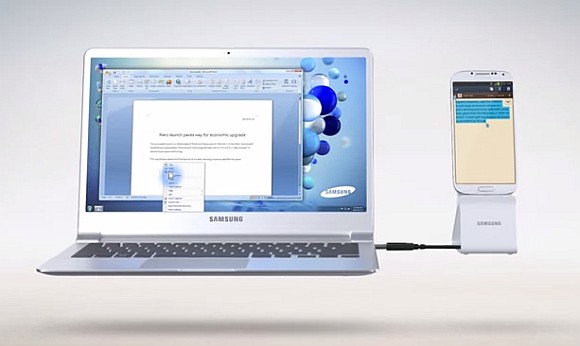
In a busy working environment where the main focus is on a laptop or PC, looking at the mobile phone occasionally can be a distraction. Now Samsung has introduced a new feature that’s called SideSync which brings both mobile and computer screen together. If you have a dock which puts your mobile screen upright, your mobile phone can be your secondary display next to your computer screen. This means you can use your computer’s mouse and keyboard across to your mobile.

Alternatively you can enable Phone Screen sharing mode by having your mobile screen displayed on your PC. In either modes, it is easy to drag and drop items between devices including copy and pasting text. This is definitely useful for those that check their phones regularly while at work. To download, the mobile app is available through Samsung Apps and it is applicable for Samsung devices running on Ice Cream Sandwich 4.0 and above.

The only bummer though is that SideSync is only available for Samsung PC and its upcoming ATIV range of notebooks. Samsung should really consider making this feature available for all computers out there.

Head after the break for the demo video.

Tags: Samsungsamsung galaxySamsung Galaxy S4Samsung Galaxy S4 malaysiaSamsung LaptopSamsung NotebookSamsung SideSync
soyacincau

soyacincau

POPULAR

Samsung SideSync integrates mobile & PC experience for Galaxy devices

May 9, 2013

Small Steps, Daily Rewards: Exploring the Maybank Tabung Daily Bonus Campaign

May 28, 2026
Photo by Vitaly Gariev

Countdown to Kickoff: Unifi TV Brings All 104 FIFA World Cup 2026 Matches Live in HD

June 11, 2026

Zeekr X 2026 now open for booking in Malaysia, comes with automatic doors and built-in fridge

June 9, 2026

We’ve been accepting broken laptop designs for 20 years. Here’s what finally changed

June 9, 2026

MyGOV app will stream FIFA World Cup 2026 matches for free

June 5, 2026

Copyright © 2025 · SoyaCincau.com
Mind Blow Sdn Bhd (1076827-P)

  • ADVERTISE
  • DISCLAIMER

Copyright © 2026 · SoyaCincau.com – Mind Blow Sdn Bhd (1076827-P)

  • ADVERTISE
  • DISCLAIMER