• 中文版
  • BM
  • News
  • Deals
  • Reviews
    • First Impressions
    • Hands-on
    • Comparisons
  • Tech
    • Mobile
    • Computers
    • Cameras
    • Wearables
    • Audio
    • Drones
  • Telco
    • Celcom
    • Digi
    • Maxis
    • Time
    • Tune Talk
    • U Mobile
    • Unifi
    • Yes
  • Cars
  • Contribute
  • Jobs
Menu
  • 中文版
  • BM
  • News
  • Deals
  • Reviews
    • First Impressions
    • Hands-on
    • Comparisons
  • Tech
    • Mobile
    • Computers
    • Cameras
    • Wearables
    • Audio
    • Drones
  • Telco
    • Celcom
    • Digi
    • Maxis
    • Time
    • Tune Talk
    • U Mobile
    • Unifi
    • Yes
  • Cars
  • Contribute
  • Jobs
Search
  • Tech
    • News
    • Mobile
    • Computers
    • Cameras
    • Wearables
    • Audio
    • Drones
  • Telco
    • Celcom
    • Digi
    • Maxis
    • Time
    • U Mobile
    • Unifi
    • Yes
  • Reviews
    • First Impressions
    • Hands-on
    • Comparisons
  • Buyer’s Guide
  • Opinions
  • Digital Life
  • Video
  • Deals
  • How-To
  • Cars
  • Bahasa Melayu
  • EV
  • Contribute
  • Advertise
Menu
  • Tech
    • News
    • Mobile
    • Computers
    • Cameras
    • Wearables
    • Audio
    • Drones
  • Telco
    • Celcom
    • Digi
    • Maxis
    • Time
    • U Mobile
    • Unifi
    • Yes
  • Reviews
    • First Impressions
    • Hands-on
    • Comparisons
  • Buyer’s Guide
  • Opinions
  • Digital Life
  • Video
  • Deals
  • How-To
  • Cars
  • Bahasa Melayu
  • EV
  • Contribute
  • Advertise
Search
Close
Home News

MWC 2013 Hands-On: Ubuntu on tablets and phone

  • BY soyacincau
  • 3 March 2013
  • 2:02 pm
  • Comment
Share on FacebookShare on Twitter

130303-ubuntu-os-01

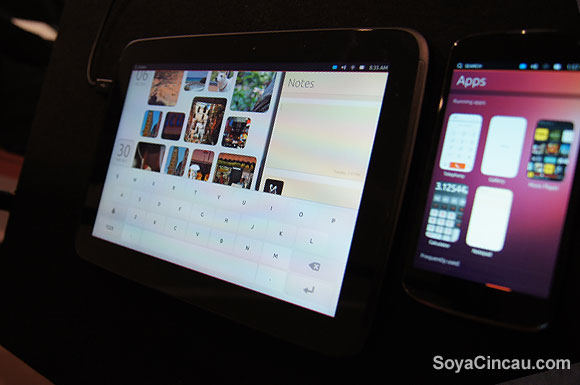
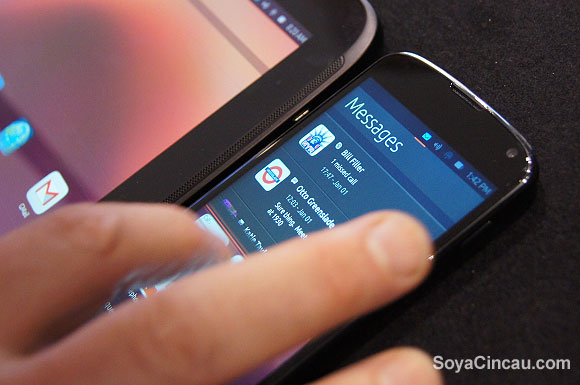
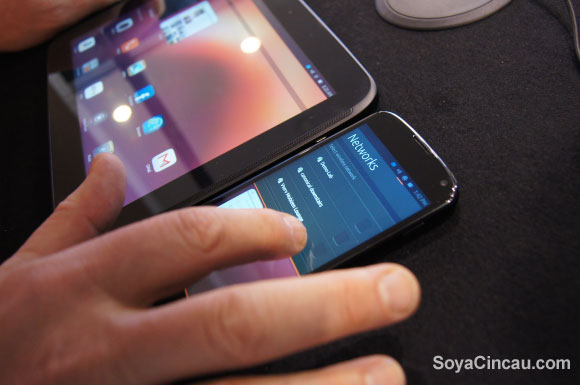
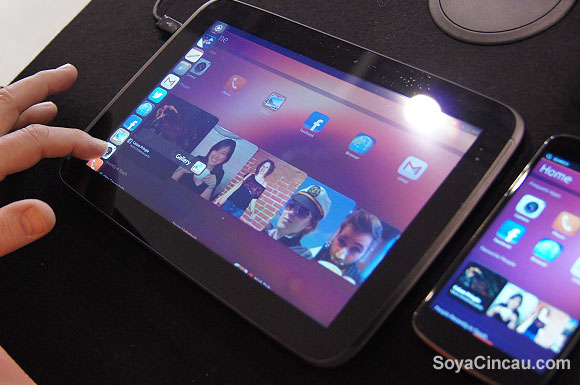
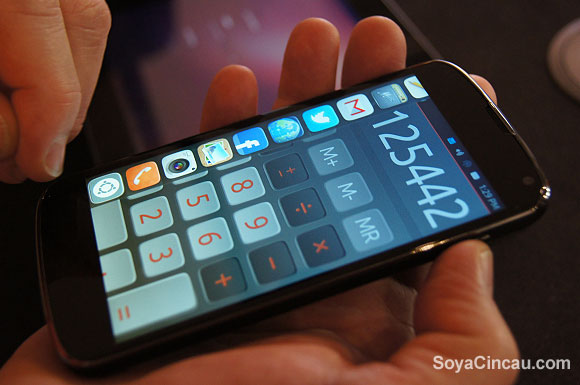
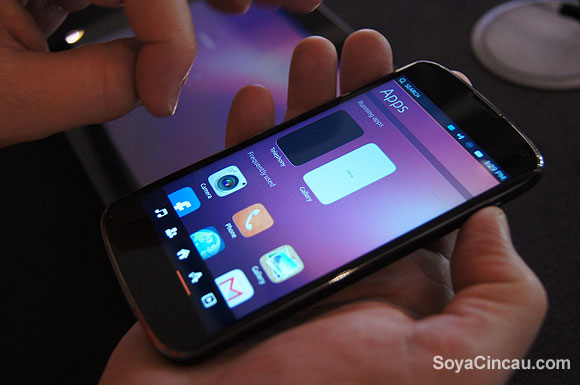
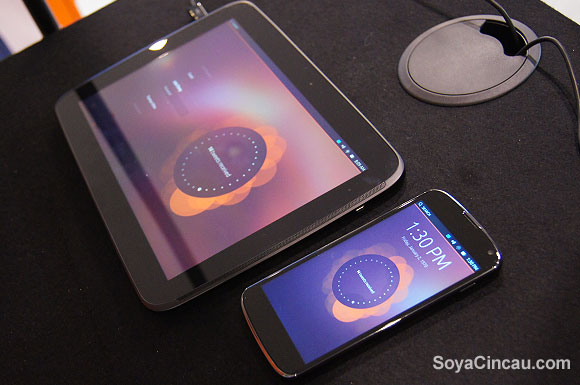
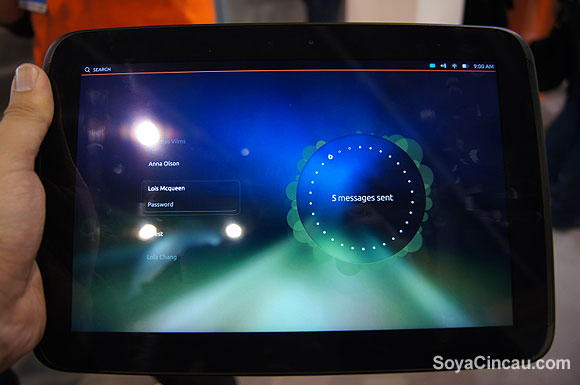
At MWC 2013, we managed to stumble upon Ubuntu’s booth where they are showcasing their OS on both mobile and tablet devices. Both platforms are being demoed on Nexus devices such as the Nexus 10, Nexus 4 and even the previous Galaxy Nexus. For starters, the Ubuntu runs purely on gestures and there’s no physical/capacitive buttons at the front. All you need to move around Ubuntu is just a single finger swipe from all corners.

For example, swiping from the left most edge brings up the app listing and if you continue to swipe all the way to the centre, it brings back the home screen. Swiping from the right toggles your running apps or brings up a side-by-side app on the tablet platform. To access the menu/options, all you’ll need to do is swipe from the bottom to bring up the basic menu. For more advance options, you would need to swipe from the bottom until the centre of the screen. Getting into the settings is pretty interesting as this is accessed by swiping from the top right corner. To toggle between settings menu, you’ll just need to move your finger slightly to the left/right after you’ve swiped down the settings option. You can get a better idea on how the gesture works in our hands-on video after the break. In terms of apps, there will be native ubuntu apps as well as HTML 5 web-based ones.

So far Ubuntu for tablets and phones are still in developer release so it isn’t ready for prime time yet. Some of the apps are not fully functional but are mere mocks just to illustrate how it would possibly work. The key difference between tablets and phones is that the tablet version is optimised for multiple users and it has a bigger display real estate to show side by side apps, subject to app type. Ubuntu for mobile and tablet devices are expected to be commercially available by end 2013 with their own hardwares. We are liking the user experience and hopefully they will be a serious mobile OS contender next year with a variety of apps.

Head after the break for the quick hands-on video and photos.
130303-ubuntu-os-09

130303-ubuntu-os-08

130303-ubuntu-os-07

130303-ubuntu-os-06

130303-ubuntu-os-05

130303-ubuntu-os-03

130303-ubuntu-os-02

130303-ubuntu-os-10

Tags: Buntu Nexus 10MWCNexus 10UbuntuUbuntu 2013Ubuntu on PhoneUbuntu on TabletsUbuntu OSUbuntu PhoneUbuntu Tablet
soyacincau

soyacincau

POPULAR

MWC 2013 Hands-On: Ubuntu on tablets and phone

March 3, 2013

Genting Highlands Road Charges begin 28 May, here are the official rates

May 26, 2026

Ryt Bank introduces Ryt Invest with RM1 entry and 0% sales charge

May 28, 2026

Xiaomi 17T and 17T Pro launched in Malaysia: Leica 5x telephoto camera and up to 7,000mAh battery

May 28, 2026

Small Steps, Daily Rewards: Exploring the Maybank Tabung Daily Bonus Campaign

May 28, 2026

U Mobile ULTRA5G: Fast 5G That Actually Works Indoors

May 29, 2026

Copyright © 2025 · SoyaCincau.com
Mind Blow Sdn Bhd (1076827-P)

  • ADVERTISE
  • DISCLAIMER

Copyright © 2026 · SoyaCincau.com – Mind Blow Sdn Bhd (1076827-P)

  • ADVERTISE
  • DISCLAIMER