• 中文版
  • BM
  • News
  • Deals
  • Reviews
    • First Impressions
    • Hands-on
    • Comparisons
  • Tech
    • Mobile
    • Computers
    • Cameras
    • Wearables
    • Audio
    • Drones
  • Telco
    • Celcom
    • Digi
    • Maxis
    • Time
    • Tune Talk
    • U Mobile
    • Unifi
    • Yes
  • Cars
  • Contribute
  • Jobs
Menu
  • 中文版
  • BM
  • News
  • Deals
  • Reviews
    • First Impressions
    • Hands-on
    • Comparisons
  • Tech
    • Mobile
    • Computers
    • Cameras
    • Wearables
    • Audio
    • Drones
  • Telco
    • Celcom
    • Digi
    • Maxis
    • Time
    • Tune Talk
    • U Mobile
    • Unifi
    • Yes
  • Cars
  • Contribute
  • Jobs
Search
  • Tech
    • News
    • Mobile
    • Computers
    • Cameras
    • Wearables
    • Audio
    • Drones
  • Telco
    • Celcom
    • Digi
    • Maxis
    • Time
    • U Mobile
    • Unifi
    • Yes
  • Reviews
    • First Impressions
    • Hands-on
    • Comparisons
  • Buyer’s Guide
  • Opinions
  • Digital Life
  • Video
  • Deals
  • How-To
  • Cars
  • Bahasa Melayu
  • EV
  • Contribute
  • Advertise
Menu
  • Tech
    • News
    • Mobile
    • Computers
    • Cameras
    • Wearables
    • Audio
    • Drones
  • Telco
    • Celcom
    • Digi
    • Maxis
    • Time
    • U Mobile
    • Unifi
    • Yes
  • Reviews
    • First Impressions
    • Hands-on
    • Comparisons
  • Buyer’s Guide
  • Opinions
  • Digital Life
  • Video
  • Deals
  • How-To
  • Cars
  • Bahasa Melayu
  • EV
  • Contribute
  • Advertise
Search
Close
Home News

iPhone security flaw lets you bypass lock screen to access Phone app

  • BY ccsoya
  • 27 October 2010
  • 6:33 pm
  • Comment
Share on FacebookShare on Twitter

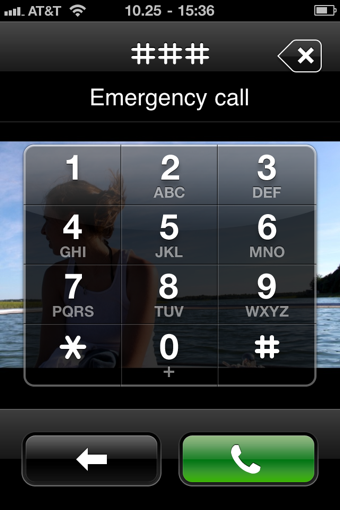
A major security vulnerability allows potentially anyone to bypass the iPhone passcode lock screen and get full access to the Phone app including call records, contacts and even share the contacts via email or MMS.

What’s alarming about this security flaw is how easy it is to execute. All you need to do is, from the passcode lock screen, make an “emergency call” and dial any number, press “call” and then then quickly press the power button on top of the iPhone. Immediately you’ll have full access to the Phone app along with all the information contained within it.

So iPhone users out there, don’t think that your phone is safe even with the passcode lock enabled. lock

Head on over to after the jump for a video that shows you how to bypass the passcode lock screen.

[source, via]
[picture credit]

Tags: iOSiPhone
ccsoya

ccsoya

POPULAR

iPhone security flaw lets you bypass lock screen to access Phone app

October 27, 2010

TNG eWallet to disable auto-reload for debit cards from 13 May 2026

April 30, 2026
vivo V70 FE 200MP camera phone in Malaysia - Best value alternative for phones under RM2,000

High-Resolution Meets High-Endurance: A Closer Look at the vivo V70 FE

April 10, 2026

Zeekr 009 upgraded for 2026: 900V architecture, 912hp, swiveling seats and 10-80% charge in 10 minutes

April 26, 2026

EV charger hoggers beware: DBKL now issuing summonses in KL

April 29, 2026

Can you and your family enjoy a 100% electric drive without ever plugging in?

April 23, 2026

Copyright © 2025 · SoyaCincau.com
Mind Blow Sdn Bhd (1076827-P)

  • ADVERTISE
  • DISCLAIMER

Copyright © 2026 · SoyaCincau.com – Mind Blow Sdn Bhd (1076827-P)

  • ADVERTISE
  • DISCLAIMER