• 中文版
  • BM
  • News
  • Deals
  • Reviews
    • First Impressions
    • Hands-on
    • Comparisons
  • Tech
    • Mobile
    • Computers
    • Cameras
    • Wearables
    • Audio
    • Drones
  • Telco
    • Celcom
    • Digi
    • Maxis
    • Time
    • Tune Talk
    • U Mobile
    • Unifi
    • Yes
  • Cars
  • Contribute
  • Jobs
Menu
  • 中文版
  • BM
  • News
  • Deals
  • Reviews
    • First Impressions
    • Hands-on
    • Comparisons
  • Tech
    • Mobile
    • Computers
    • Cameras
    • Wearables
    • Audio
    • Drones
  • Telco
    • Celcom
    • Digi
    • Maxis
    • Time
    • Tune Talk
    • U Mobile
    • Unifi
    • Yes
  • Cars
  • Contribute
  • Jobs
Search
  • Tech
    • News
    • Mobile
    • Computers
    • Cameras
    • Wearables
    • Audio
    • Drones
  • Telco
    • Celcom
    • Digi
    • Maxis
    • Time
    • U Mobile
    • Unifi
    • Yes
  • Reviews
    • First Impressions
    • Hands-on
    • Comparisons
  • Buyer’s Guide
  • Opinions
  • Digital Life
  • Video
  • Deals
  • How-To
  • Cars
  • Bahasa Melayu
  • EV
  • Contribute
  • Advertise
Menu
  • Tech
    • News
    • Mobile
    • Computers
    • Cameras
    • Wearables
    • Audio
    • Drones
  • Telco
    • Celcom
    • Digi
    • Maxis
    • Time
    • U Mobile
    • Unifi
    • Yes
  • Reviews
    • First Impressions
    • Hands-on
    • Comparisons
  • Buyer’s Guide
  • Opinions
  • Digital Life
  • Video
  • Deals
  • How-To
  • Cars
  • Bahasa Melayu
  • EV
  • Contribute
  • Advertise
Search
Close
Home Digital Life

Instagram lets you create Hyperlapse videos easily on iOS

  • BY soyacincau
  • 27 August 2014
  • 10:08 am
  • Comment
Share on FacebookShare on Twitter

140827-instagram-hyperlapse-download

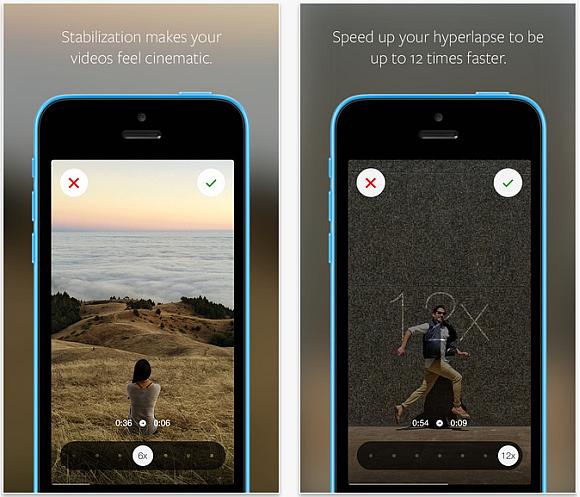
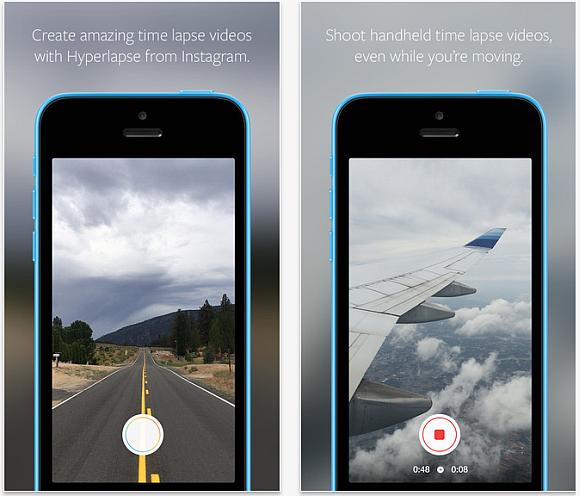
Instagram is taking social video creation to the next level with the introduction of its hyperlapse feature. It lets you create high quality time lapse video that’s stabilised, as if it was taken with a secured mount. So anyone can create awesome videos without the need of specialised equipment.

To make things easy, the Hyperlapse app does not require any account sign in and you can start recording right away. Just record several video snippets by tapping to start and tap again to stop. Once you’re done, just select the playback speed ranging from 1x to 12x.

It is available now for iOS devices and you can download Hyperlapse from Instagram over here. To give you a better idea on how it looks like, check out the official sample video after the break.

Introducing Hyperlapse from Instagram from Instagram on Vimeo.
140827-instagram-hyperlapse-download-2

140827-instagram-hyperlapse-download-3

[ SOURCE, VIA ]

Tags: hyperlapseHyperlapse from InstagramInstagramInstagram HyperlapseSocialTimelapse
soyacincau

soyacincau

POPULAR

Instagram lets you create Hyperlapse videos easily on iOS

August 27, 2014

Malaysia now spending over RM4 billion monthly on fuel subsidies. It’s time to accelerate EV shift

March 29, 2026

The Xiaomi 17 Proves You Don’t Need a Giant Phone for Pro-Level Photos

February 28, 2026
Image source: Jakub Zerdzicki on Pexels

AEON Bank’s Personal Financing-i (PF-i): Flexible Funds to Help Ease Budget Constraints

December 24, 2025

Is Your Current Phone Generations Behind? Here’s a Simpler Way to Close the Gap

March 13, 2026
Tesla Model Y L Malaysia

Tesla Model Y L 3-row electric SUV to launch in Malaysia on 1 April: 681km range, supports V2L

March 30, 2026

Copyright © 2025 · SoyaCincau.com
Mind Blow Sdn Bhd (1076827-P)

  • ADVERTISE
  • DISCLAIMER

Copyright © 2026 · SoyaCincau.com – Mind Blow Sdn Bhd (1076827-P)

  • ADVERTISE
  • DISCLAIMER