
• 中文版
  • BM
  • News
  • Deals
  • Reviews
    • First Impressions
    • Hands-on
    • Comparisons
  • Tech
    • Mobile
    • Computers
    • Cameras
    • Wearables
    • Audio
    • Drones
  • Telco
    • Celcom
    • Digi
    • Maxis
    • Time
    • Tune Talk
    • U Mobile
    • Unifi
    • Yes
  • Cars
  • Contribute
  • Jobs
Menu
  • 中文版
  • BM
  • News
  • Deals
  • Reviews
    • First Impressions
    • Hands-on
    • Comparisons
  • Tech
    • Mobile
    • Computers
    • Cameras
    • Wearables
    • Audio
    • Drones
  • Telco
    • Celcom
    • Digi
    • Maxis
    • Time
    • Tune Talk
    • U Mobile
    • Unifi
    • Yes
  • Cars
  • Contribute
  • Jobs
Search
  • Tech
    • News
    • Mobile
    • Computers
    • Cameras
    • Wearables
    • Audio
    • Drones
  • Telco
    • Celcom
    • Digi
    • Maxis
    • Time
    • U Mobile
    • Unifi
    • Yes
  • Reviews
    • First Impressions
    • Hands-on
    • Comparisons
  • Buyer’s Guide
  • Opinions
  • Digital Life
  • Video
  • Deals
  • How-To
  • Cars
  • Bahasa Melayu
  • EV
  • Contribute
  • Advertise
Menu
  • Tech
    • News
    • Mobile
    • Computers
    • Cameras
    • Wearables
    • Audio
    • Drones
  • Telco
    • Celcom
    • Digi
    • Maxis
    • Time
    • U Mobile
    • Unifi
    • Yes
  • Reviews
    • First Impressions
    • Hands-on
    • Comparisons
  • Buyer’s Guide
  • Opinions
  • Digital Life
  • Video
  • Deals
  • How-To
  • Cars
  • Bahasa Melayu
  • EV
  • Contribute
  • Advertise
Search
Close
Home Digital Life Apps

Google Photos’ locked folder is rolling out to all Android devices

  • BY Redza Dzafri
  • 4 December 2021
  • 9:11 pm
  • Comment
Share on FacebookShare on Twitter

Earlier this year, Google Photos got a feature called ‘Locked Folder’ which enabled users to lock away photos and videos with a passcode. This was only available for Google Pixel smartphones, but it is now rolling out to all Android phones running on Android 6 or later. Users are reportedly getting pop-up notifications about the feature, so be on the lookout if you don’t have it already.

How exactly does ‘Locked Folder’ work?

Google Photos’ Locked Folder is a simple, yet incredibly useful feature. If you have any photos that you want to keep private, such as your vaccination card, driver’s license, or… anything else, you can put them in the folder for safe keeping. This will hide the photos from the photo grid, search, and apps that have access to your device’s photos.

For Apple users, it’s like the Hidden album in Photos, but with a few key differences. Images in the Locked Folder are hidden behind a passcode (your device screen lock), and they are stored right on the device. This means that they’re not backed up to the cloud and will be removed if you delete the Google Photos app. This also means that your other devices will not share the same Locked Folder.

Want to check if you have the feature already? Head to Google Photos, tap on ‘Library’, then ‘Utilities’. If you have the device, there should be a prompt to set it up under ‘Organise your library’.
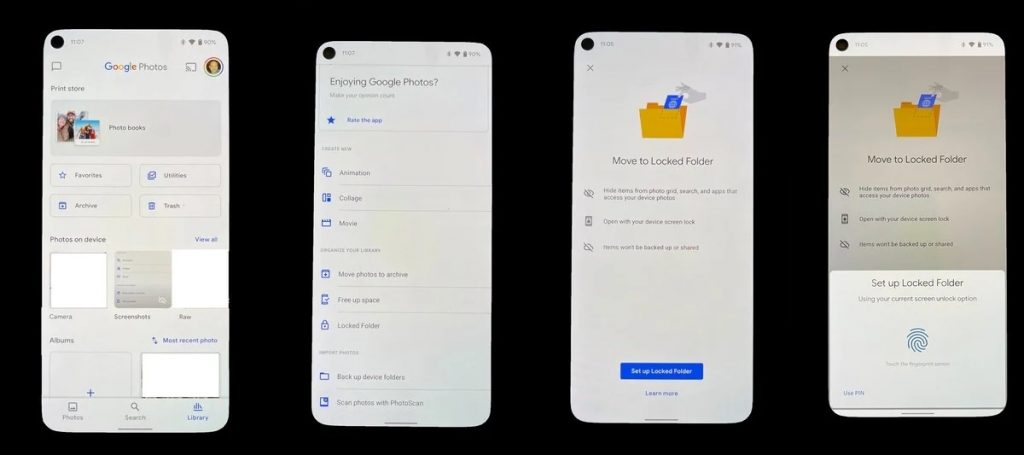
Source: Android Central

If you have a Google Pixel, you can even take a picture and save directly to the Locked Folder instead of the camera roll. This could be useful if you do an intensive photoshoot and don’t want every picture to be automatically synced to the cloud.

Unfortunately, iOS users will have to wait until sometime next year to get the feature. If you can’t wait until then, Apple’s Notes app has a Lock feature that you can use to hide things behind a passcode. Just make a new note, tap on the triple dot icon, and select Lock. You can even use biometrics or a full password! Have fun hiding your… “vaccination cards”.
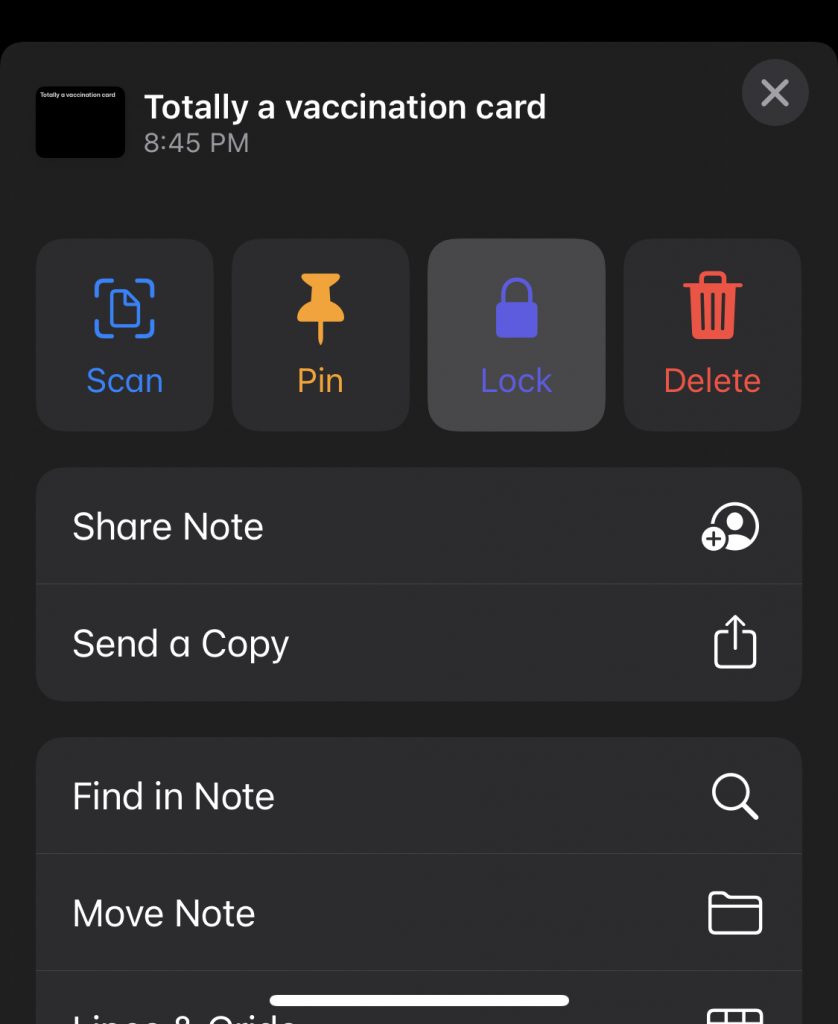
[ SOURCE ]

Tags: Androidgooglegoogle photoslocked folderlocked photos
Redza Dzafri

Redza Dzafri

POPULAR

Google Photos’ locked folder is rolling out to all Android devices

December 4, 2021

Malaysia to review EV policy amid concerns over strict rules affecting BYD CKD operations in Tanjung Malim

April 17, 2026

Zeekr 8X: Premium 900V PHEV SUV, up to triple-motor setup and 0–100km/h in 2.96s

April 20, 2026
Apple Tap To Pay on iPhone Malaysia

Apple’s Tap to Pay on iPhone is now in Malaysia

April 22, 2026

Malaysia’s EV policy and the BYD debate: Are affordable EVs at risk? | Let’s Talk About #140

April 19, 2026
vivo V70 FE 200MP camera phone in Malaysia - Best value alternative for phones under RM2,000

High-Resolution Meets High-Endurance: A Closer Look at the vivo V70 FE

April 10, 2026

Copyright © 2025 · SoyaCincau.com
Mind Blow Sdn Bhd (1076827-P)

  • ADVERTISE
  • DISCLAIMER

Copyright © 2026 · SoyaCincau.com – Mind Blow Sdn Bhd (1076827-P)

  • ADVERTISE
  • DISCLAIMER





