• 中文版
  • BM
  • News
  • Deals
  • Reviews
    • First Impressions
    • Hands-on
    • Comparisons
  • Tech
    • Mobile
    • Computers
    • Cameras
    • Wearables
    • Audio
    • Drones
  • Telco
    • Celcom
    • Digi
    • Maxis
    • Time
    • Tune Talk
    • U Mobile
    • Unifi
    • Yes
  • Cars
  • Contribute
  • Jobs
Menu
  • 中文版
  • BM
  • News
  • Deals
  • Reviews
    • First Impressions
    • Hands-on
    • Comparisons
  • Tech
    • Mobile
    • Computers
    • Cameras
    • Wearables
    • Audio
    • Drones
  • Telco
    • Celcom
    • Digi
    • Maxis
    • Time
    • Tune Talk
    • U Mobile
    • Unifi
    • Yes
  • Cars
  • Contribute
  • Jobs
Search
  • Tech
    • News
    • Mobile
    • Computers
    • Cameras
    • Wearables
    • Audio
    • Drones
  • Telco
    • Celcom
    • Digi
    • Maxis
    • Time
    • U Mobile
    • Unifi
    • Yes
  • Reviews
    • First Impressions
    • Hands-on
    • Comparisons
  • Buyer’s Guide
  • Opinions
  • Digital Life
  • Video
  • Deals
  • How-To
  • Cars
  • Bahasa Melayu
  • EV
  • Contribute
  • Advertise
Menu
  • Tech
    • News
    • Mobile
    • Computers
    • Cameras
    • Wearables
    • Audio
    • Drones
  • Telco
    • Celcom
    • Digi
    • Maxis
    • Time
    • U Mobile
    • Unifi
    • Yes
  • Reviews
    • First Impressions
    • Hands-on
    • Comparisons
  • Buyer’s Guide
  • Opinions
  • Digital Life
  • Video
  • Deals
  • How-To
  • Cars
  • Bahasa Melayu
  • EV
  • Contribute
  • Advertise
Search
Close
Home Digital Life

WeChat Pay now lets you Quick Pay with your Credit Card

  • BY Alexander Wong
  • 6 December 2019
  • 4:52 pm
  • Comment
Share on FacebookShare on Twitter

WeChat Pay is now offering greater convenience when it comes to mobile payments. If you don’t have sufficient eWallet balance, you can now pay directly via your assigned credit card.

The Quick Pay feature via Credit Card is now available for WeChat Pay users in Malaysia. Previously, you can link your credit card but it is only limited for in-app service providers.

To make a payment at a store, tap on “Me” in the WeChat app and select WeChat Pay > Quick Pay. On the QR code screen, just tap on “Balance” to change your payment mode from your eWallet balance to your credit card. Do note that it doesn’t support debit cards at the moment. When the merchant scans your code, the transaction amount will be charged to your credit card and it won’t deduct your eWallet balance.
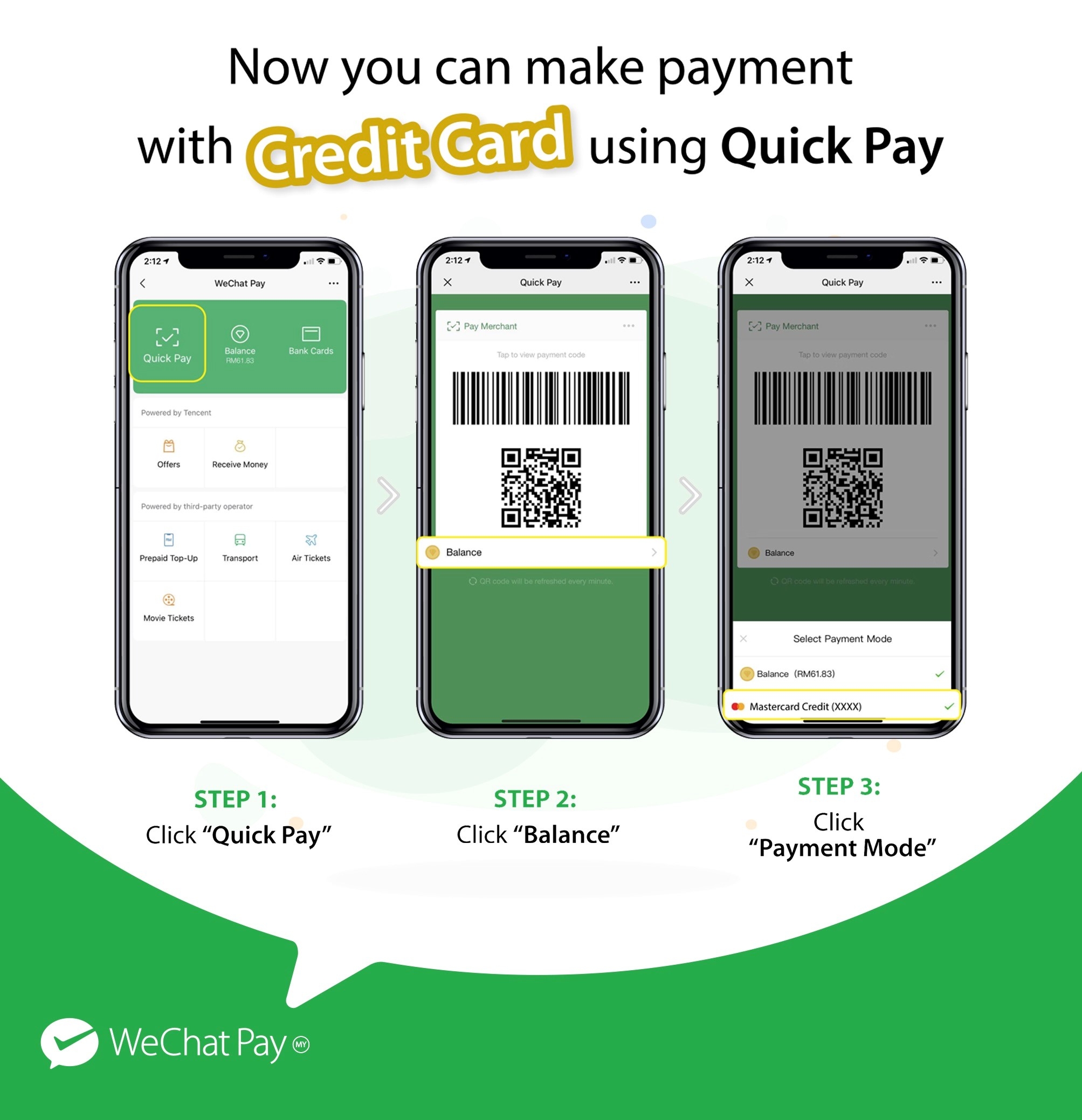
Wechat pay quick pay credit card

The WeChat Pay Quick Pay feature has a daily cap of RM250 per credit card. According to Tencent, the credit card payment mode is among the many new features that will be rolled out to WeChat in the months to come. Tencent will continue to increase its WeChat Pay merchant touchpoints in Malaysia which currently includes Sephora, Caring Pharmacy and The Alley.

Tags: Digital WalletMobile PaymentWeChat Pay
Alexander Wong

Alexander Wong

POPULAR

WeChat Pay now lets you Quick Pay with your Credit Card

December 6, 2019
Rear view of the OPPO Find X9 Ultra in Tundra Umber standing vertically on a stone surface with a lush green bokeh background. The device features an eco-friendly vegan leather back with a classic stitching design , vertically oriented Hasselblad and OPPO logos , and a large circular Master Lens camera module with a bronze-toned knurled ring.

Clearing Every Expectation: How the OPPO Find X9 Ultra Redefines the Modern Flagship Experience

April 16, 2026
Proton EV Plant, Tanjung Malim

MITI says EVs won’t become more expensive, but can Malaysia’s CKD industry fill the gap?

May 10, 2026

Maxis Home Solar now offers outright purchase option, with up to 80% electricity bill savings

May 11, 2026

Vibe Mobile is U Mobile’s latest MVNO partner for 5G services

May 11, 2026

SoyaCincau x Dongfeng: We’re taking over Sepang for Malaysia’s biggest EV Track Day for 2026

May 8, 2026

Copyright © 2025 · SoyaCincau.com
Mind Blow Sdn Bhd (1076827-P)

  • ADVERTISE
  • DISCLAIMER

Copyright © 2026 · SoyaCincau.com – Mind Blow Sdn Bhd (1076827-P)

  • ADVERTISE
  • DISCLAIMER