
• 中文版
  • BM
  • News
  • Deals
  • Reviews
    • First Impressions
    • Hands-on
    • Comparisons
  • Tech
    • Mobile
    • Computers
    • Cameras
    • Wearables
    • Audio
    • Drones
  • Telco
    • Celcom
    • Digi
    • Maxis
    • Time
    • Tune Talk
    • U Mobile
    • Unifi
    • Yes
  • Cars
  • Contribute
  • Jobs
Menu
  • 中文版
  • BM
  • News
  • Deals
  • Reviews
    • First Impressions
    • Hands-on
    • Comparisons
  • Tech
    • Mobile
    • Computers
    • Cameras
    • Wearables
    • Audio
    • Drones
  • Telco
    • Celcom
    • Digi
    • Maxis
    • Time
    • Tune Talk
    • U Mobile
    • Unifi
    • Yes
  • Cars
  • Contribute
  • Jobs
Search
  • Tech
    • News
    • Mobile
    • Computers
    • Cameras
    • Wearables
    • Audio
    • Drones
  • Telco
    • Celcom
    • Digi
    • Maxis
    • Time
    • U Mobile
    • Unifi
    • Yes
  • Reviews
    • First Impressions
    • Hands-on
    • Comparisons
  • Buyer’s Guide
  • Opinions
  • Digital Life
  • Video
  • Deals
  • How-To
  • Cars
  • Bahasa Melayu
  • EV
  • Contribute
  • Advertise
Menu
  • Tech
    • News
    • Mobile
    • Computers
    • Cameras
    • Wearables
    • Audio
    • Drones
  • Telco
    • Celcom
    • Digi
    • Maxis
    • Time
    • U Mobile
    • Unifi
    • Yes
  • Reviews
    • First Impressions
    • Hands-on
    • Comparisons
  • Buyer’s Guide
  • Opinions
  • Digital Life
  • Video
  • Deals
  • How-To
  • Cars
  • Bahasa Melayu
  • EV
  • Contribute
  • Advertise
Search
Close
Home Digital Life

Miss Internet Explorer? Here’s how to get it back on Windows 11

  • BY Raymond Saw
  • 4 August 2022
  • 6:21 pm
  • Comment
Share on FacebookShare on Twitter

Internet Explorer is dead, long live Internet Explorer. Despite Microsoft having officially retired Internet Explorer back in June—a South Korean software engineer even built a grave for the browser—it turns out there still exists a way for you to get Internet Explorer to work on Windows 11. That is despite Windows 11 even being launched with Internet Explorer disabled in the first place, with the system forcing you towards Microsoft Edge instead.

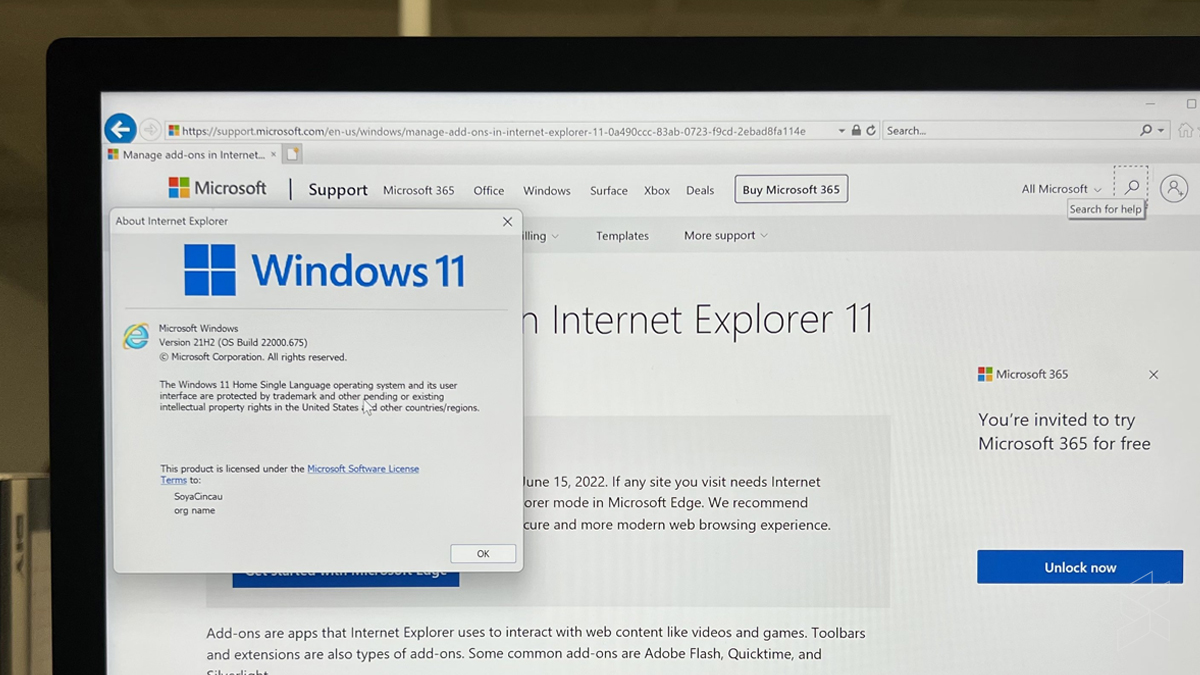
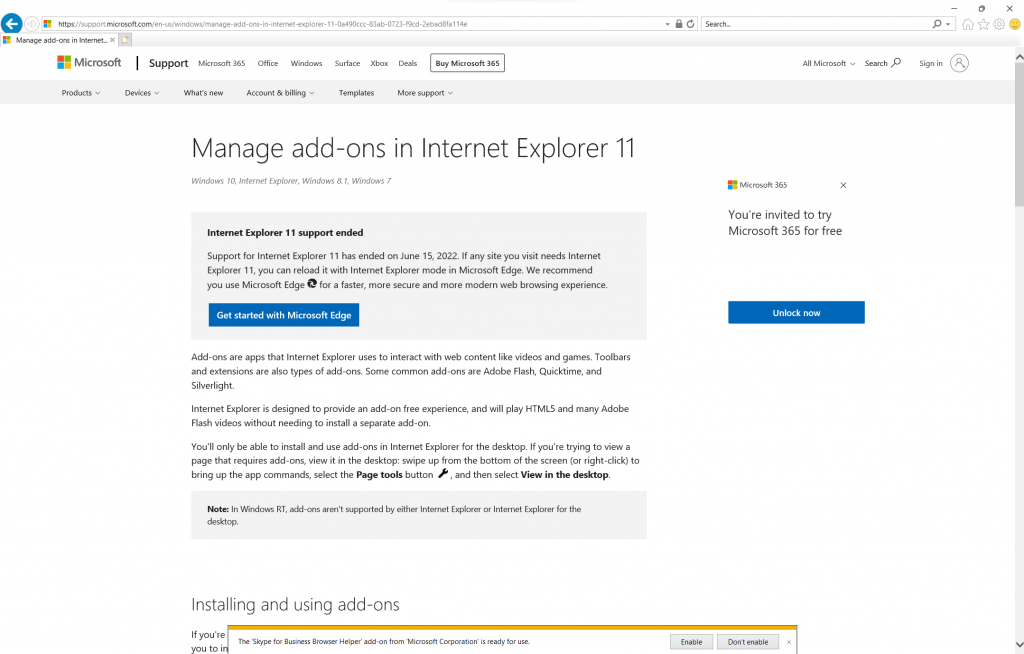
As demonstrated by Twitter user XenoPanther, you can still get it to boot on Microsoft’s latest operating system. You’ll first need to hit the search bar and look for ‘Internet Options’, click on it, and then click on the ‘Programs’ tab. There, you’ll see an option to ‘Manage add-ons’—click on that too and a new window for it will pop up. On the bottom of that window, you’ll see an option to ‘Learn more about toolbars and extensions’. Click on that and voila, you’ll be greeted by Internet Explorer 11 displaying a page about managing add-ons in IE11.
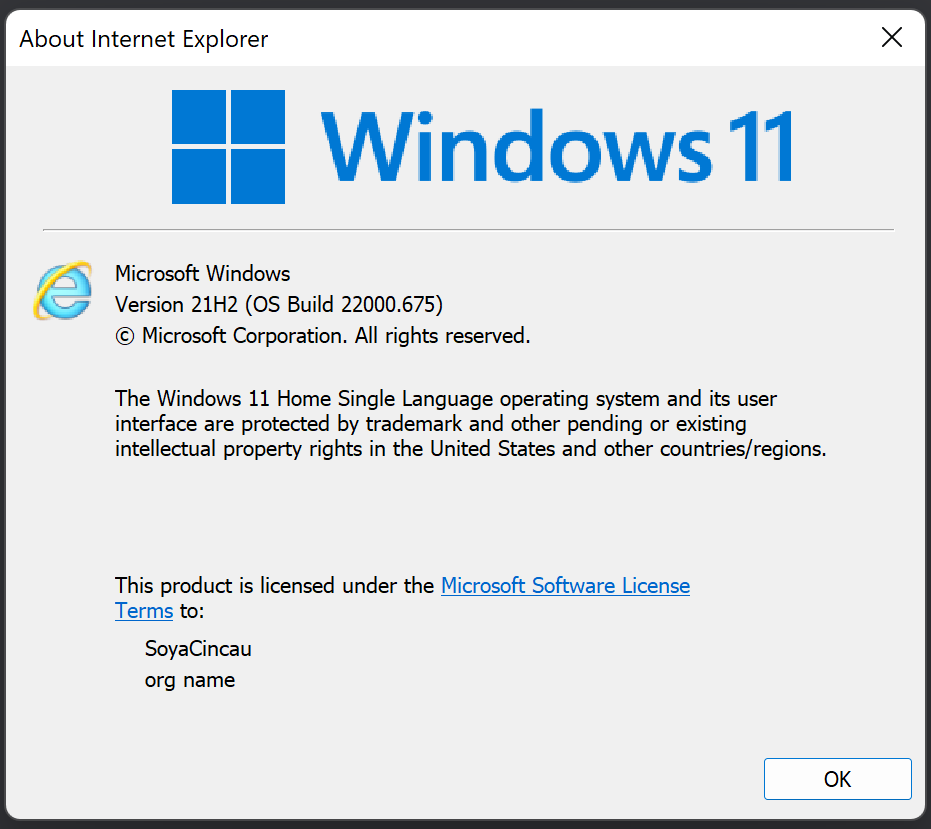
You can even then enter the Settings of the browser and click on ‘About Internet Explorer’, and it’ll show you the Windows 11 logo along with the Internet Explorer logo below it. It seems that this was probably an error on Microsoft’s part, as above the ‘Learn more’ option in the Manage add-ons window, there’s another option to ‘Find more toolbars and extensions’, which opens a link using your preferred browser rather than Internet Explorer. I also found that simply clicking the ‘?’ icon after launching Internet Options will boot Internet Explorer, though apparently this was patched out in the latest Windows 11 dev build.
Of course, while it’s a cool little Easter egg of sorts, I should definitely point out that you do not want to actually use Internet Explorer as your regular browser. There’s even a warning by Microsoft on the page telling you that Internet Explorer support has ended and that you should at least use Microsoft Edge for a faster, safer and more modern browsing experience. Or you know, just use Google Chrome instead.

[ SOURCE, VIA ]

Tags: Internet ExplorermicrosoftMicrosoft Edgewindows 11
Raymond Saw

Raymond Saw

POPULAR

Nissan Finally Gives the Serena a Real Hybrid Powertrain in Malaysia. Estimated from RM160k to RM180k

January 16, 2026

Miss Internet Explorer? Here’s how to get it back on Windows 11

August 4, 2022

Tired of cracked screens or short battery life? The REDMI Note 15 Series take a durability-first approach

January 15, 2026

Is your TNG eWallet suspended? Here’s what you should do

January 27, 2026
BYD Atto 3 Ultra

BYD Atto 3 Ultra now available for as low as RM106k

January 27, 2026

CelcomDigi updates 5G prepaid plan for 2026, no more 28 day validity for “unlimited” options

January 28, 2026

Copyright © 2025 · SoyaCincau.com
Mind Blow Sdn Bhd (1076827-P)

  • ADVERTISE
  • DISCLAIMER

Copyright © 2026 · SoyaCincau.com – Mind Blow Sdn Bhd (1076827-P)

  • ADVERTISE
  • DISCLAIMER




