• 中文版
  • BM
  • News
  • Deals
  • Reviews
    • First Impressions
    • Hands-on
    • Comparisons
  • Tech
    • Mobile
    • Computers
    • Cameras
    • Wearables
    • Audio
    • Drones
  • Telco
    • Celcom
    • Digi
    • Maxis
    • Time
    • Tune Talk
    • U Mobile
    • Unifi
    • Yes
  • Cars
  • Contribute
  • Jobs
Menu
  • 中文版
  • BM
  • News
  • Deals
  • Reviews
    • First Impressions
    • Hands-on
    • Comparisons
  • Tech
    • Mobile
    • Computers
    • Cameras
    • Wearables
    • Audio
    • Drones
  • Telco
    • Celcom
    • Digi
    • Maxis
    • Time
    • Tune Talk
    • U Mobile
    • Unifi
    • Yes
  • Cars
  • Contribute
  • Jobs
Search
  • Tech
    • News
    • Mobile
    • Computers
    • Cameras
    • Wearables
    • Audio
    • Drones
  • Telco
    • Celcom
    • Digi
    • Maxis
    • Time
    • U Mobile
    • Unifi
    • Yes
  • Reviews
    • First Impressions
    • Hands-on
    • Comparisons
  • Buyer’s Guide
  • Opinions
  • Digital Life
  • Video
  • Deals
  • How-To
  • Cars
  • Bahasa Melayu
  • EV
  • Contribute
  • Advertise
Menu
  • Tech
    • News
    • Mobile
    • Computers
    • Cameras
    • Wearables
    • Audio
    • Drones
  • Telco
    • Celcom
    • Digi
    • Maxis
    • Time
    • U Mobile
    • Unifi
    • Yes
  • Reviews
    • First Impressions
    • Hands-on
    • Comparisons
  • Buyer’s Guide
  • Opinions
  • Digital Life
  • Video
  • Deals
  • How-To
  • Cars
  • Bahasa Melayu
  • EV
  • Contribute
  • Advertise
Search
Close
Home Digital Life

Google Drive is adding a Gmail-like search feature to help you find files quicker

  • BY Dzamira Dzafri
  • 5 November 2021
  • 4:02 pm
  • Comment
Share on FacebookShare on Twitter

Google has announced that they are rolling out the search chips feature for Google Drive, similar to what we already have for Gmail. It’s currently available to all Google Workspace customers, as well as G Suite Basic and Business customers—for it’s only available in beta.

Currently in Gmail, you’re able to search for the specific email you want by typing for it in the Gmail search bar. But if, for example, you have way too many emails under the subject you’re searching for, you can refine it even further with multiple extra search options.

You can search by choosing options like “From”—which you can specify who the email came from, “To”—who the email went to, “Time”—where you can specify how old the email is, and whether or not the email has attachments. You can also refined the search even further by going to “Advanced Search”.
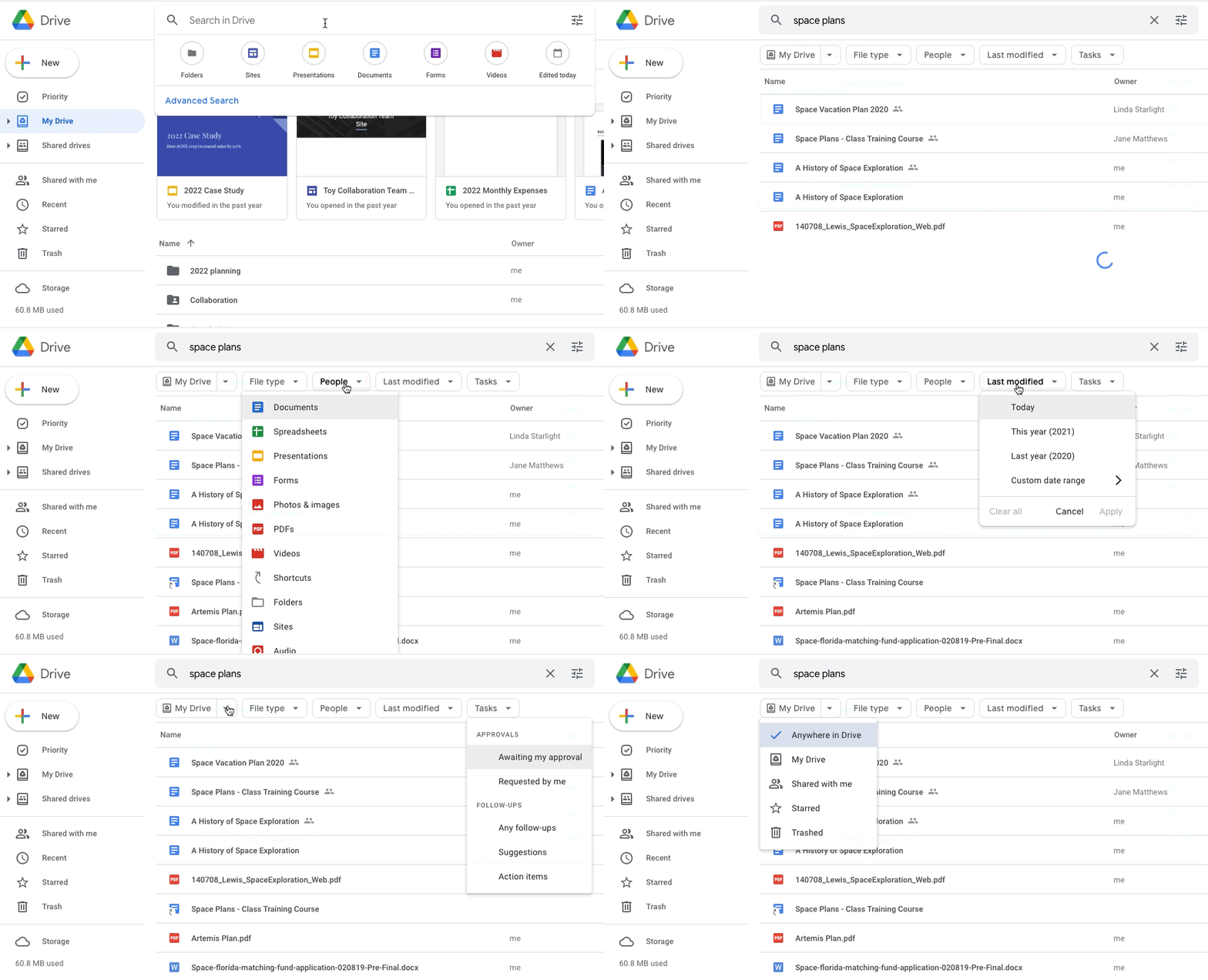
For Google Drive’s search chip feature, it basically works the same way. We often use a few keywords to try and locate the file they’re looking for, like “marketing plan” or “vacation”. But like Gmail searches, searching for these general keywords on Drive might be too vague if you have a lot of files. The added search options include:

  • File type, such as a Google Doc, PDF, or image
  • People
  • Location, such as a shared drive or specific folder
  • When the document was last modified
  • File titles only
  • Shared drive labels
  • Tasks

“We hope search chips in Drive make it easier to find relevant files faster, eliminating the need to perform multiple searches or sort through irrelevant results,” Google noted in their blog.

While it’s available for Google Workspace, G Suite Basic and Business customers, it’s still in beta so it’s not going to show up for everyone. But eligible customers can express interest in the beta by filling up this form.  If accepted into the beta, search chips will be available by default to users in the Google group(s) provided at sign-up. 

Another effective tool Google introduced for Drive is letting users block emails to prevent file sharing spam. This was introduced after some users noticed that they were unable to remove themselves from a folder that they initially had view-only access to. 

[ SOURCE, IMAGE SOURCE ]

Tags: GmailgoogleGoogle Drive
Dzamira Dzafri

Dzamira Dzafri

POPULAR

SoyaCincau Awards 2025: The Best Tablets of the Year

January 5, 2026

Google Drive is adding a Gmail-like search feature to help you find files quicker

November 5, 2021

HUAWEI MatePad 12 X 2026: The Best Productivity Tablet with PC-Level WPS and the All-New HUAWEI M-Pencil Pro

January 6, 2026

SARA: All Malaysian adults to receive RM100 credit from 9 February

January 5, 2026

SoyaCincau Awards 2025: Best Telcos of the Year

January 2, 2026
Maybank Google Pay - May 2024

Maybank on Google Pay: No PIN required for transactions above RM250, transactions limited to RM2,500

January 5, 2026

Copyright © 2025 · SoyaCincau.com
Mind Blow Sdn Bhd (1076827-P)

  • ADVERTISE
  • DISCLAIMER

Copyright © 2026 · SoyaCincau.com – Mind Blow Sdn Bhd (1076827-P)

  • ADVERTISE
  • DISCLAIMER