
• 中文版
  • BM
  • News
  • Deals
  • Reviews
    • First Impressions
    • Hands-on
    • Comparisons
  • Tech
    • Mobile
    • Computers
    • Cameras
    • Wearables
    • Audio
    • Drones
  • Telco
    • Celcom
    • Digi
    • Maxis
    • Time
    • Tune Talk
    • U Mobile
    • Unifi
    • Yes
  • Cars
  • Contribute
  • Jobs
Menu
  • 中文版
  • BM
  • News
  • Deals
  • Reviews
    • First Impressions
    • Hands-on
    • Comparisons
  • Tech
    • Mobile
    • Computers
    • Cameras
    • Wearables
    • Audio
    • Drones
  • Telco
    • Celcom
    • Digi
    • Maxis
    • Time
    • Tune Talk
    • U Mobile
    • Unifi
    • Yes
  • Cars
  • Contribute
  • Jobs
Search
  • Tech
    • News
    • Mobile
    • Computers
    • Cameras
    • Wearables
    • Audio
    • Drones
  • Telco
    • Celcom
    • Digi
    • Maxis
    • Time
    • U Mobile
    • Unifi
    • Yes
  • Reviews
    • First Impressions
    • Hands-on
    • Comparisons
  • Buyer’s Guide
  • Opinions
  • Digital Life
  • Video
  • Deals
  • How-To
  • Cars
  • Bahasa Melayu
  • EV
  • Contribute
  • Advertise
Menu
  • Tech
    • News
    • Mobile
    • Computers
    • Cameras
    • Wearables
    • Audio
    • Drones
  • Telco
    • Celcom
    • Digi
    • Maxis
    • Time
    • U Mobile
    • Unifi
    • Yes
  • Reviews
    • First Impressions
    • Hands-on
    • Comparisons
  • Buyer’s Guide
  • Opinions
  • Digital Life
  • Video
  • Deals
  • How-To
  • Cars
  • Bahasa Melayu
  • EV
  • Contribute
  • Advertise
Search
Close
Home Digital Life Apps

How to automatically calculate how much you’ve spent in total on Shopee

  • BY Alexander Wong
  • 8 October 2021
  • 9:55 am
  • Comment
Share on FacebookShare on Twitter

Ever wondered how much money you’ve spent online? If you’ve been active during the major online sales like 9.9, 10.10 and 11.11 on Shopee, you might be surprised to find out how much you’ve spent throughout the years.

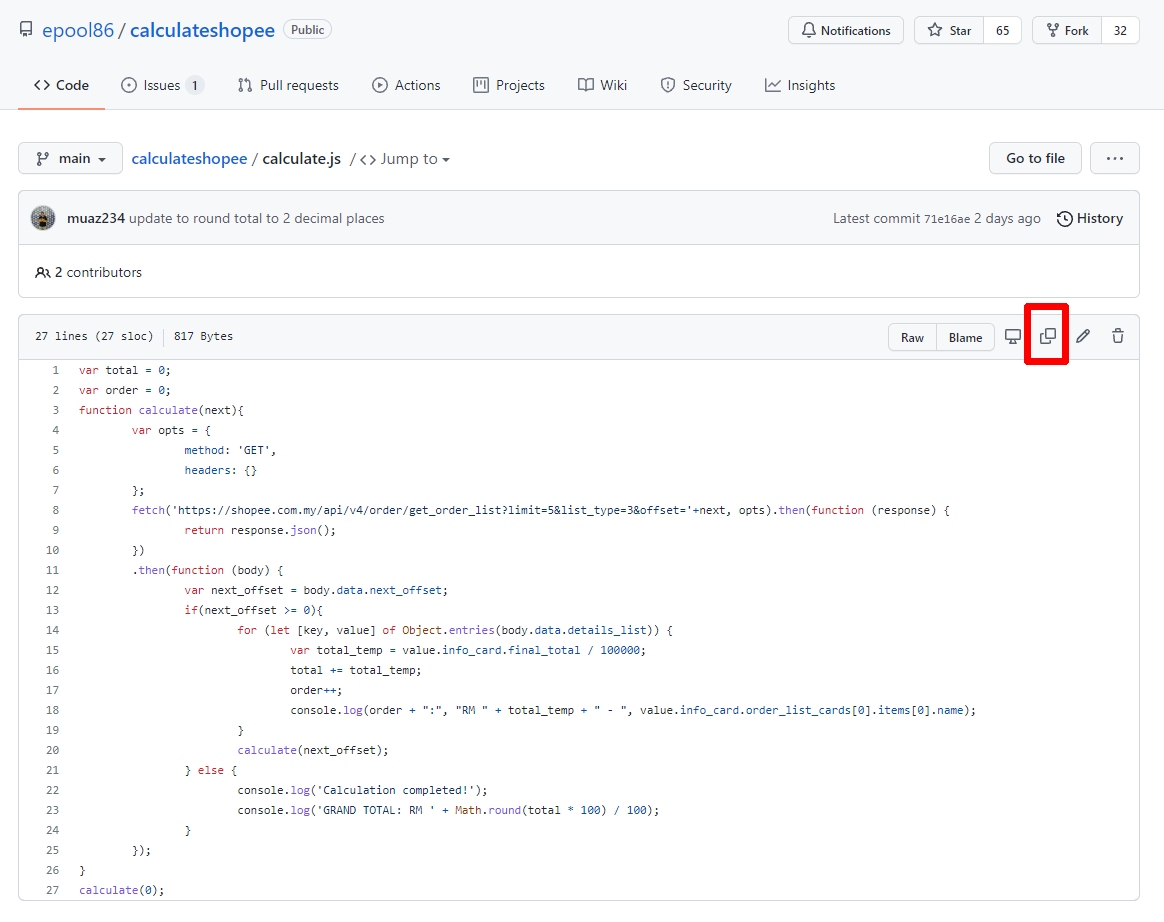
Ahmad Saiful Bahri (epool86) has created a nifty script called calculateShopee that can automatically calculate your total amount of completed transactions on your Shopee account. All you’ll need is a desktop web browser and some copy and pasting work from GitHub which can be done in a few minutes.

How to calculate total spend on Shopee?

1. Copy the calculateShopee script

Go to this calculate.js page and copy (CTRL+C) the full script. You can click on the “Copy” icon as shown below to copy.
2. Login to Shopee

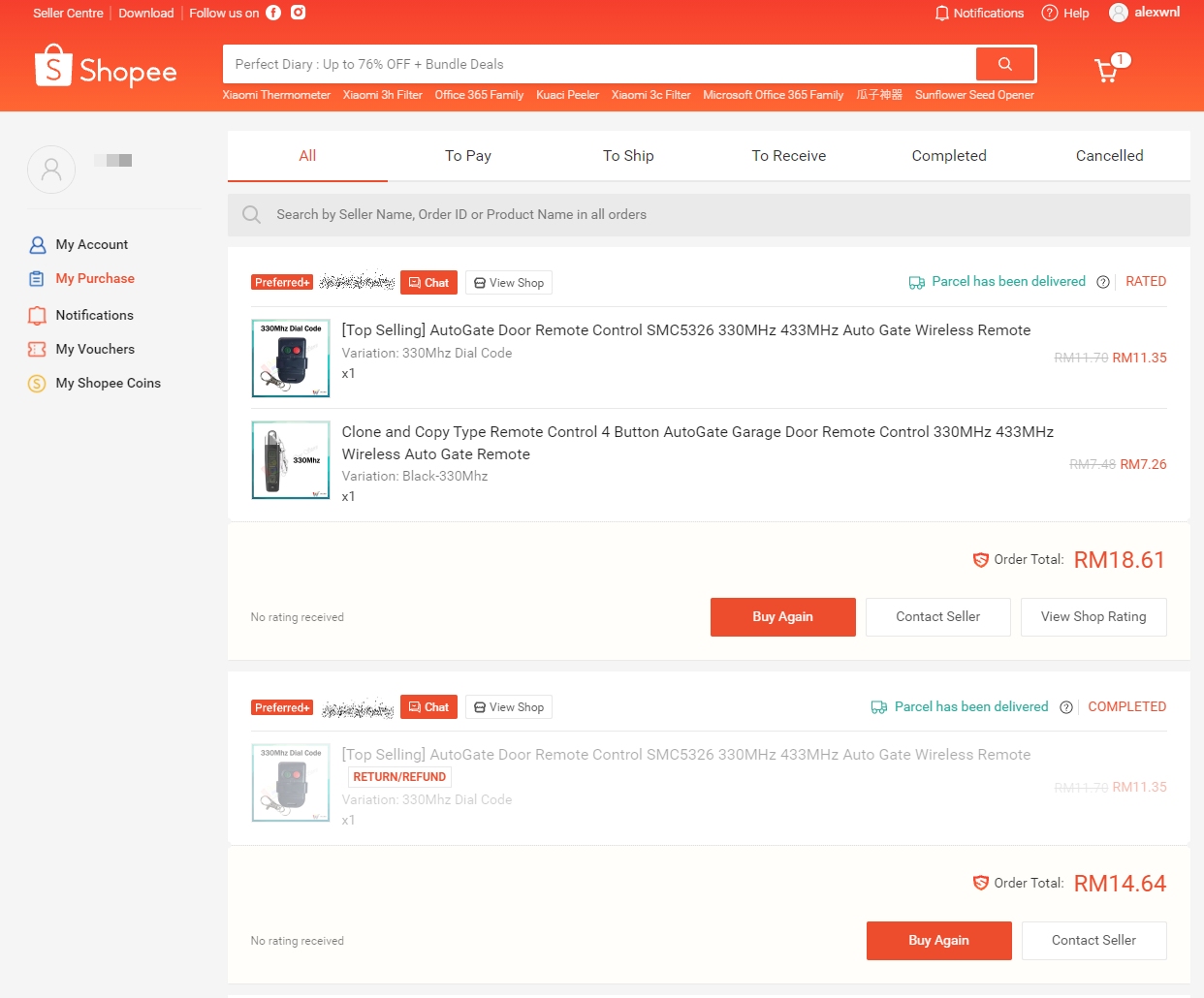
Login to your Shopee account’s purchase page and make sure you’re in the “All” tab.
3. Paste the script

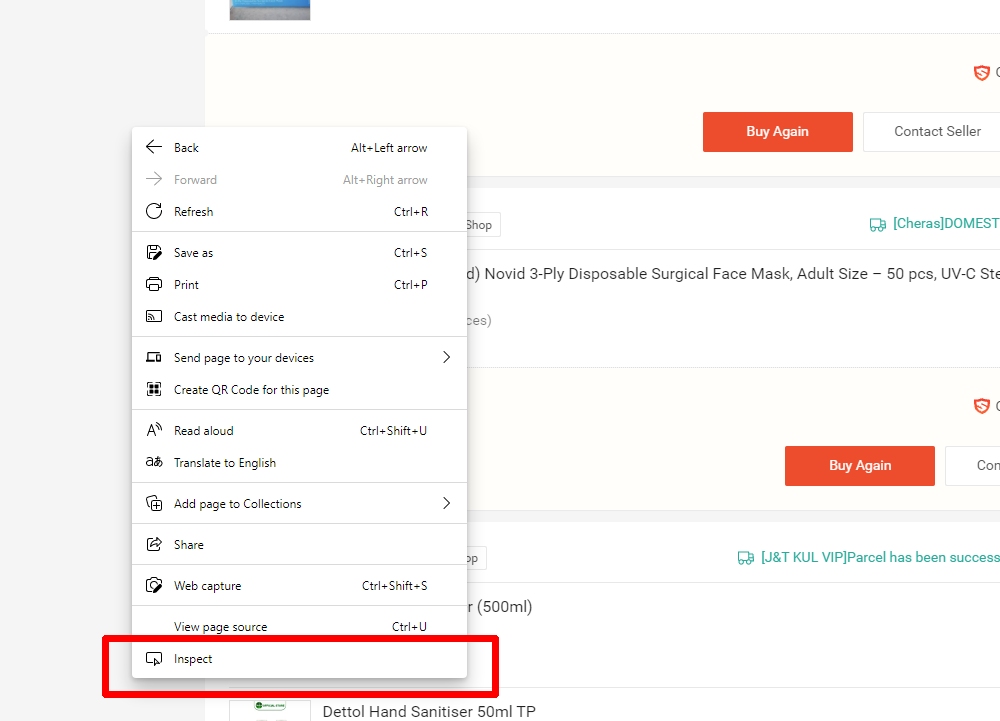
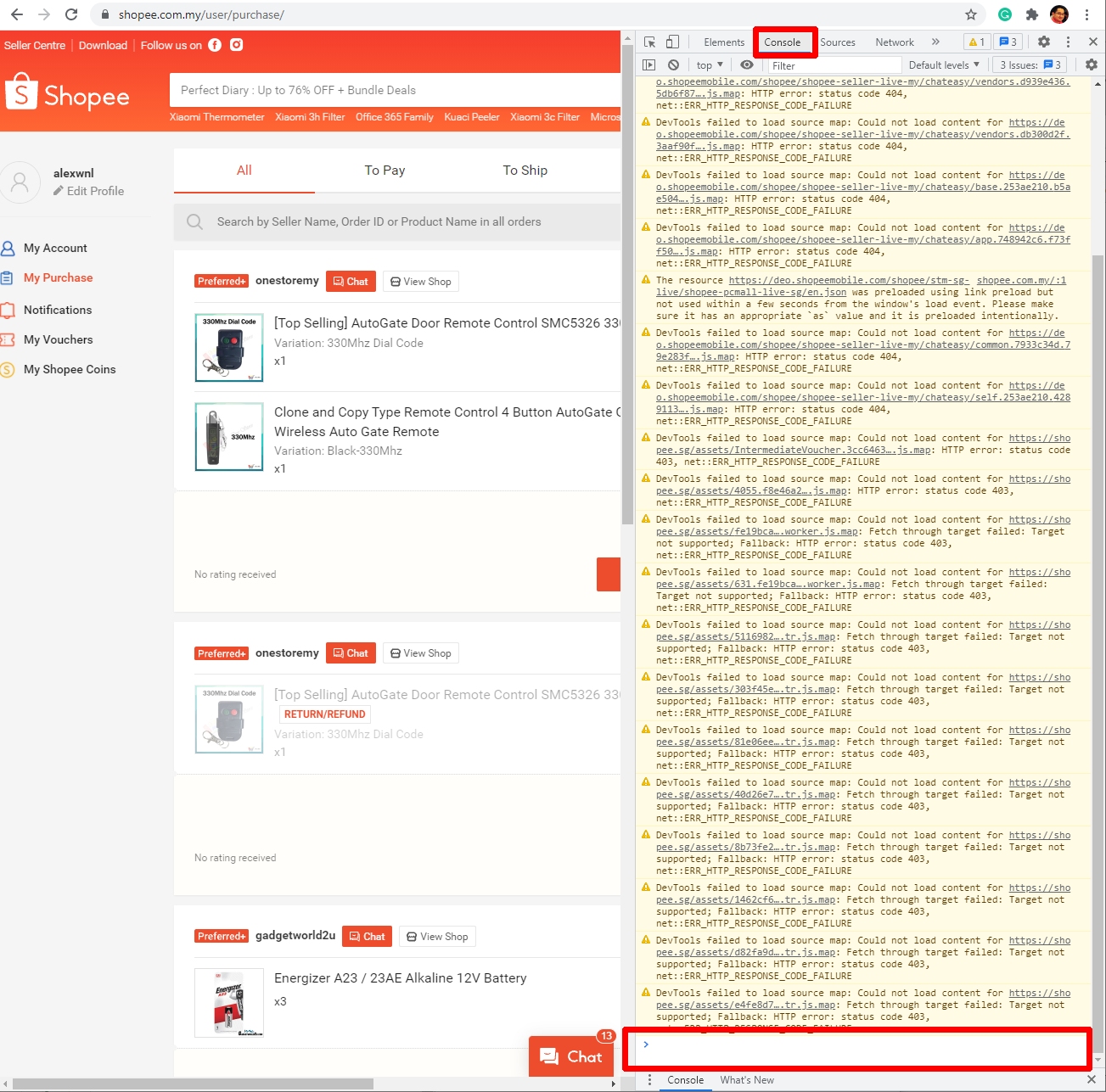
Next, right-click anywhere on the page and select “Inspect”. This feature should be available by default for Microsoft Edge or Chrome browsers.
You should see a side panel on the right that displays a bunch of codes. Go to the console tab as shown below.
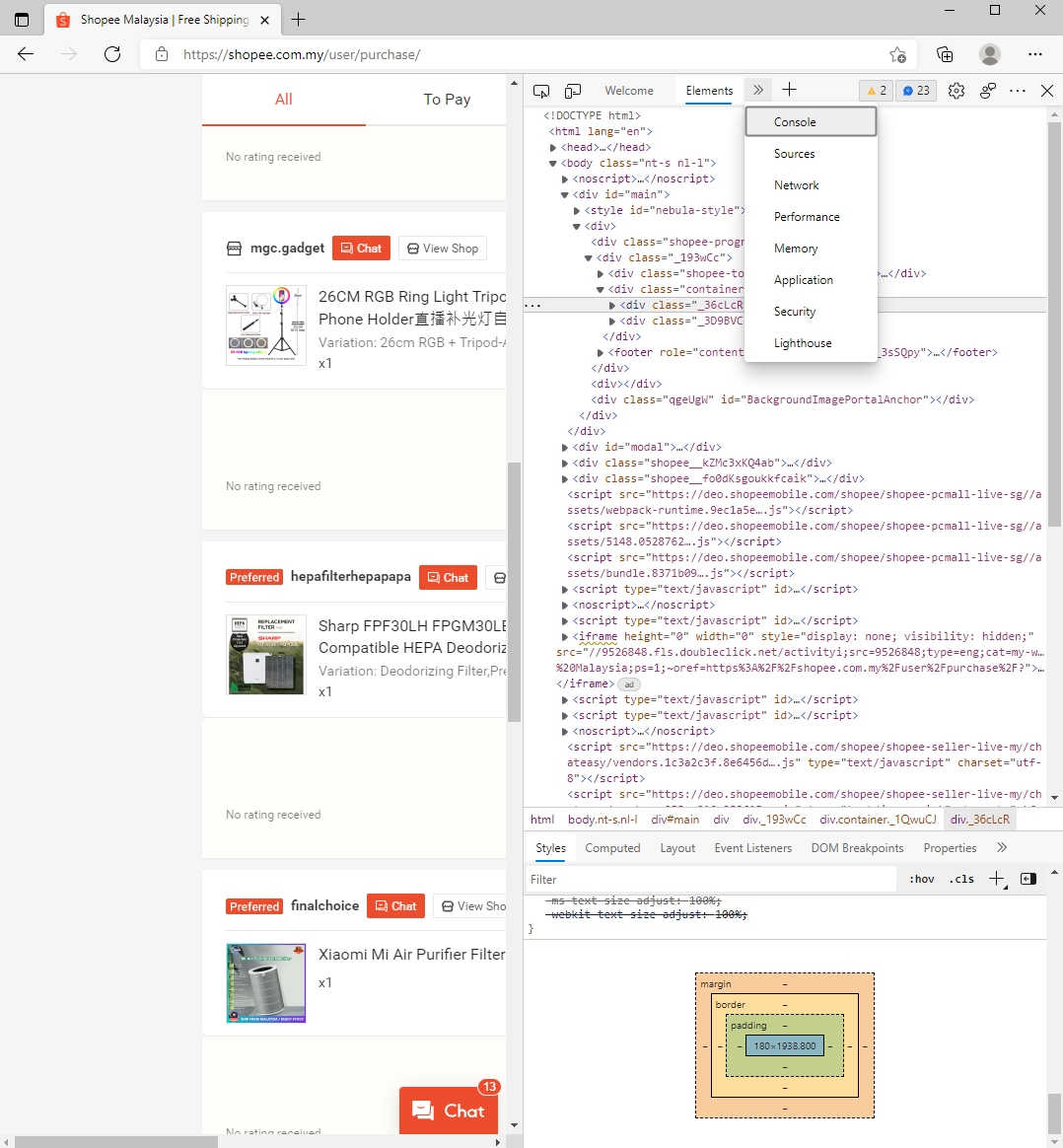
On the console tab, proceed to paste (CTRL+V) the code and hit enter.
Safari users
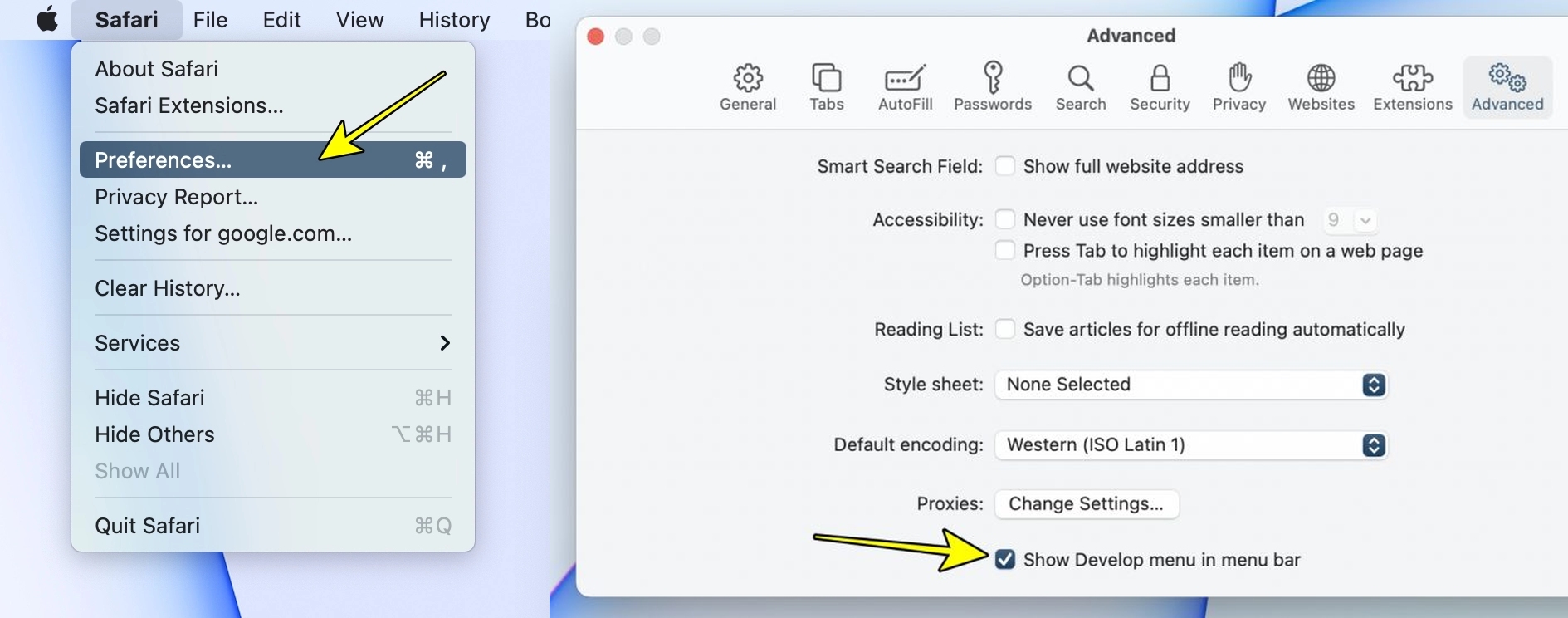
If you’re using Safari browser but can’t find the inspect element when you right-click on the page, not to worry. It might have not been enabled and you can go to Safari’s Preferences > Advanced menu, then tick on “Show Develop menu in menu bar”.

4. The grand total is….
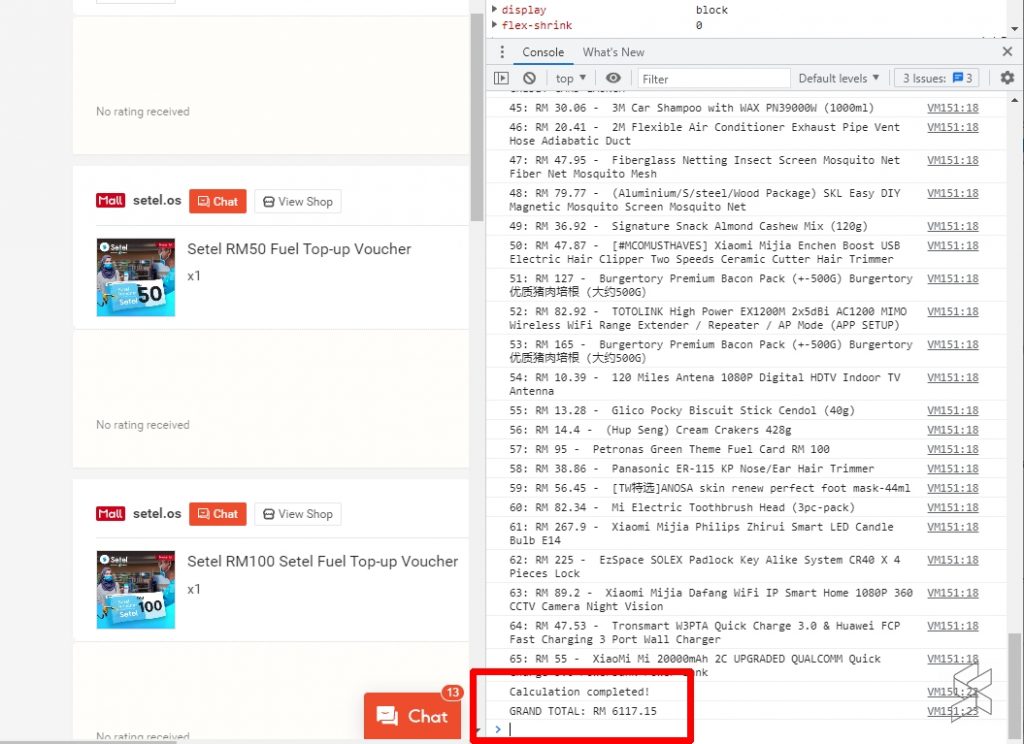
After running the script, it will display the grand total amount in the final line as shown above. The script basically loads up all your Shopee transactions and total up all the completed transactions in your account. Transactions marked as “To Ship” and “To Receive” are not counted. At the moment there’s no Lazada version yet and this is probably due to the way Lazada uses pagination when displaying all orders.

So were you surprised with how much you’ve spent on Shopee? Is it more or less than your expectation? Let us know in the comments below.

If you’re looking for tech deals, do follow our 10.10 live blog.

Tags: CalculateShopeeChromeedgeShopee
Alexander Wong

Alexander Wong

POPULAR

Upgraded To a New Phone? Cool. But When Was the Last Time you Upgraded your Shaver?

November 10, 2025

How to automatically calculate how much you’ve spent in total on Shopee

October 8, 2021

5 Reasons Every Home Should Have a Smart Security System

November 11, 2025

Solar ATAP: The new solar programme for consumers will only start in 2026

December 2, 2025
Perodua QV-E EV

Perodua QV-E is now official: Electric sportback with 201hp, 445km NEDC range, priced at RM80k not inclusive of battery subscription

December 1, 2025

GrabRewards is now GrabCoins: Now with even more ways to earn and save

November 17, 2025

Copyright © 2025 · SoyaCincau.com
Mind Blow Sdn Bhd (1076827-P)

  • ADVERTISE
  • DISCLAIMER

Copyright © 2025 · SoyaCincau.com – Mind Blow Sdn Bhd (1076827-P)

  • ADVERTISE
  • DISCLAIMER