• 中文版
  • BM
  • News
  • Deals
  • Reviews
    • First Impressions
    • Hands-on
    • Comparisons
  • Tech
    • Mobile
    • Computers
    • Cameras
    • Wearables
    • Audio
    • Drones
  • Telco
    • Celcom
    • Digi
    • Maxis
    • Time
    • Tune Talk
    • U Mobile
    • Unifi
    • Yes
  • Cars
  • Contribute
  • Jobs
Menu
  • 中文版
  • BM
  • News
  • Deals
  • Reviews
    • First Impressions
    • Hands-on
    • Comparisons
  • Tech
    • Mobile
    • Computers
    • Cameras
    • Wearables
    • Audio
    • Drones
  • Telco
    • Celcom
    • Digi
    • Maxis
    • Time
    • Tune Talk
    • U Mobile
    • Unifi
    • Yes
  • Cars
  • Contribute
  • Jobs
Search
  • Tech
    • News
    • Mobile
    • Computers
    • Cameras
    • Wearables
    • Audio
    • Drones
  • Telco
    • Celcom
    • Digi
    • Maxis
    • Time
    • U Mobile
    • Unifi
    • Yes
  • Reviews
    • First Impressions
    • Hands-on
    • Comparisons
  • Buyer’s Guide
  • Opinions
  • Digital Life
  • Video
  • Deals
  • How-To
  • Cars
  • Bahasa Melayu
  • EV
  • Contribute
  • Advertise
Menu
  • Tech
    • News
    • Mobile
    • Computers
    • Cameras
    • Wearables
    • Audio
    • Drones
  • Telco
    • Celcom
    • Digi
    • Maxis
    • Time
    • U Mobile
    • Unifi
    • Yes
  • Reviews
    • First Impressions
    • Hands-on
    • Comparisons
  • Buyer’s Guide
  • Opinions
  • Digital Life
  • Video
  • Deals
  • How-To
  • Cars
  • Bahasa Melayu
  • EV
  • Contribute
  • Advertise
Search
Close
Home Digital Life Apps

Instagram launches Security Checkup tool to help you secure your account after you get hacked

  • BY Redza Dzafri
  • 15 July 2021
  • 1:15 pm
  • Comment
Share on FacebookShare on Twitter

This week, Instagram launched a new Security Checkup feature to help keep your account secure. If you’ve been hacked, this tool will help you check your login activity, review your profile information, and update your recovery contact info.
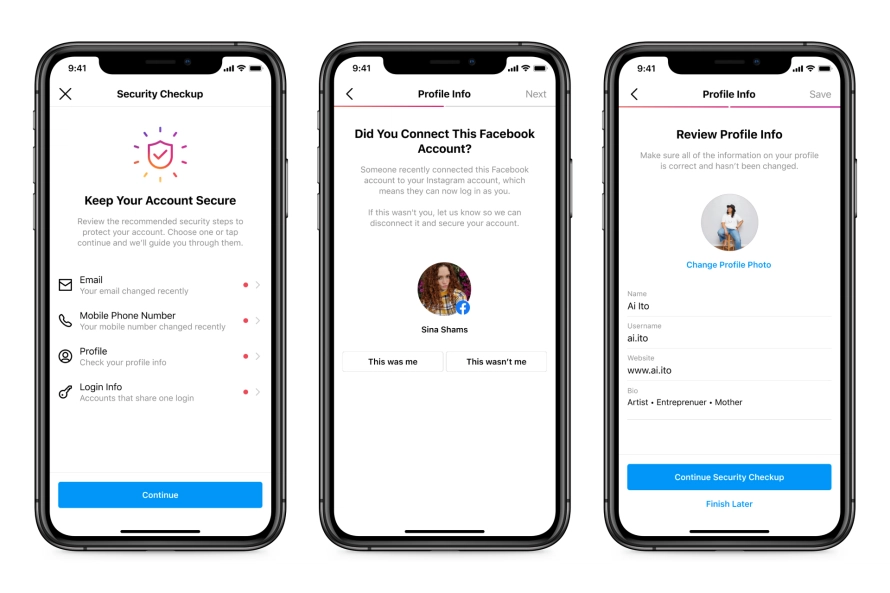
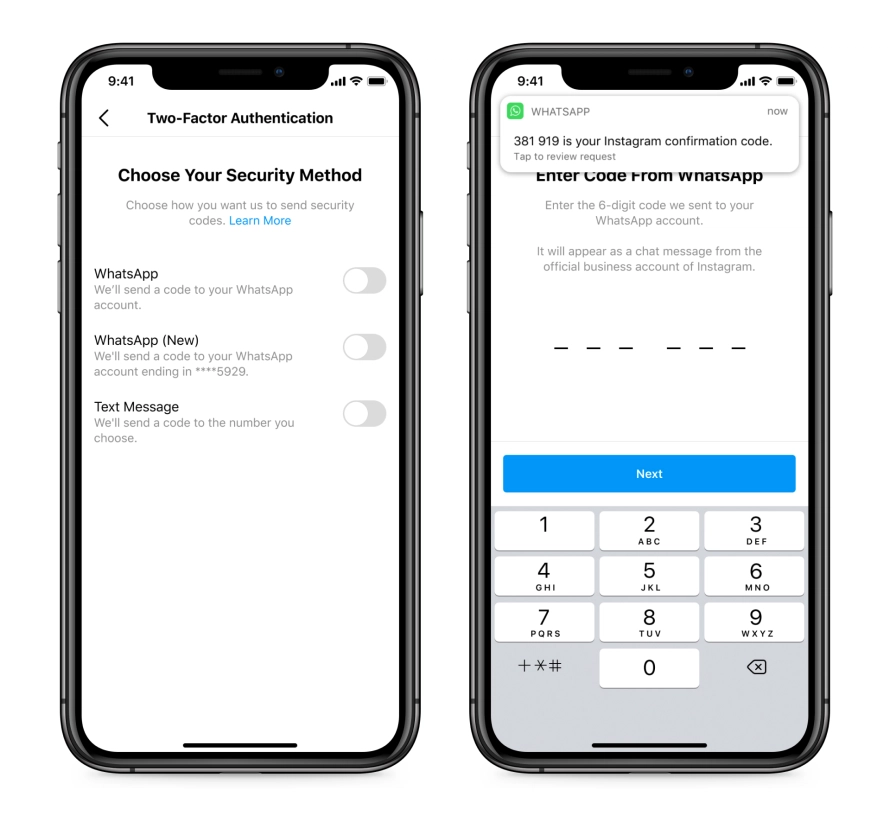
In the blog post where they mention this tool, they go over some additional ways to secure your account. The main thing they strongly suggest doing is enabling two-factor-authentication. They even alluded to the fact that you will be able to use your WhatsApp number to authenticate your account in the coming weeks.
They also emphasized that Instagram will never send you a DM. Over the past few months, there has been a rise in malicious accounts trying to get personal information through phishing. They often pose as Instagram in these phishing attacks, and users should stay cautious. If they require to contact you, it should be through the ‘E-mails from Instagram’ tab in your settings.

Instagram also encourages users to report any fraudulent or malicious accounts that have been found. This, along with their own safety methods, will help reduce the number of people affected by these scammers.

[ SOURCE ]

Tags: hackInstagramsecurityWhatsapp
Redza Dzafri

Redza Dzafri

POPULAR

Instagram launches Security Checkup tool to help you secure your account after you get hacked

July 15, 2021

SoyaCincau Awards 2025: The Best Tablets of the Year

January 5, 2026

HUAWEI MatePad 12 X 2026: The Best Productivity Tablet with PC-Level WPS and the All-New HUAWEI M-Pencil Pro

January 6, 2026

SARA: All Malaysian adults to receive RM100 credit from 9 February

January 5, 2026

SoyaCincau Awards 2025: Best Telcos of the Year

January 2, 2026
Maybank Google Pay - May 2024

Maybank on Google Pay: No PIN required for transactions above RM250, transactions limited to RM2,500

January 5, 2026

Copyright © 2025 · SoyaCincau.com
Mind Blow Sdn Bhd (1076827-P)

  • ADVERTISE
  • DISCLAIMER

Copyright © 2026 · SoyaCincau.com – Mind Blow Sdn Bhd (1076827-P)

  • ADVERTISE
  • DISCLAIMER