• 中文版
  • BM
  • News
  • Deals
  • Reviews
    • First Impressions
    • Hands-on
    • Comparisons
  • Tech
    • Mobile
    • Computers
    • Cameras
    • Wearables
    • Audio
    • Drones
  • Telco
    • Celcom
    • Digi
    • Maxis
    • Time
    • Tune Talk
    • U Mobile
    • Unifi
    • Yes
  • Cars
  • Contribute
  • Jobs
Menu
  • 中文版
  • BM
  • News
  • Deals
  • Reviews
    • First Impressions
    • Hands-on
    • Comparisons
  • Tech
    • Mobile
    • Computers
    • Cameras
    • Wearables
    • Audio
    • Drones
  • Telco
    • Celcom
    • Digi
    • Maxis
    • Time
    • Tune Talk
    • U Mobile
    • Unifi
    • Yes
  • Cars
  • Contribute
  • Jobs
Search
  • Tech
    • News
    • Mobile
    • Computers
    • Cameras
    • Wearables
    • Audio
    • Drones
  • Telco
    • Celcom
    • Digi
    • Maxis
    • Time
    • U Mobile
    • Unifi
    • Yes
  • Reviews
    • First Impressions
    • Hands-on
    • Comparisons
  • Buyer’s Guide
  • Opinions
  • Digital Life
  • Video
  • Deals
  • How-To
  • Cars
  • Bahasa Melayu
  • EV
  • Contribute
  • Advertise
Menu
  • Tech
    • News
    • Mobile
    • Computers
    • Cameras
    • Wearables
    • Audio
    • Drones
  • Telco
    • Celcom
    • Digi
    • Maxis
    • Time
    • U Mobile
    • Unifi
    • Yes
  • Reviews
    • First Impressions
    • Hands-on
    • Comparisons
  • Buyer’s Guide
  • Opinions
  • Digital Life
  • Video
  • Deals
  • How-To
  • Cars
  • Bahasa Melayu
  • EV
  • Contribute
  • Advertise
Search
Close
Home Digital Life

Microsoft Powerpoint Presenter Coach is now available on desktop and mobile

  • BY Dzamira Dzafri
  • 18 March 2021
  • 6:22 pm
  • Comment
Share on FacebookShare on Twitter

Microsoft Powerpoint has been giving users the ability to practise being less awkward at presentations with their Presenter Coach feature since 2019—but only on the web version of the app. Now, the feature is available on desktop and mobile versions of Powerpoint, too.

“Presenter Coach leverages AI to help anyone—professionals, students, and even those who just want to practice a speech for a wedding or graduation. Especially in this hybrid work and learning environment, presentation skills are more important than ever, with more meetings and presentations than ever before,” wrote Derek Johnson, Principal PM Manager for PowerPoint AI.

Presenter Coach is able to provide users with feedback on their pace, use of monotone pitch, use of filler words, poor grammar, lack of originality, use of sensitive phrases, and others while they rehearse presentations. Users will also get a summary report containing feedback to make them become better presenters.
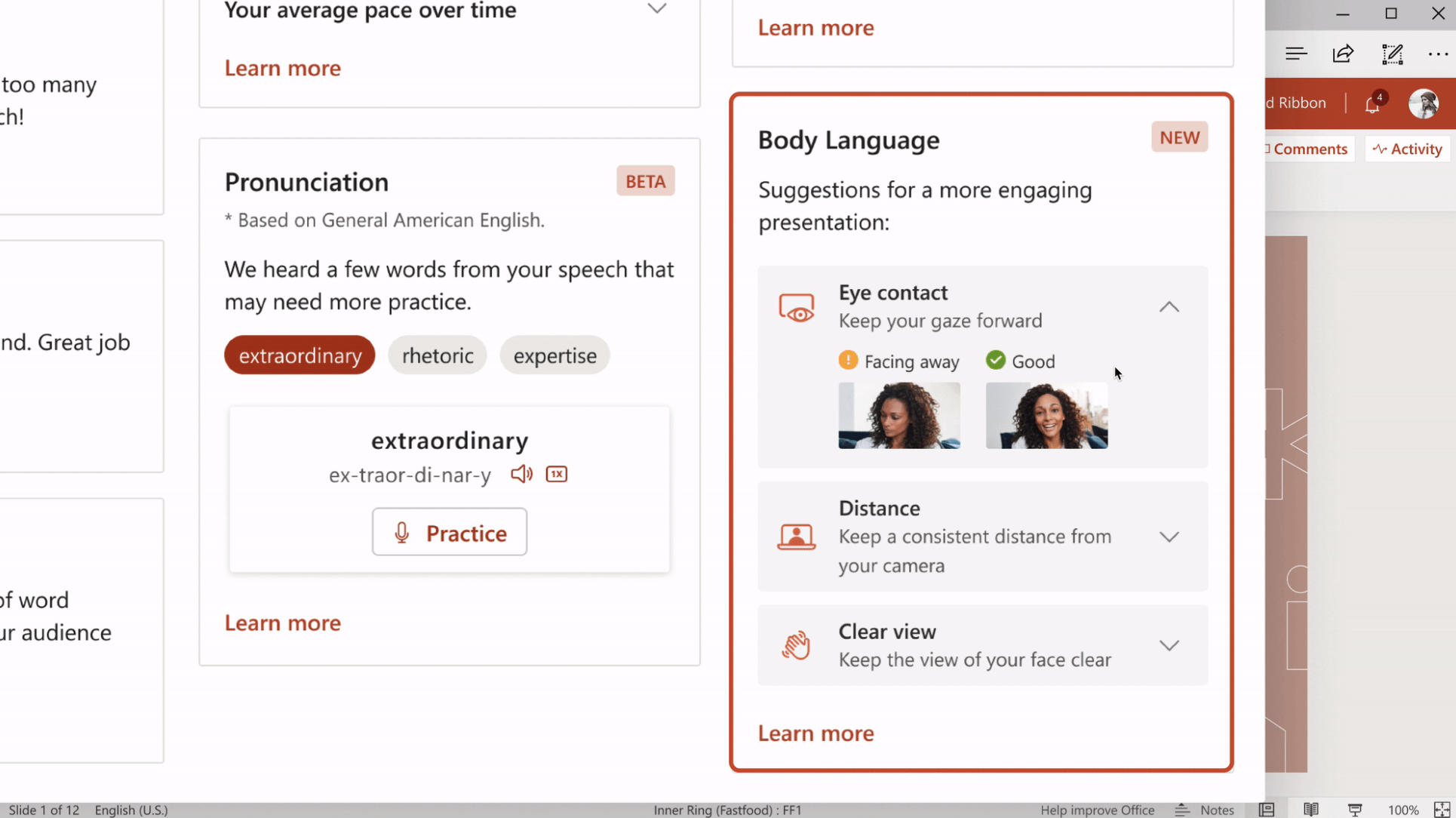
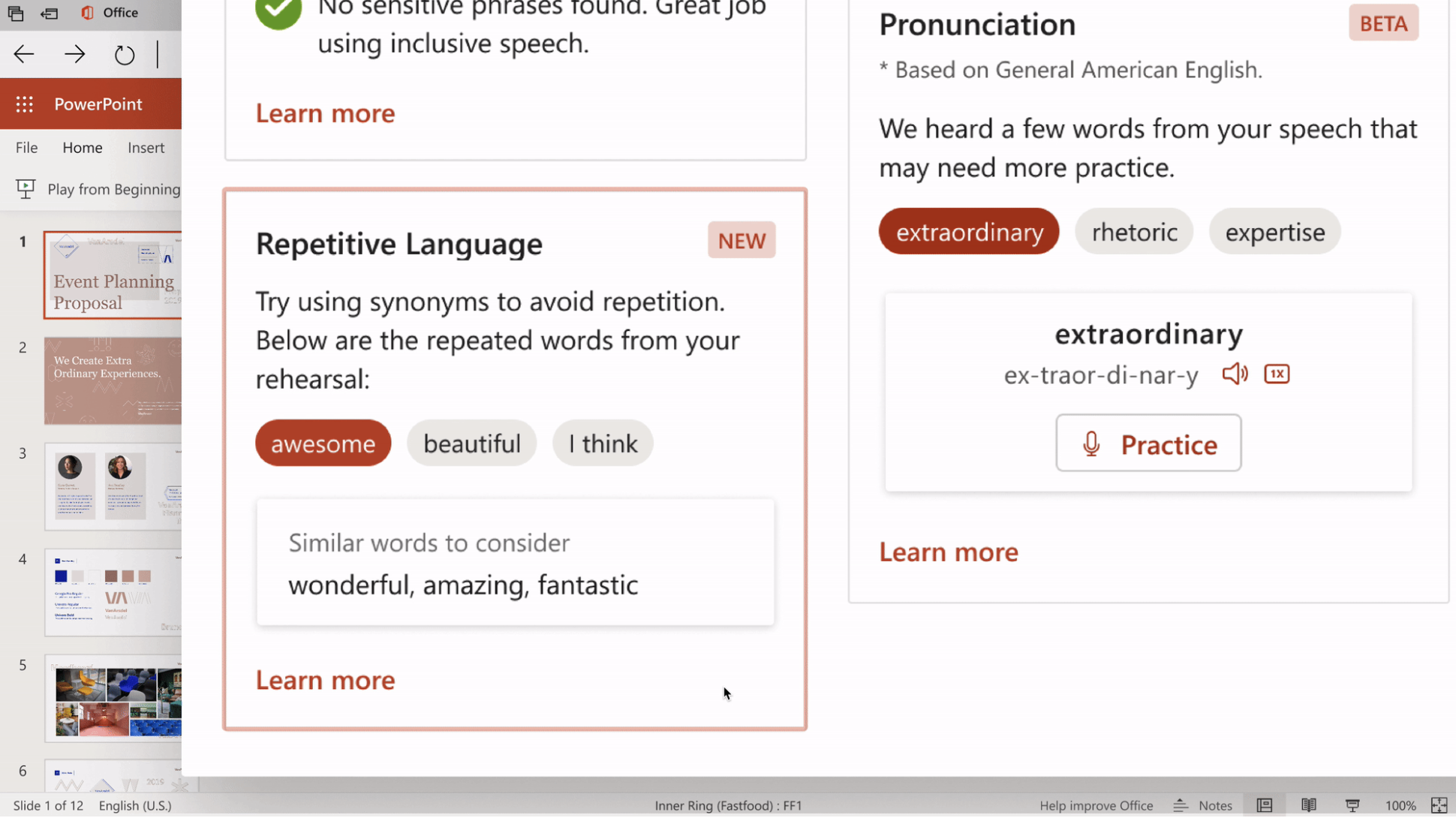
Microsoft also announced that they are adding new features to Presenter Coach. You can opt to get feedback for body language—including eye contact and your distance which can help your virtual presentations. It can also note repetitive language and your pronunciation.

However, The Verge noted that some features show up on some platforms but not others. For example, the feature that checks your presentation for swear words is available for web and iOS but isn’t available for Windows and Mac.

You also aren’t able to use the feature on airplane mode. Microsoft Powerpoint would ask you to connect to the internet to use the coaching feature.

To learn more about how to research with the Presenter Coach, Microsoft added a support page for all platforms. The page will give you detailed steps on how to use the feature.

[ SOURCE, IMAGE SOURCE ]

Related reading

Microsoft reveals a brand new Office 2016
Tags: microsoftmicrosoft powerpointPresenter Coach
Dzamira Dzafri

Dzamira Dzafri

POPULAR

SoyaCincau Awards 2025: The Best Tablets of the Year

January 5, 2026

Microsoft Powerpoint Presenter Coach is now available on desktop and mobile

March 18, 2021

HUAWEI MatePad 12 X 2026: The Best Productivity Tablet with PC-Level WPS and the All-New HUAWEI M-Pencil Pro

January 6, 2026

SARA: All Malaysian adults to receive RM100 credit from 9 February

January 5, 2026

SoyaCincau Awards 2025: Best Telcos of the Year

January 2, 2026
Maybank Google Pay - May 2024

Maybank on Google Pay: No PIN required for transactions above RM250, transactions limited to RM2,500

January 5, 2026

Copyright © 2025 · SoyaCincau.com
Mind Blow Sdn Bhd (1076827-P)

  • ADVERTISE
  • DISCLAIMER

Copyright © 2026 · SoyaCincau.com – Mind Blow Sdn Bhd (1076827-P)

  • ADVERTISE
  • DISCLAIMER