• 中文版
  • BM
  • News
  • Deals
  • Reviews
    • First Impressions
    • Hands-on
    • Comparisons
  • Tech
    • Mobile
    • Computers
    • Cameras
    • Wearables
    • Audio
    • Drones
  • Telco
    • Celcom
    • Digi
    • Maxis
    • Time
    • Tune Talk
    • U Mobile
    • Unifi
    • Yes
  • Cars
  • Contribute
  • Jobs
Menu
  • 中文版
  • BM
  • News
  • Deals
  • Reviews
    • First Impressions
    • Hands-on
    • Comparisons
  • Tech
    • Mobile
    • Computers
    • Cameras
    • Wearables
    • Audio
    • Drones
  • Telco
    • Celcom
    • Digi
    • Maxis
    • Time
    • Tune Talk
    • U Mobile
    • Unifi
    • Yes
  • Cars
  • Contribute
  • Jobs
Search
  • Tech
    • News
    • Mobile
    • Computers
    • Cameras
    • Wearables
    • Audio
    • Drones
  • Telco
    • Celcom
    • Digi
    • Maxis
    • Time
    • U Mobile
    • Unifi
    • Yes
  • Reviews
    • First Impressions
    • Hands-on
    • Comparisons
  • Buyer’s Guide
  • Opinions
  • Digital Life
  • Video
  • Deals
  • How-To
  • Cars
  • Bahasa Melayu
  • EV
  • Contribute
  • Advertise
Menu
  • Tech
    • News
    • Mobile
    • Computers
    • Cameras
    • Wearables
    • Audio
    • Drones
  • Telco
    • Celcom
    • Digi
    • Maxis
    • Time
    • U Mobile
    • Unifi
    • Yes
  • Reviews
    • First Impressions
    • Hands-on
    • Comparisons
  • Buyer’s Guide
  • Opinions
  • Digital Life
  • Video
  • Deals
  • How-To
  • Cars
  • Bahasa Melayu
  • EV
  • Contribute
  • Advertise
Search
Close
Home Digital Life

WhatsApp now lets you make messages disappear automatically. Here’s how to activate it

  • BY Alexander Wong
  • 3 November 2020
  • 12:09 pm
  • Comment
Share on FacebookShare on Twitter

WhatsApp has offered users the option to delete messages for everyone which is a potential lifesaver if you accidentally sent a wrong text to the wrong person. However, if you want your messages to disappear automatically, WhatsApp has finally rolled out its Disappearing Messages feature to all users on both Android and iOS.

At the moment, the feature allows you to make your messages disappear after 7 days and you can enable this on specific chats including individual and group chats (if you’re an admin).

To enable this, just enter a chat and go to the Group Info by tapping the name of the group or person at the top of the screen. You should find a new “Disappearing Messages” option above the “Encryption” settings.
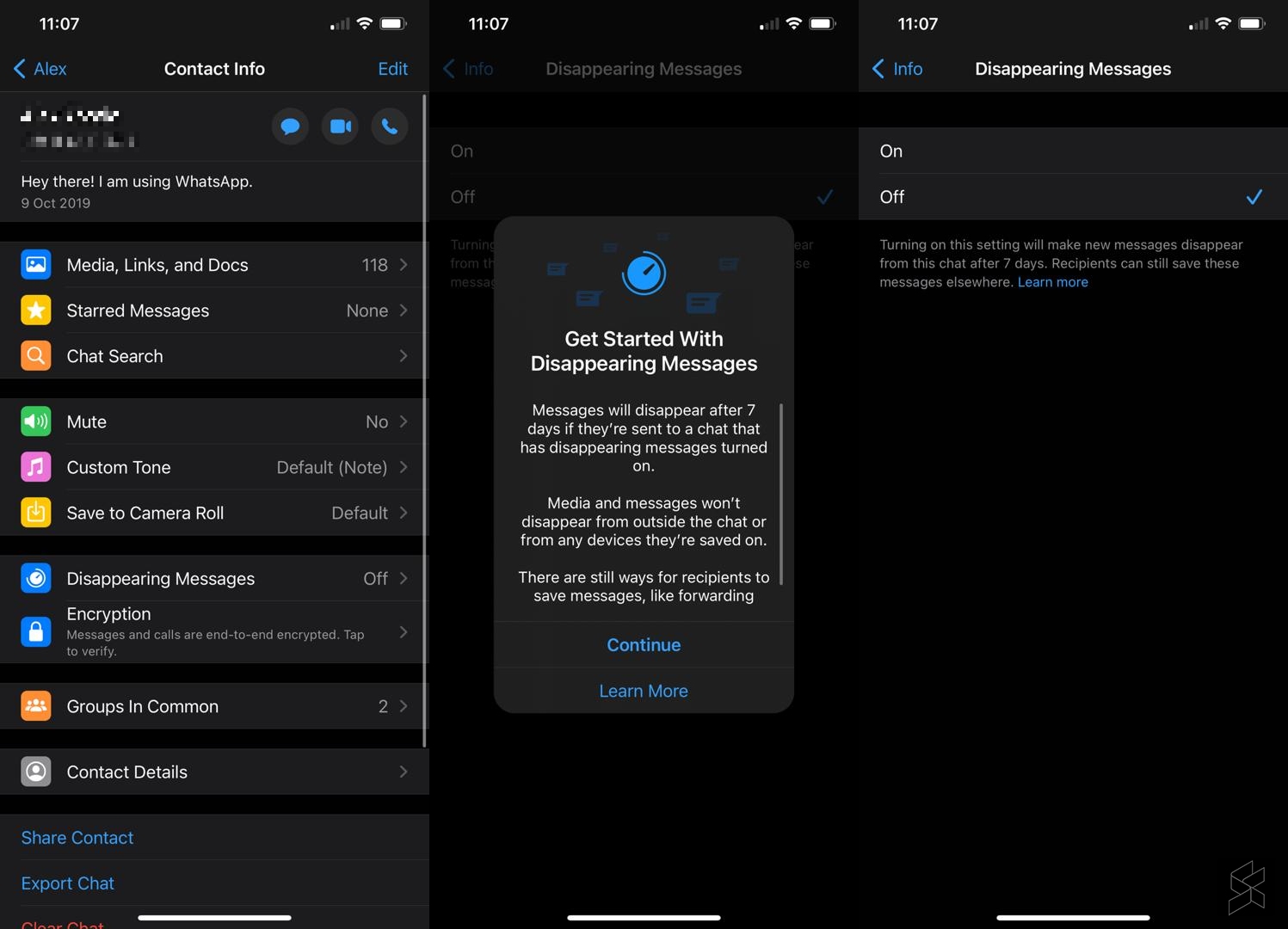
WhatsApp Disappearing Messages iPhone
Disappearing Messages on WhatsApp for iOS

At the moment, there’s only a single on/off toggle and this will make new messages in the chat to disappear after 7 days. For clarity, WhatsApp says that this won’t stop people from saving the message elsewhere. Other users can still copy, screenshot or forward the message to someone else which will be kept permanently.

According to the FAQ, the message will also disappear if someone doesn’t open WhatsApp in the 7 day period. However, if someone replies to a message, the quoted text might still remain even after the 7 day period.
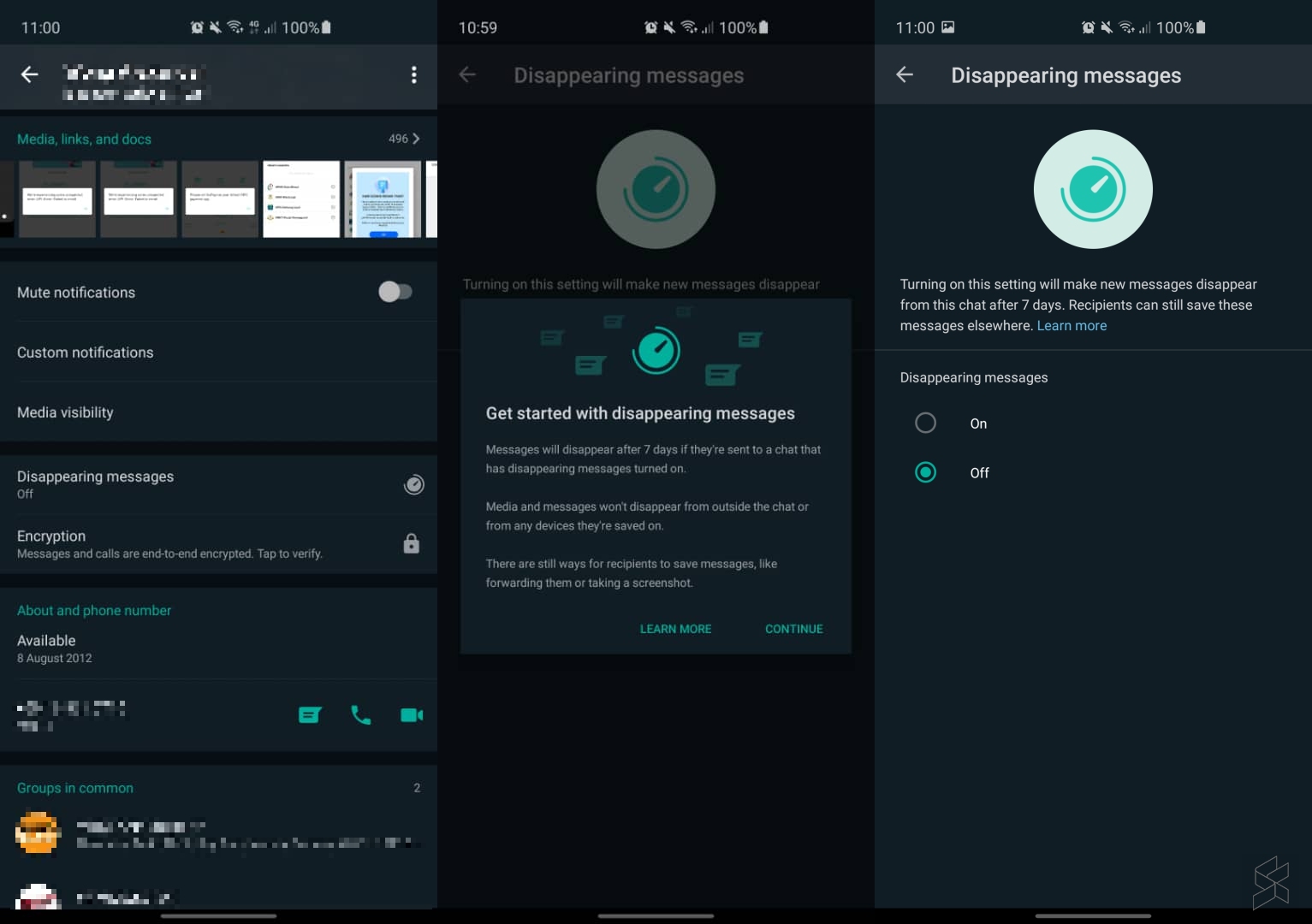
WhatsApp Disappearing Messages Android
Disappearing Messages on WhatsApp for Android

If a user performs a backup before the 7th day, the messages will be backed up as well. However, if the message is more than 7 days old, WhatsApp says that it will be deleted automatically when the chat history is restored.

When it comes to pictures and videos, the attached media will also disappear from the chat. However, it will still be saved on the phone if the recipient enables auto-download.

Unfortunately, there’s no option for you to change the auto-disappear duration. When the disappearing messages feature was spotted in a beta release last year, there were options to change it to as short as 1 hour, 1 day or as long as 1 month and 1 year.

If you’re dealing with sensitive information, it is still best to delete the message immediately. Or better yet, don’t share it on WhatsApp and use other instant messaging platforms such as Telegram that has a more sophisticated secret chat with a flexible self-destruct timer.

[ SOURCE ]

Related reading

  • WhatsApp is rolling out default disappearing messages for iPhone and Android
Tags: Whatsapp
Alexander Wong

Alexander Wong

POPULAR

WhatsApp now lets you make messages disappear automatically. Here’s how to activate it

November 3, 2020

SoyaCincau Awards 2025: The Best Tablets of the Year

January 5, 2026

HUAWEI MatePad 12 X 2026: The Best Productivity Tablet with PC-Level WPS and the All-New HUAWEI M-Pencil Pro

January 6, 2026

SARA: All Malaysian adults to receive RM100 credit from 9 February

January 5, 2026

SoyaCincau Awards 2025: Best Telcos of the Year

January 2, 2026
Maybank Google Pay - May 2024

Maybank on Google Pay: No PIN required for transactions above RM250, transactions limited to RM2,500

January 5, 2026

Copyright © 2025 · SoyaCincau.com
Mind Blow Sdn Bhd (1076827-P)

  • ADVERTISE
  • DISCLAIMER

Copyright © 2026 · SoyaCincau.com – Mind Blow Sdn Bhd (1076827-P)

  • ADVERTISE
  • DISCLAIMER