• 中文版
  • BM
  • News
  • Deals
  • Reviews
    • First Impressions
    • Hands-on
    • Comparisons
  • Tech
    • Mobile
    • Computers
    • Cameras
    • Wearables
    • Audio
    • Drones
  • Telco
    • Celcom
    • Digi
    • Maxis
    • Time
    • Tune Talk
    • U Mobile
    • Unifi
    • Yes
  • Cars
  • Contribute
  • Jobs
Menu
  • 中文版
  • BM
  • News
  • Deals
  • Reviews
    • First Impressions
    • Hands-on
    • Comparisons
  • Tech
    • Mobile
    • Computers
    • Cameras
    • Wearables
    • Audio
    • Drones
  • Telco
    • Celcom
    • Digi
    • Maxis
    • Time
    • Tune Talk
    • U Mobile
    • Unifi
    • Yes
  • Cars
  • Contribute
  • Jobs
Search
  • Tech
    • News
    • Mobile
    • Computers
    • Cameras
    • Wearables
    • Audio
    • Drones
  • Telco
    • Celcom
    • Digi
    • Maxis
    • Time
    • U Mobile
    • Unifi
    • Yes
  • Reviews
    • First Impressions
    • Hands-on
    • Comparisons
  • Buyer’s Guide
  • Opinions
  • Digital Life
  • Video
  • Deals
  • How-To
  • Cars
  • Bahasa Melayu
  • EV
  • Contribute
  • Advertise
Menu
  • Tech
    • News
    • Mobile
    • Computers
    • Cameras
    • Wearables
    • Audio
    • Drones
  • Telco
    • Celcom
    • Digi
    • Maxis
    • Time
    • U Mobile
    • Unifi
    • Yes
  • Reviews
    • First Impressions
    • Hands-on
    • Comparisons
  • Buyer’s Guide
  • Opinions
  • Digital Life
  • Video
  • Deals
  • How-To
  • Cars
  • Bahasa Melayu
  • EV
  • Contribute
  • Advertise
Search
Close
Home News

iOS 11.3: Say bye bye bye to forced throttling on your iPhone

  • BY Rory Lee
  • 30 March 2018
  • 12:32 pm
  • Comment
Share on FacebookShare on Twitter

Firstly, I would like to apologise for the NSYNC reference, but that song was stuck in my head all morning. But now that that’s out of the way, iOS users rejoice! Apple has released the latest version of their mobile OS and this is the one that comes with the feature all old iPhone users have been waiting for (probably).

I’m sure you all remember the fiasco about Apple admitting that they were intentionally slowing down older iPhones because of their aging batteries. Whether you buy that or not, the good news was that Apple had solution in the works for users who were willing to sacrifice battery performance for raw performance.
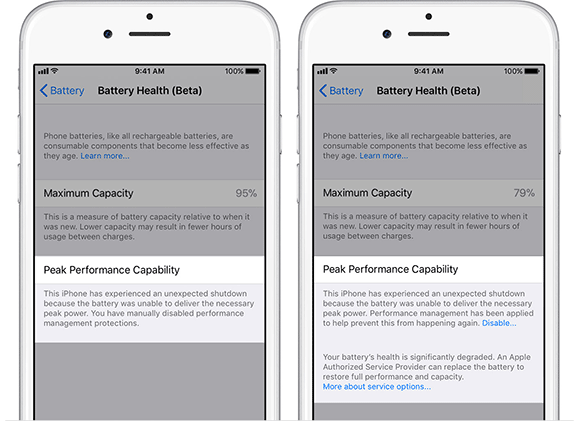
Today, that solution comes to you with iOS 11.3. You can read more about about it in Alex’s post, but the gist of it is that you will now see a new “Battery Health (Beta)” menu item under Settings > Battery. There, in addition to a bunch of stats about your battery, you can also disable the performance throttling. Of course, Apple doesn’t encourage you to do it, but you can.

Besides that, Apple also added a bunch of new updates including ARKit 1.5 for developers and a nice charge management tweak for iPads that will maintain battery health when iPads are connected to power for prolonged periods of time.

Apple also added an icon that will now appear alongside a link to detailed information about how your data will be used and protected when an Apple feature asks for your personal information. There are also tweaks to how Safari handles AutoFilling as well as some tweaks to Apple Music which you can read all about here.

But, I know what everyone’s really here for. With iOS 11.3, Apple has added FOUR NEW ANIMOJI characters. Now, you can make silly faces as a dragon, a bear, a skull or, my personal favourite, a lion.

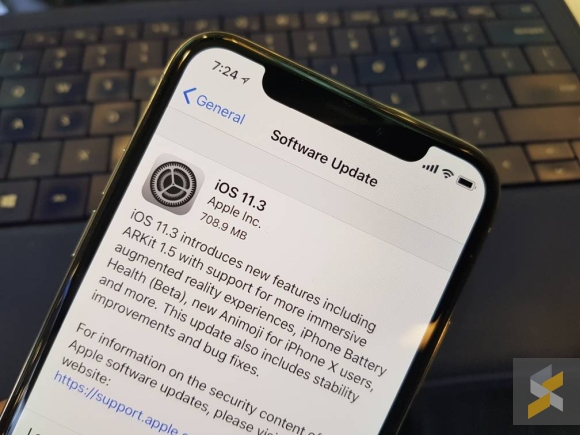
You can check for the iOS 11.3 update by going into your device’s Settings > General > Software Update.


Tags: AppleBattery HealthBear Animojidragon AnimojiiOS 11iOS 11 UpdateiOS 11.3iOS updateiPadiPhoneLion Animojinew Animojiold batterySkull AnimojiSlow iPhonethrottle iphone
Rory Lee

Rory Lee

POPULAR

Image source: Jakub Zerdzicki on Pexels

AEON Bank’s Personal Financing-i (PF-i): Flexible Funds to Help Ease Budget Constraints

December 24, 2025

iOS 11.3: Say bye bye bye to forced throttling on your iPhone

March 30, 2018

The Xiaomi 17 Proves You Don’t Need a Giant Phone for Pro-Level Photos

February 28, 2026

Is Your Current Phone Generations Behind? Here’s a Simpler Way to Close the Gap

March 13, 2026

Maybank MAE users: Update your app by 11 April or risk losing access

April 4, 2026

U Mobile’s new ULTRA Prepaid now offers no speed cap for 5G. RM50 prepaid offers 500GB data and 2x ULTRA5G Priority pass

April 7, 2026

Copyright © 2025 · SoyaCincau.com
Mind Blow Sdn Bhd (1076827-P)

  • ADVERTISE
  • DISCLAIMER

Copyright © 2026 · SoyaCincau.com – Mind Blow Sdn Bhd (1076827-P)

  • ADVERTISE
  • DISCLAIMER