• 中文版
  • BM
  • News
  • Deals
  • Reviews
    • First Impressions
    • Hands-on
    • Comparisons
  • Tech
    • Mobile
    • Computers
    • Cameras
    • Wearables
    • Audio
    • Drones
  • Telco
    • Celcom
    • Digi
    • Maxis
    • Time
    • Tune Talk
    • U Mobile
    • Unifi
    • Yes
  • Cars
  • Contribute
  • Jobs
Menu
  • 中文版
  • BM
  • News
  • Deals
  • Reviews
    • First Impressions
    • Hands-on
    • Comparisons
  • Tech
    • Mobile
    • Computers
    • Cameras
    • Wearables
    • Audio
    • Drones
  • Telco
    • Celcom
    • Digi
    • Maxis
    • Time
    • Tune Talk
    • U Mobile
    • Unifi
    • Yes
  • Cars
  • Contribute
  • Jobs
Search
  • Tech
    • News
    • Mobile
    • Computers
    • Cameras
    • Wearables
    • Audio
    • Drones
  • Telco
    • Celcom
    • Digi
    • Maxis
    • Time
    • U Mobile
    • Unifi
    • Yes
  • Reviews
    • First Impressions
    • Hands-on
    • Comparisons
  • Buyer’s Guide
  • Opinions
  • Digital Life
  • Video
  • Deals
  • How-To
  • Cars
  • Bahasa Melayu
  • EV
  • Contribute
  • Advertise
Menu
  • Tech
    • News
    • Mobile
    • Computers
    • Cameras
    • Wearables
    • Audio
    • Drones
  • Telco
    • Celcom
    • Digi
    • Maxis
    • Time
    • U Mobile
    • Unifi
    • Yes
  • Reviews
    • First Impressions
    • Hands-on
    • Comparisons
  • Buyer’s Guide
  • Opinions
  • Digital Life
  • Video
  • Deals
  • How-To
  • Cars
  • Bahasa Melayu
  • EV
  • Contribute
  • Advertise
Search
Close
Home Digital Life

Here’s how you can create custom voice prompts in Waze

  • BY Rory Lee
  • 12 May 2017
  • 12:42 pm
  • Comment
Share on FacebookShare on Twitter

Waze just released a brand new update that that lets you record your own custom voice prompts. Yep, say hello to the Waze Voice Recorder because we’re all set, let’s go.
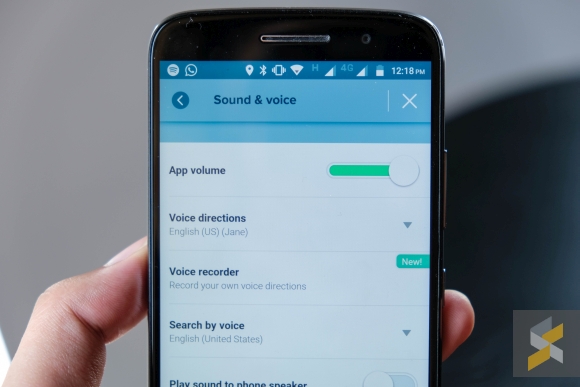
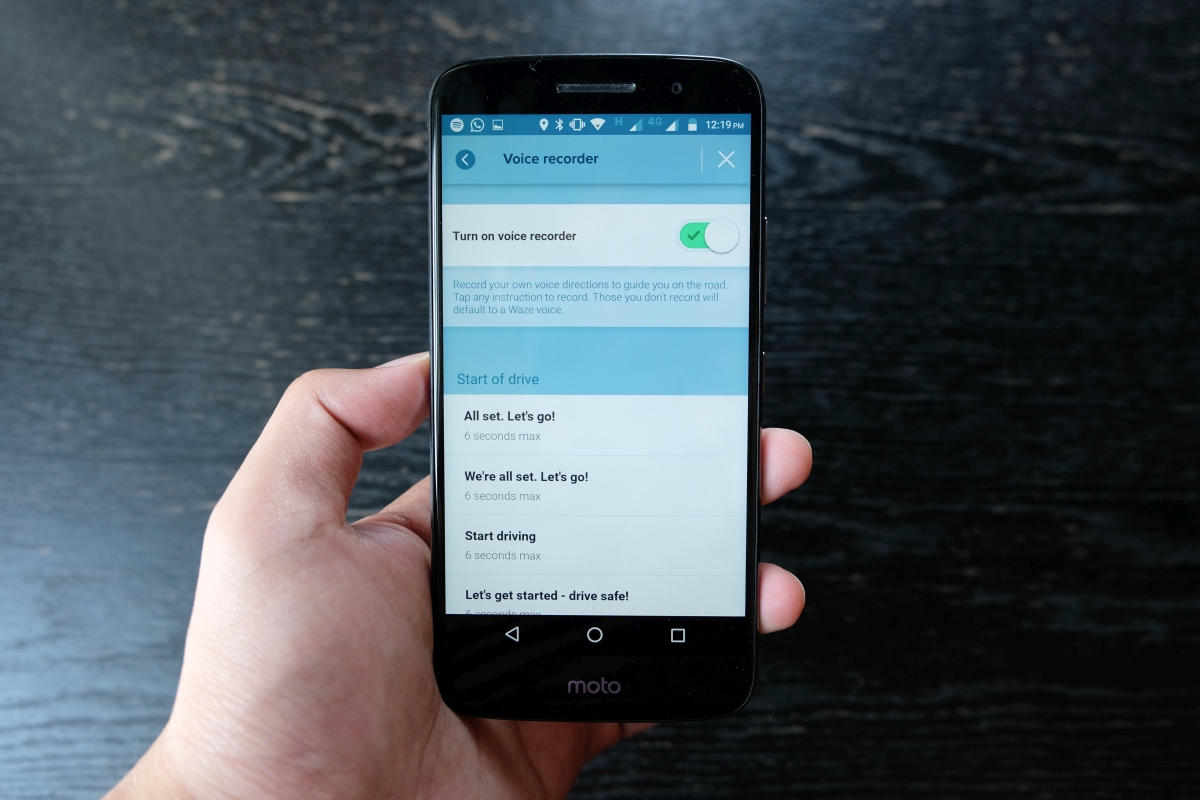
This feature can be accessed in the Waze Settings > Sound & voice menu. Once you’re in, just hit Voice recorder and you’ll be greeted with a toggle to turn it on or off. If you flick it on, Waze will warn you that “your recordings are used to guide you on the road, so make sure they’re accurate. These recordings are available to you only.”
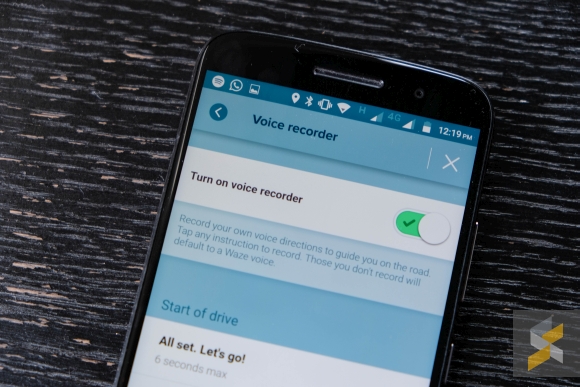
Hit “Got it!” and you will now be able to record your own personalised custom versions of the prompts you’d normally hear when navigating. There are dozens of prompts and commands that range from “Start of drive”, to “Distances”, “Instructions”, “Reports”, and finally “Other”. There’s also a time limit for each command that ranges from 3 to 6 seconds depending on the command. Any voice commands left unrecorded will default back to the default voice instead.

Voice Recorder means that you can now record your own voice and use it for navigation, though I do find that a tad narcissistic. But this feature also means that you can get virtually anyone to voice your recordings! Your friend! Your girlfriend! Your boyfriend! Your mother! Your grandmother! Your dad! And even your pet iguana! Though I personally wouldn’t recommend that last one.

The current iteration of Voice Recorder doesn’t allow you to share your recordings with other people, but Waze has stated that they’re working towards implementing that in the future. This feature is also only available on Android devices right now, but iOS platform support will be coming soon.

According to Waze, the custom voice guides (y’know, like the ones from Shaquille O’Neal and The Grand Tour crew to name a few) were incredibly popular and because of that, users have submitted “countless requests and ideas” to Waze with personalised voice guidance being one of the most popular.

With this new feature, there’s only really one question left to ask: Who are you going to get to voice your navigation?

Tags: android navigationcustom Waze voicegoogleMalaysianavigationsmartphoneWazeWaze Custom Voice commandsWaze MalaysiaWaze Voice PackWaze voice recorder
Rory Lee

Rory Lee

POPULAR

Here’s how you can create custom voice prompts in Waze

May 12, 2017

Genting Highlands Road Charges begin 28 May, here are the official rates

May 26, 2026

Ryt Bank introduces Ryt Invest with RM1 entry and 0% sales charge

May 28, 2026

Xiaomi 17T and 17T Pro launched in Malaysia: Leica 5x telephoto camera and up to 7,000mAh battery

May 28, 2026

Small Steps, Daily Rewards: Exploring the Maybank Tabung Daily Bonus Campaign

May 28, 2026

Xiaomi 17T series with 5x optical zoom launching in Malaysia on 28 May

May 24, 2026

Copyright © 2025 · SoyaCincau.com
Mind Blow Sdn Bhd (1076827-P)

  • ADVERTISE
  • DISCLAIMER

Copyright © 2026 · SoyaCincau.com – Mind Blow Sdn Bhd (1076827-P)

  • ADVERTISE
  • DISCLAIMER