• 中文版
  • BM
  • News
  • Deals
  • Reviews
    • First Impressions
    • Hands-on
    • Comparisons
  • Tech
    • Mobile
    • Computers
    • Cameras
    • Wearables
    • Audio
    • Drones
  • Telco
    • Celcom
    • Digi
    • Maxis
    • Time
    • Tune Talk
    • U Mobile
    • Unifi
    • Yes
  • Cars
  • Contribute
  • Jobs
Menu
  • 中文版
  • BM
  • News
  • Deals
  • Reviews
    • First Impressions
    • Hands-on
    • Comparisons
  • Tech
    • Mobile
    • Computers
    • Cameras
    • Wearables
    • Audio
    • Drones
  • Telco
    • Celcom
    • Digi
    • Maxis
    • Time
    • Tune Talk
    • U Mobile
    • Unifi
    • Yes
  • Cars
  • Contribute
  • Jobs
Search
  • Tech
    • News
    • Mobile
    • Computers
    • Cameras
    • Wearables
    • Audio
    • Drones
  • Telco
    • Celcom
    • Digi
    • Maxis
    • Time
    • U Mobile
    • Unifi
    • Yes
  • Reviews
    • First Impressions
    • Hands-on
    • Comparisons
  • Buyer’s Guide
  • Opinions
  • Digital Life
  • Video
  • Deals
  • How-To
  • Cars
  • Bahasa Melayu
  • EV
  • Contribute
  • Advertise
Menu
  • Tech
    • News
    • Mobile
    • Computers
    • Cameras
    • Wearables
    • Audio
    • Drones
  • Telco
    • Celcom
    • Digi
    • Maxis
    • Time
    • U Mobile
    • Unifi
    • Yes
  • Reviews
    • First Impressions
    • Hands-on
    • Comparisons
  • Buyer’s Guide
  • Opinions
  • Digital Life
  • Video
  • Deals
  • How-To
  • Cars
  • Bahasa Melayu
  • EV
  • Contribute
  • Advertise
Search
Close
Home Digital Life

Microsoft is finally improving Game Bar for gamers using an Xbox Controller on PC

  • BY Raymond Saw
  • 6 May 2022
  • 2:25 pm
  • Comment
Share on FacebookShare on Twitter

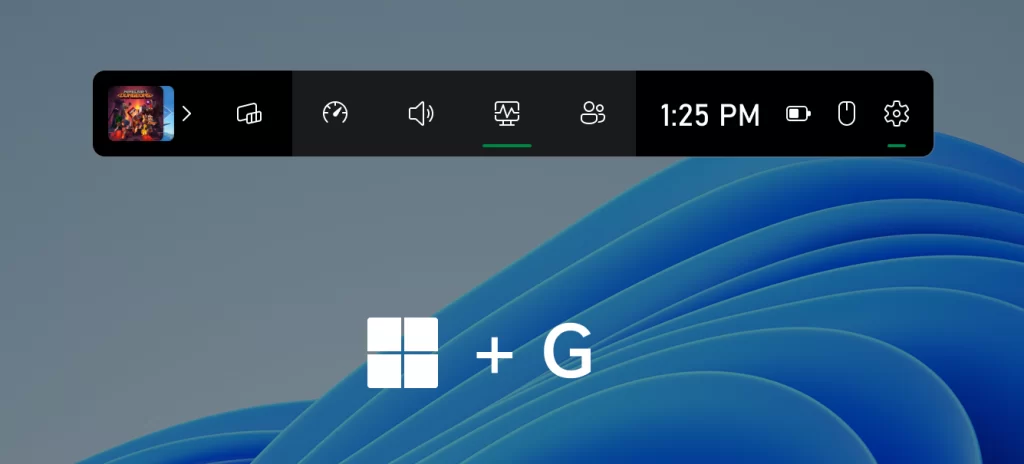
If you’re a gamer on PC, you might be familiar with the Game Bar. By hitting Win+G or, if you have an Xbox controller for PC, hitting the Xbox logo on the controller it’ll bring up the Game bar which lets you do things like control audio and monitor system performance while in game. It’s simple and only really ever useful when you’re already in game, but Microsoft are planning some notable changes to it especially for controller users in particular.

Microsoft are now testing out an early preview of an improved Game Bar called Controller bar. Controller Bar provides an easy and controller-friendly way to access your recently played games as well as your game launchers with just your controller. It automatically triggers open once you pair or connect a controller to your gaming PC running Windows 11 and rather than the usual Game Bar that shows your widgets, it instead lists up to three of your most recently played games on your PC as well as your bookmarked game launchers like the Xbox App and Steam.

Meanwhile, when you are in a game, the Xbox button on your controller will still take you to the regular Game Bar with its widgets along with an additional tab on the left where you’ll find the recently played games and game launchers tucked away. It might not seem like much when you consider that most PC users already predominantly have a keyboard and mouse and only bring out the controllers when they’re gaming, but it’s actually pretty useful in home theater-styled gaming setups for couch gaming in the living room, or even simracing setups where the PC is tucked away behind a racing wheel, a controller and the display.
If you want to try out the new Controller Bar for yourself, it’s sadly still only for Windows Insider users in the time being, with no word just yet on when Microsoft plans to roll it out for stable releases. However, if you are a Windows Insider user running the latest Build 225xx from the Dev and Beta Channel, you can simply download the Xbox Insider Hub from the Microsoft Store and access the Previews tab in the app. There, you can download the latest version of Game Bar and reboot your PC to get the new Controller Bar.

[ SOURCE ]

Tags: Controller BarGame Bargamingmicrosoftmicrosoft windows 11windows 11xbox
Raymond Saw

Raymond Saw

POPULAR

Nissan Finally Gives the Serena a Real Hybrid Powertrain in Malaysia. Estimated from RM160k to RM180k

January 16, 2026

Neta V now available for only RM40k, but with a limited 6-month warranty

January 31, 2026

Microsoft is finally improving Game Bar for gamers using an Xbox Controller on PC

May 6, 2022

Perodua QV-E only costs RM1.4k to maintain for 5 years, cheaper than Axia

January 30, 2026

Tired of cracked screens or short battery life? The REDMI Note 15 Series take a durability-first approach

January 15, 2026

Is your TNG eWallet suspended? Here’s what you should do

January 27, 2026

Copyright © 2025 · SoyaCincau.com
Mind Blow Sdn Bhd (1076827-P)

  • ADVERTISE
  • DISCLAIMER

Copyright © 2026 · SoyaCincau.com – Mind Blow Sdn Bhd (1076827-P)

  • ADVERTISE
  • DISCLAIMER