• 中文版
  • BM
  • News
  • Deals
  • Reviews
    • First Impressions
    • Hands-on
    • Comparisons
  • Tech
    • Mobile
    • Computers
    • Cameras
    • Wearables
    • Audio
    • Drones
  • Telco
    • Celcom
    • Digi
    • Maxis
    • Time
    • Tune Talk
    • U Mobile
    • Unifi
    • Yes
  • Cars
  • Contribute
  • Jobs
Menu
  • 中文版
  • BM
  • News
  • Deals
  • Reviews
    • First Impressions
    • Hands-on
    • Comparisons
  • Tech
    • Mobile
    • Computers
    • Cameras
    • Wearables
    • Audio
    • Drones
  • Telco
    • Celcom
    • Digi
    • Maxis
    • Time
    • Tune Talk
    • U Mobile
    • Unifi
    • Yes
  • Cars
  • Contribute
  • Jobs
Search
  • Tech
    • News
    • Mobile
    • Computers
    • Cameras
    • Wearables
    • Audio
    • Drones
  • Telco
    • Celcom
    • Digi
    • Maxis
    • Time
    • U Mobile
    • Unifi
    • Yes
  • Reviews
    • First Impressions
    • Hands-on
    • Comparisons
  • Buyer’s Guide
  • Opinions
  • Digital Life
  • Video
  • Deals
  • How-To
  • Cars
  • Bahasa Melayu
  • EV
  • Contribute
  • Advertise
Menu
  • Tech
    • News
    • Mobile
    • Computers
    • Cameras
    • Wearables
    • Audio
    • Drones
  • Telco
    • Celcom
    • Digi
    • Maxis
    • Time
    • U Mobile
    • Unifi
    • Yes
  • Reviews
    • First Impressions
    • Hands-on
    • Comparisons
  • Buyer’s Guide
  • Opinions
  • Digital Life
  • Video
  • Deals
  • How-To
  • Cars
  • Bahasa Melayu
  • EV
  • Contribute
  • Advertise
Search
Close
Home Digital Life

Got the new Touch ‘n Go NFC Card? Here’s how to request a refund for your old TNG card online

  • BY Alexander Wong
  • 22 April 2022
  • 2:32 pm
  • Comment
Share on FacebookShare on Twitter

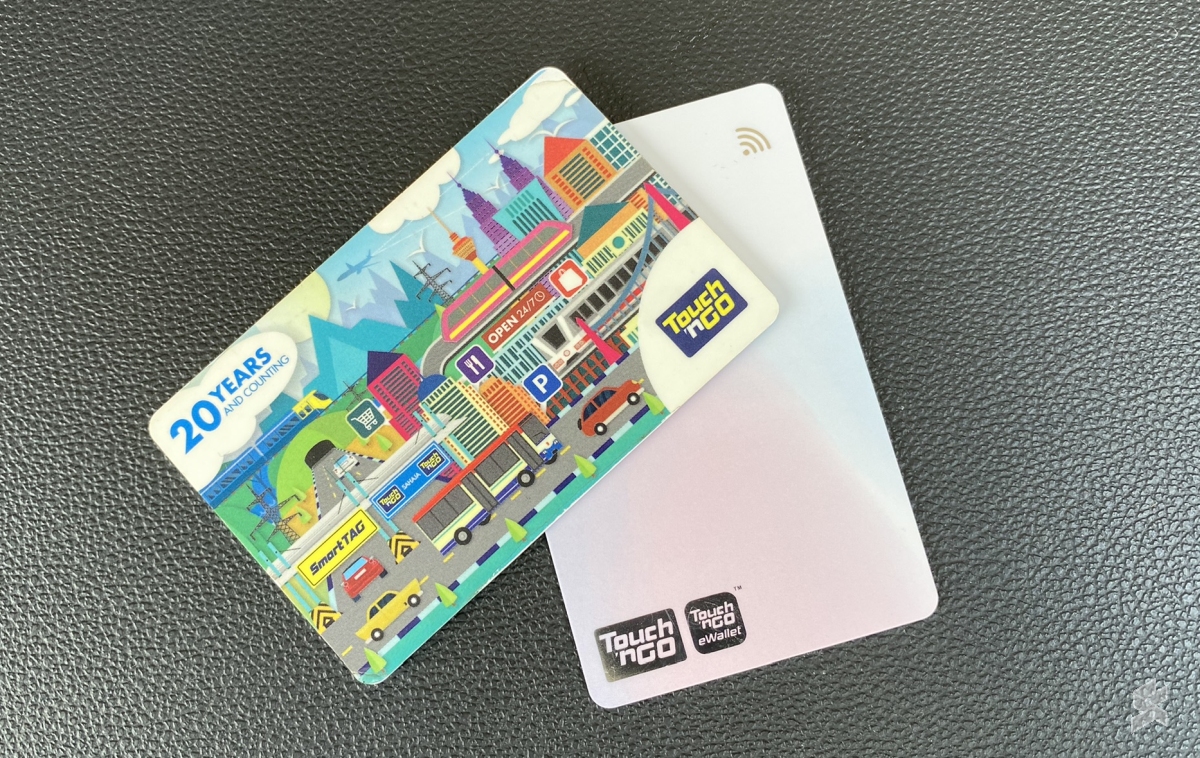
Touch ‘n Go has officially launched its new NFC-enabled TNG card which allows you to reload conveniently via Touch ‘n Go eWallet using your smartphone. If you’ve already ordered the new card, what should you do with your old TNG card which still has a credit value in them? Are you able to transfer the balance to the new card?

We’ve reached out to Touch ‘n Go and the recommended option is to request a refund for your old card. This can be done online and all you need is the serial number of your old TNG card.

How to request a refund for Touch ‘n Go card online?

To request a refund, you can visit the eRefund page on Touch ‘n Go’s website. If you have never linked your card to the online platform before, you will need to register your card first on the MyTouchnGo portal which has a very long registration form.
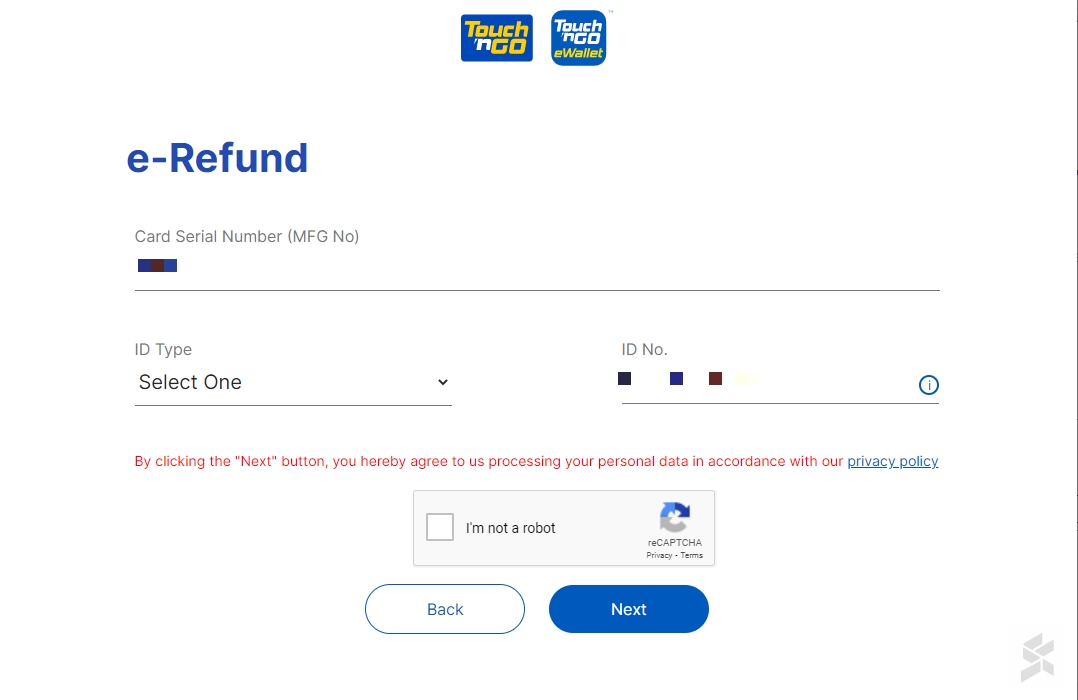
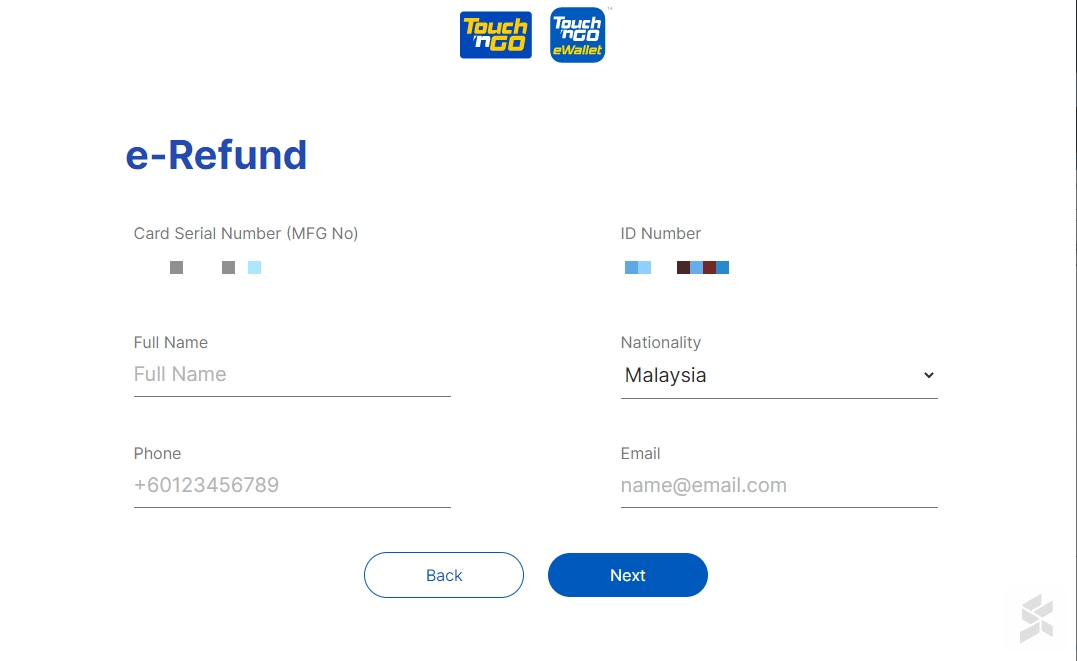
Once that’s done, you can proceed to request for the eRefund by entering your card’s serial number, ID type and number. Next, you will need to verify your information by submitting your Full Name, phone number and email address.
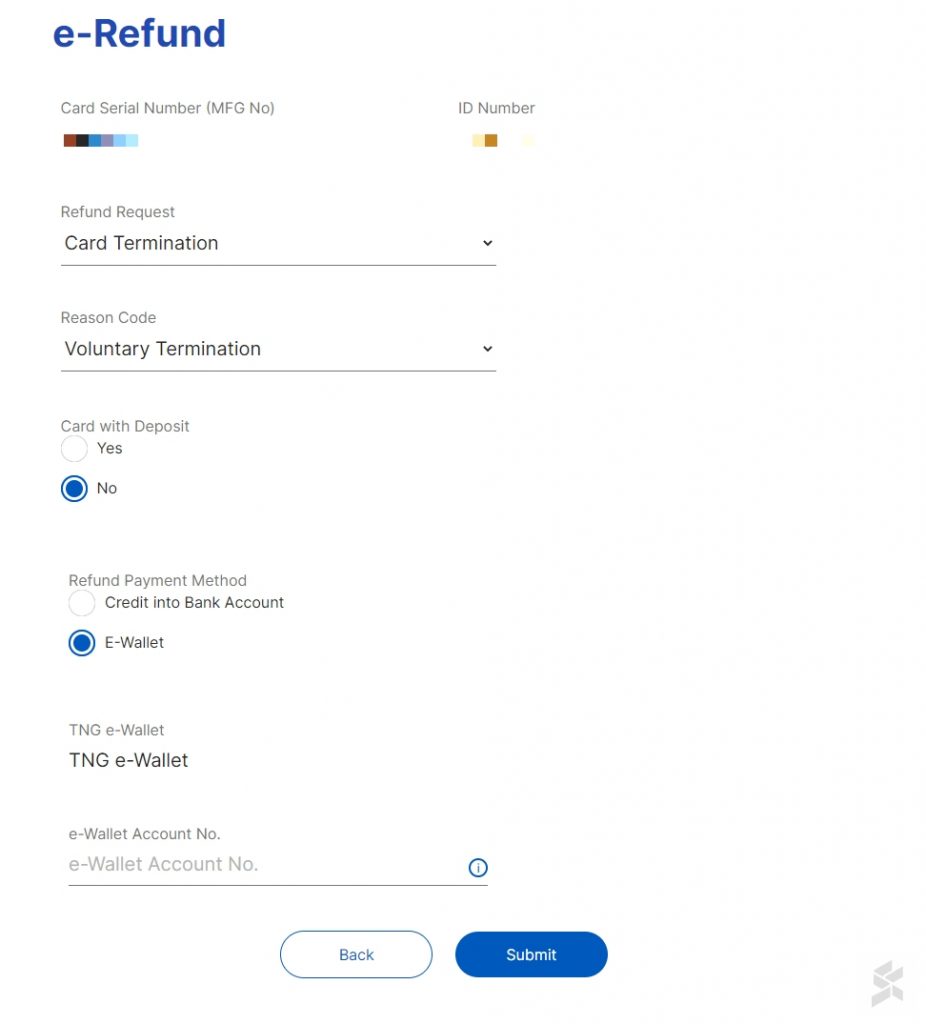
On the next page, just select “Card Termination” and choose “Voluntary Termination” as the reason to refund. You are able to get the refunds either through your bank account or directly into your eWallet. If you choose to get it via eWallet, you’ll have to enter your Touch ‘n Go eWallet account number.
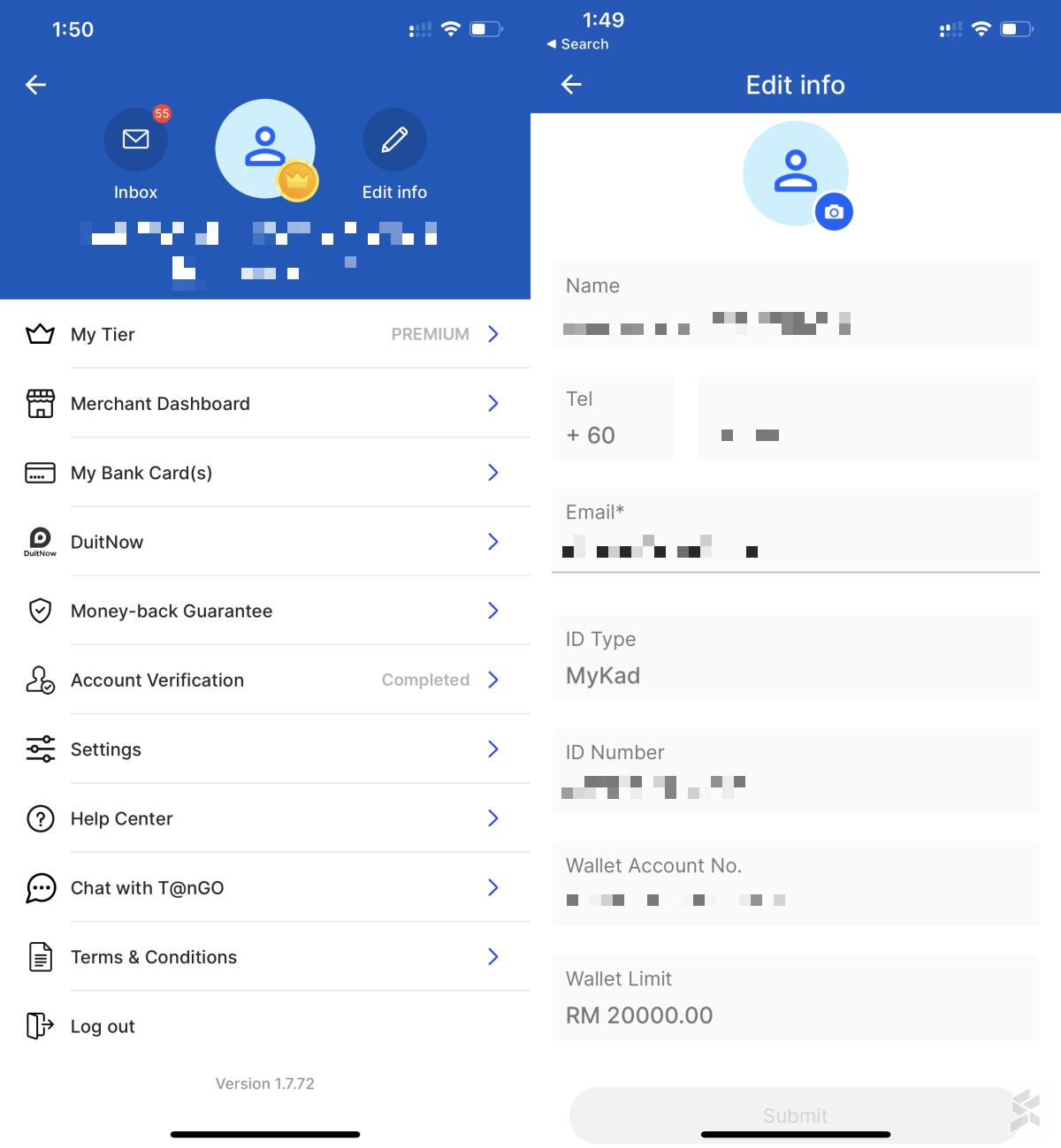
To obtain your TNG eWallet account number, just launch the app, tap on your profile icon in the top right corner and then select “Edit Info”. You should find “Wallet Account No” at the bottom of the page. Make sure you copied the number correctly into the eRefund form.
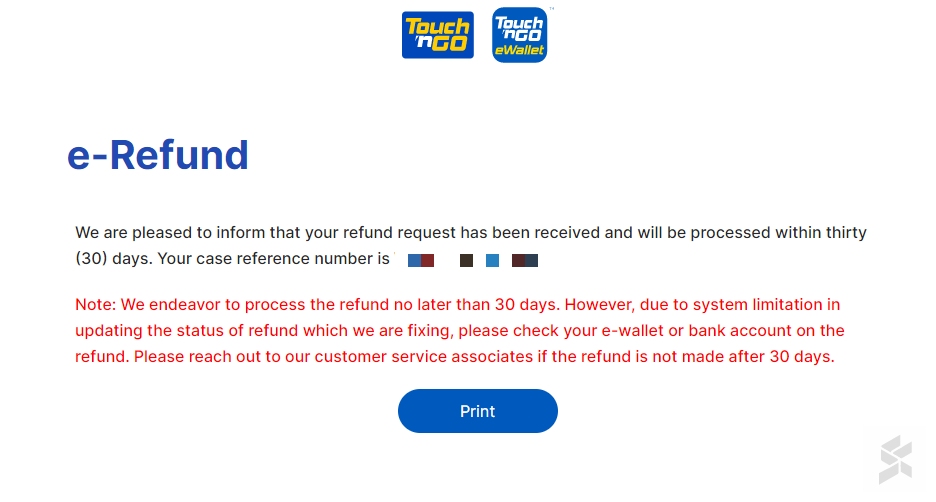
Once that’s done, your Touch ‘n Go card refund request will be processed within 30 days. If you still don’t receive it after 30 days, you can follow up with Touch ‘n Go customer service on the status. If you choose to get the refund by eWallet, you can use the NFC feature to top-up your new TNG card.

To recap, the new Enhanced Touch ‘n Go card costs RM10 and it can be ordered directly from the Touch ‘n Go eWallet app. With this new feature, the eWallet acts as your personal reload kiosks and you can top up from as little as RM10 by tapping the card behind your NFC-enabled phone. This is a convenient way to maintain sufficient balance in your card when you’re using for public transport, highway tolls and parking lots that don’t support PayDirect. You can top-up from a minimum of RM10 and there’s no additional service charge when you reload using this feature.

You can learn more about the new enhanced card with NFC in our announcement post.

Related reading

  • Finally, Touch ‘n Go enables TNG NFC card reload via smartphone
  • Enhanced TNG Card with NFC: Should you bother upgrading to this new card?
  • Enhanced Touch ‘n Go card with eWallet reload leaked, here’s how it works
Tags: Enhanced TNG Cardenhanced touch n go cardewalletTNG CardTouch n GoTouch n go card refundTouch n go eWallet
Alexander Wong

Alexander Wong

POPULAR

Got the new Touch ‘n Go NFC Card? Here’s how to request a refund for your old TNG card online

April 22, 2022

How Do You Want to Pay for Your iPhone 18 Pro? 3 Ways to Get More Value

September 18, 2026

Here’s how to catch the F1 Bahrain Grand Prix in Malaysia 2026 for free

October 3, 2026

Here is how to turn your unused GrabCoins balance into real discounts today

August 13, 2026

Proton to launch 2 new cars by end of 2026: Saga Cross and e.MAS EV sedan?

October 5, 2026

BOMBA: JB City Square car park fire did not start from an EV

October 7, 2026

Copyright © 2026 · SoyaCincau.com
Mind Blow Sdn Bhd (1076827-P)

  • ADVERTISE
  • DISCLAIMER

Copyright © 2026 · SoyaCincau.com – Mind Blow Sdn Bhd (1076827-P)

  • ADVERTISE
  • DISCLAIMER