• 中文版
  • BM
  • News
  • Deals
  • Reviews
    • First Impressions
    • Hands-on
    • Comparisons
  • Tech
    • Mobile
    • Computers
    • Cameras
    • Wearables
    • Audio
    • Drones
  • Telco
    • Celcom
    • Digi
    • Maxis
    • Time
    • Tune Talk
    • U Mobile
    • Unifi
    • Yes
  • Cars
  • Contribute
  • Jobs
Menu
  • 中文版
  • BM
  • News
  • Deals
  • Reviews
    • First Impressions
    • Hands-on
    • Comparisons
  • Tech
    • Mobile
    • Computers
    • Cameras
    • Wearables
    • Audio
    • Drones
  • Telco
    • Celcom
    • Digi
    • Maxis
    • Time
    • Tune Talk
    • U Mobile
    • Unifi
    • Yes
  • Cars
  • Contribute
  • Jobs
Search
  • Tech
    • News
    • Mobile
    • Computers
    • Cameras
    • Wearables
    • Audio
    • Drones
  • Telco
    • Celcom
    • Digi
    • Maxis
    • Time
    • U Mobile
    • Unifi
    • Yes
  • Reviews
    • First Impressions
    • Hands-on
    • Comparisons
  • Buyer’s Guide
  • Opinions
  • Digital Life
  • Video
  • Deals
  • How-To
  • Cars
  • Bahasa Melayu
  • EV
  • Contribute
  • Advertise
Menu
  • Tech
    • News
    • Mobile
    • Computers
    • Cameras
    • Wearables
    • Audio
    • Drones
  • Telco
    • Celcom
    • Digi
    • Maxis
    • Time
    • U Mobile
    • Unifi
    • Yes
  • Reviews
    • First Impressions
    • Hands-on
    • Comparisons
  • Buyer’s Guide
  • Opinions
  • Digital Life
  • Video
  • Deals
  • How-To
  • Cars
  • Bahasa Melayu
  • EV
  • Contribute
  • Advertise
Search
Close
Home News

HTC One’s logo as the 3rd capacitive button made possible with custom kernel

  • BY soyacincau
  • 24 April 2013
  • 10:00 am
  • Comment
Share on FacebookShare on Twitter

130424-htc-one-button

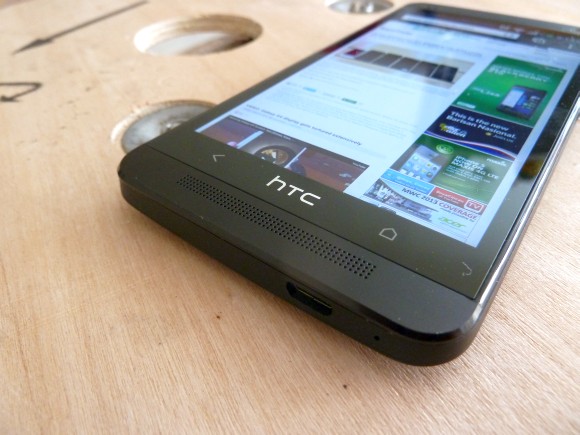
The HTC One comes with a simplified design where there’s only 2 buttons at the front – Home and Back. The other additional functions such as viewing current running apps is accessed by double tapping on the home button, while Google Now is triggered by pressing and holding the home button.

From the looks of it, looks like there’s nothing much can be done. However discovering that there’s a digitiser behind the logo, the folks at XDA Developer started cracking to make this hidden button functional. They had come out with 2 kernals – Home button to wake & Logo to Sleep and Home button to wake & Logo for Menu.

For those having the HTC One and feeling a bit adventurous, you can find out more about these custom kernels here. Note that these are unofficial mods, so do it at your own risk.

Watch the video of the HTC One’s functional logo button demo after the break.

[ SOURCE ]

Tags: HTCHTC OneHTC One 3rd ButtonHTC One Custom KernelHTC One HackHTC One LogoHTC One Logo ButtonHTC One MalaysiaHTC One Menu button
soyacincau

soyacincau

POPULAR

HTC One’s logo as the 3rd capacitive button made possible with custom kernel

April 24, 2013

F1 Bahrain GP in Malaysia 2026: Ticket sales now open, from RM200 for Malaysians

August 13, 2026

Why Tune Talk Launched Epik+ Family Safe

July 31, 2026
Photo by Formula 1 official website

F1 Sepang 2026: Leaked MyKad ticket prices start from RM200 for three-day access

August 12, 2026

U Mobile leads in 5G quality, coverage and experience before leaving DNB, according to Opensignal

August 10, 2026

Google Pixel 11, Pixel 11 Pro, Pixel 11 Pro Fold and Pixel Watch 5 Malaysia Pricing

August 12, 2026

Copyright © 2026 · SoyaCincau.com
Mind Blow Sdn Bhd (1076827-P)

  • ADVERTISE
  • DISCLAIMER

Copyright © 2026 · SoyaCincau.com – Mind Blow Sdn Bhd (1076827-P)

  • ADVERTISE
  • DISCLAIMER