• 中文版
  • BM
  • News
  • Deals
  • Reviews
    • First Impressions
    • Hands-on
    • Comparisons
  • Tech
    • Mobile
    • Computers
    • Cameras
    • Wearables
    • Audio
    • Drones
  • Telco
    • Celcom
    • Digi
    • Maxis
    • Time
    • Tune Talk
    • U Mobile
    • Unifi
    • Yes
  • Cars
  • Contribute
  • Jobs
Menu
  • 中文版
  • BM
  • News
  • Deals
  • Reviews
    • First Impressions
    • Hands-on
    • Comparisons
  • Tech
    • Mobile
    • Computers
    • Cameras
    • Wearables
    • Audio
    • Drones
  • Telco
    • Celcom
    • Digi
    • Maxis
    • Time
    • Tune Talk
    • U Mobile
    • Unifi
    • Yes
  • Cars
  • Contribute
  • Jobs
Search
  • Tech
    • News
    • Mobile
    • Computers
    • Cameras
    • Wearables
    • Audio
    • Drones
  • Telco
    • Celcom
    • Digi
    • Maxis
    • Time
    • U Mobile
    • Unifi
    • Yes
  • Reviews
    • First Impressions
    • Hands-on
    • Comparisons
  • Buyer’s Guide
  • Opinions
  • Digital Life
  • Video
  • Deals
  • How-To
  • Cars
  • Bahasa Melayu
  • EV
  • Contribute
  • Advertise
Menu
  • Tech
    • News
    • Mobile
    • Computers
    • Cameras
    • Wearables
    • Audio
    • Drones
  • Telco
    • Celcom
    • Digi
    • Maxis
    • Time
    • U Mobile
    • Unifi
    • Yes
  • Reviews
    • First Impressions
    • Hands-on
    • Comparisons
  • Buyer’s Guide
  • Opinions
  • Digital Life
  • Video
  • Deals
  • How-To
  • Cars
  • Bahasa Melayu
  • EV
  • Contribute
  • Advertise
Search
Close
Home Digital Life

TNG eWallet QR payments now available for Huawei smartwatch. Here’s how to activate

  • BY Alexander Wong
  • 15 January 2025
  • 5:15 pm
  • Comment
Share on FacebookShare on Twitter

If you’re using a compatible Huawei smartwatch, you can now make Touch ‘n Go eWallet payments directly from your wrist. Huawei Malaysia has announced that the TNG eWallet QR Pay feature is now supported on the latest Huawei smartwatches and users can now link their eWallet account to their wearable devices.

TNG eWallet app shows QR code on the display
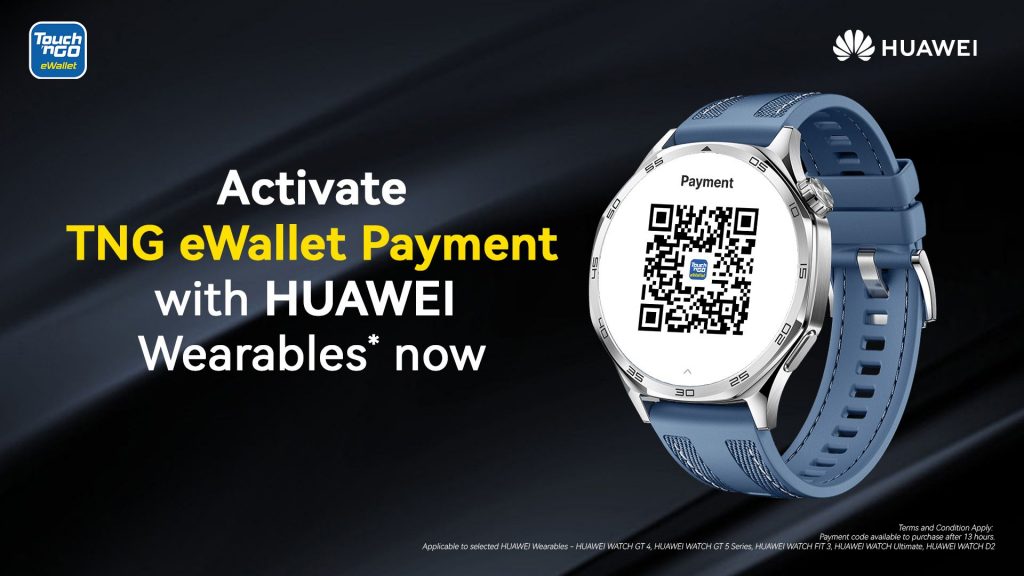
With the TNG eWallet payment feature, Huawei smartwatch users can enjoy convenient QR payments via the TNG eWallet app on the smartwatch.

Since the app only shows the QR code, take note that this feature only works for the “Merchant Scan User” method where the shop has a scanner to read your QR code.

For merchants that only accepts “User Scan Merchant” method where they require users to scan their QR codes (TNG eWallet or DuitNow QR) instead, you’ll need to use your smartphone to make a payment.

At the moment, this TNG eWallet QR feature is compatible with the following Huawei wearable devices:

  • Huawei Watch GT 4
  • Huawei Watch GT 5 series
  • Huawei Watch Fit 3
  • Huawei Watch Ultimate
  • Huawei Watch D2

How to activate TNG eWallet QR on your Huawei wearable device
Before you get started, ensure that you’ve updated your wearable to the latest firmware via the Huawei Health app on your iOS or Android device. Next, go to App Gallery on your Huawei Wearable and then click on search and search for “tng” to download and install the eWallet app on your smartwatch.

Next, open Settings in your Huawei wearable and then go to Payment. You should see TNG eWallet and you can tap on Activate to proceed. You will be required to enter a 6-digit PIN to protect your TNG eWallet account on your wearable device.

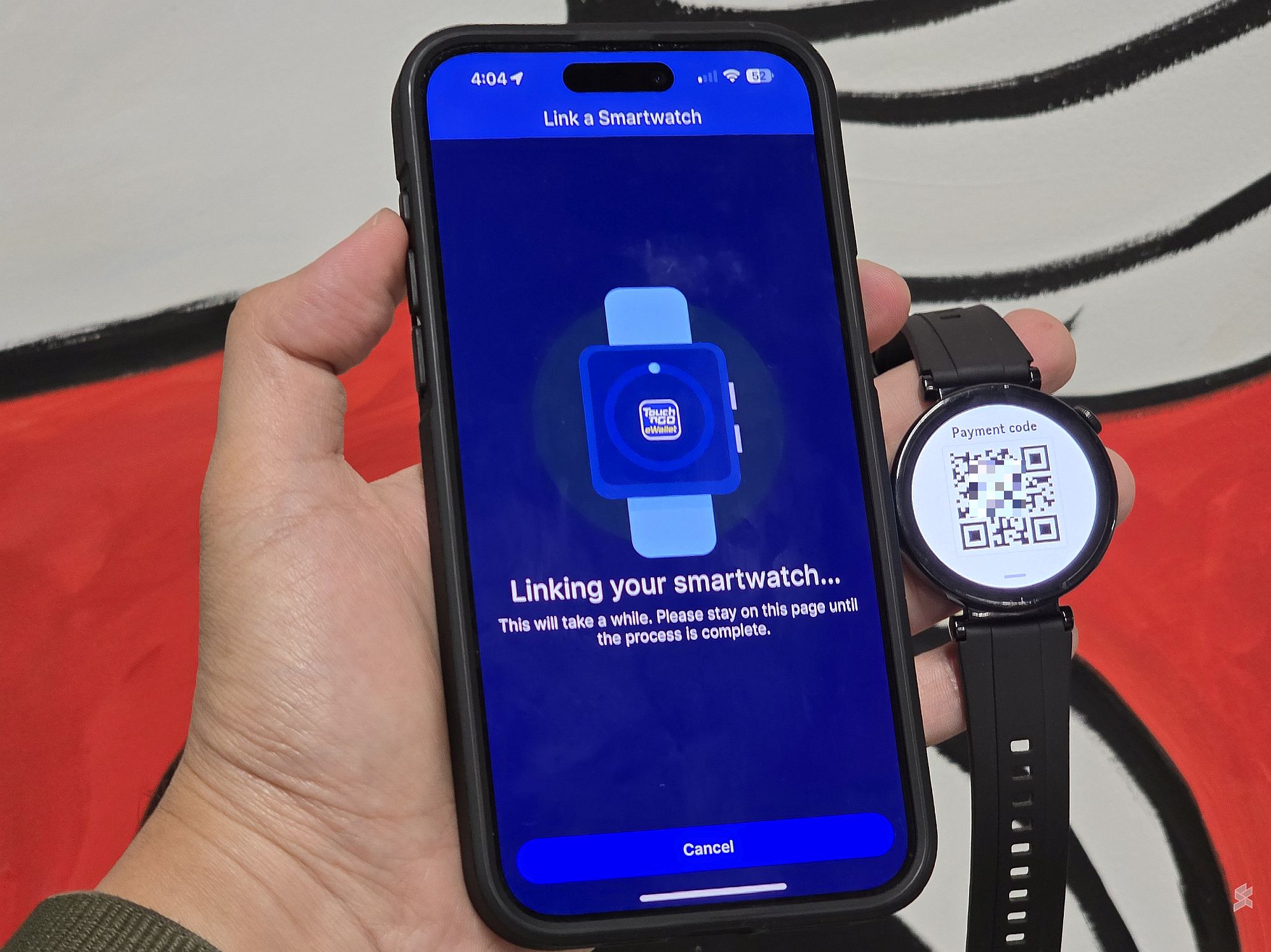
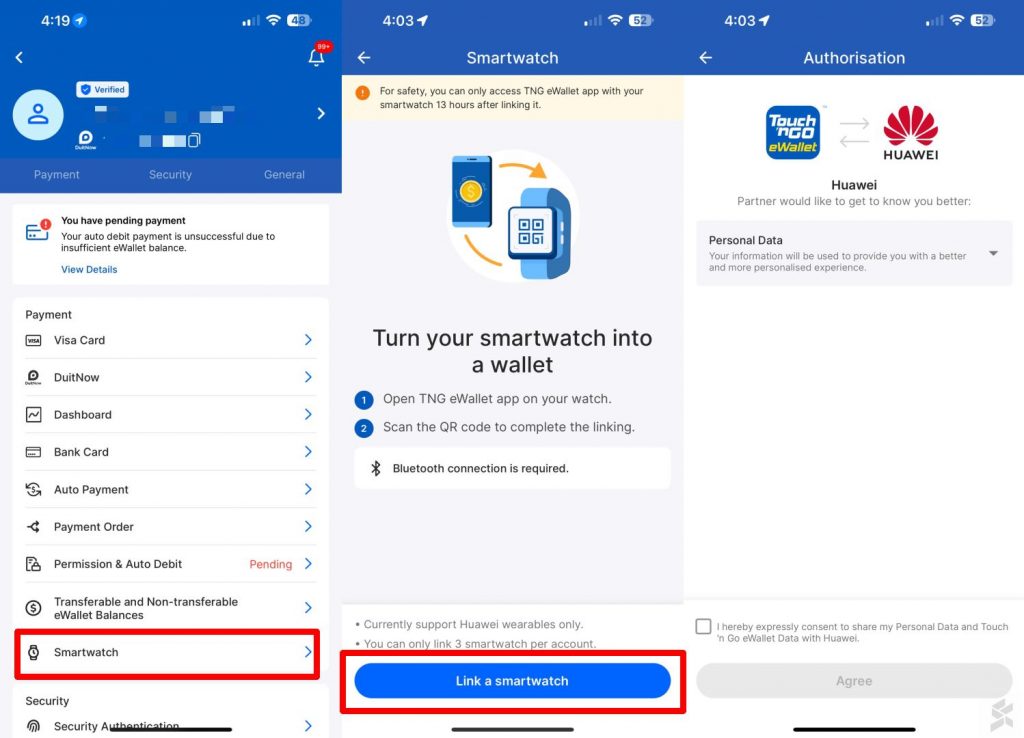
Once the 6-digit PIN is set, you can proceed to link your wearable device to your TNG eWallet account that’s installed on your smartphone. On the wearable device, launch the TNG eWallet app and tap on show QR to display the linking QR code.

Meanwhile, on your smartphone, launch the TNG eWallet app, go to Settings and then tap on “Smartwatch’ as shown above. Follow the instructions to start the linking process and you’ll be asked to scan the QR code on your smartwatch to complete the linking process.

To verify that it’s you, the TNG eWallet app will require a 6-digit PIN verification and a facial verification process.
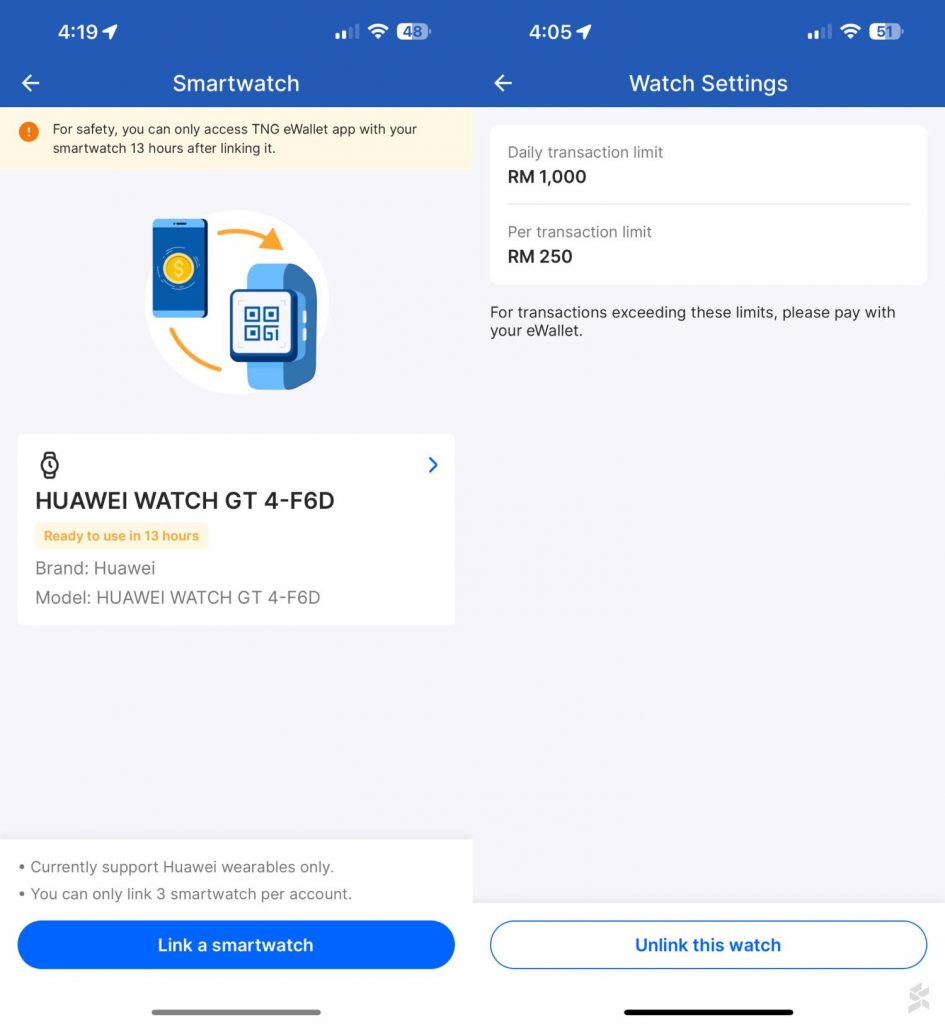
Once linking is completed, there’s a 13- hour cooling off period before you can start using your Huawei wearable for QR payments. Each TNG eWallet account can be linked with up to 3 smartwatch. Do also take note that TNG eWallet transactions via your wearable is limited up to RM250 per transaction and there’s a maximum daily limit of RM1,000.

To make a payment at a supported merchant, just launch the TNG eWallet app on your wearable device and show the QR code to the merchant.

For more information, you can check out the official FAQ for Huawei wearable devices on the TNG eWallet portal.

Tags: ewalletHuaweiHuawei Watch D2Huawei Watch FIt 3Huawei Watch GT 4Huawei Watch GT 5Huawei Watch GT 5 ProHuawei Watch GT4Huawei Watch GT5Huawei Watch UltimateTNG eWalletTNG eWallet QRTouch n go eWallet
Alexander Wong

Alexander Wong

POPULAR

Upgraded To a New Phone? Cool. But When Was the Last Time you Upgraded your Shaver?

November 10, 2025

TNG eWallet QR payments now available for Huawei smartwatch. Here’s how to activate

January 15, 2025

5 Reasons Every Home Should Have a Smart Security System

November 11, 2025

Solar ATAP: The new solar programme for consumers will only start in 2026

December 2, 2025
Perodua QV-E EV

Perodua QV-E is now official: Electric sportback with 201hp, 445km NEDC range, priced at RM80k not inclusive of battery subscription

December 1, 2025

GrabRewards is now GrabCoins: Now with even more ways to earn and save

November 17, 2025

Copyright © 2025 · SoyaCincau.com
Mind Blow Sdn Bhd (1076827-P)

  • ADVERTISE
  • DISCLAIMER

Copyright © 2025 · SoyaCincau.com – Mind Blow Sdn Bhd (1076827-P)

  • ADVERTISE
  • DISCLAIMER