• 中文版
  • BM
  • News
  • Deals
  • Reviews
    • First Impressions
    • Hands-on
    • Comparisons
  • Tech
    • Mobile
    • Computers
    • Cameras
    • Wearables
    • Audio
    • Drones
  • Telco
    • Celcom
    • Digi
    • Maxis
    • Time
    • Tune Talk
    • U Mobile
    • Unifi
    • Yes
  • Cars
  • Contribute
  • Jobs
Menu
  • 中文版
  • BM
  • News
  • Deals
  • Reviews
    • First Impressions
    • Hands-on
    • Comparisons
  • Tech
    • Mobile
    • Computers
    • Cameras
    • Wearables
    • Audio
    • Drones
  • Telco
    • Celcom
    • Digi
    • Maxis
    • Time
    • Tune Talk
    • U Mobile
    • Unifi
    • Yes
  • Cars
  • Contribute
  • Jobs
Search
  • Tech
    • News
    • Mobile
    • Computers
    • Cameras
    • Wearables
    • Audio
    • Drones
  • Telco
    • Celcom
    • Digi
    • Maxis
    • Time
    • U Mobile
    • Unifi
    • Yes
  • Reviews
    • First Impressions
    • Hands-on
    • Comparisons
  • Buyer’s Guide
  • Opinions
  • Digital Life
  • Video
  • Deals
  • How-To
  • Cars
  • Bahasa Melayu
  • EV
  • Contribute
  • Advertise
Menu
  • Tech
    • News
    • Mobile
    • Computers
    • Cameras
    • Wearables
    • Audio
    • Drones
  • Telco
    • Celcom
    • Digi
    • Maxis
    • Time
    • U Mobile
    • Unifi
    • Yes
  • Reviews
    • First Impressions
    • Hands-on
    • Comparisons
  • Buyer’s Guide
  • Opinions
  • Digital Life
  • Video
  • Deals
  • How-To
  • Cars
  • Bahasa Melayu
  • EV
  • Contribute
  • Advertise
Search
Close
Home Digital Life Apps

How to use Touch ‘n Go eWallet in Japan?

  • BY Alexander Wong
  • 28 March 2024
  • 6:25 pm
  • Comment
Share on FacebookShare on Twitter

Touch ‘n Go eWallet (TNG eWallet) is now accepted by 2 million merchants in Japan following the expansion of Alipay+’s footprint in the country. If you’re a Malaysian visiting Japan, you can enjoy a seamless cashless experience at major retail chains, convenience stores and small merchants with your TNG eWallet account.

According to Ant International, Alipay+ has enabled crossborder payments allowing merchants in Japan to accept payments from 16 eWallets and banking apps from 10 markets. Alipay+ coverage is now wider thanks to its integration with PayPay, a major mobile payment network in Japan.
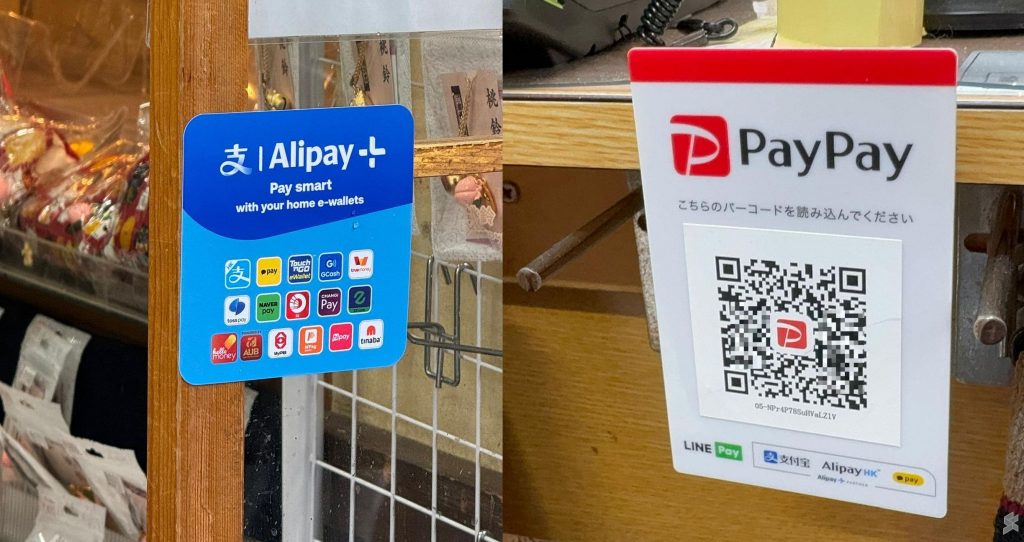
TNG eWallet is now accepted by 2 million merchants in Japan. Look out for Alipay+ and PayPay signs.

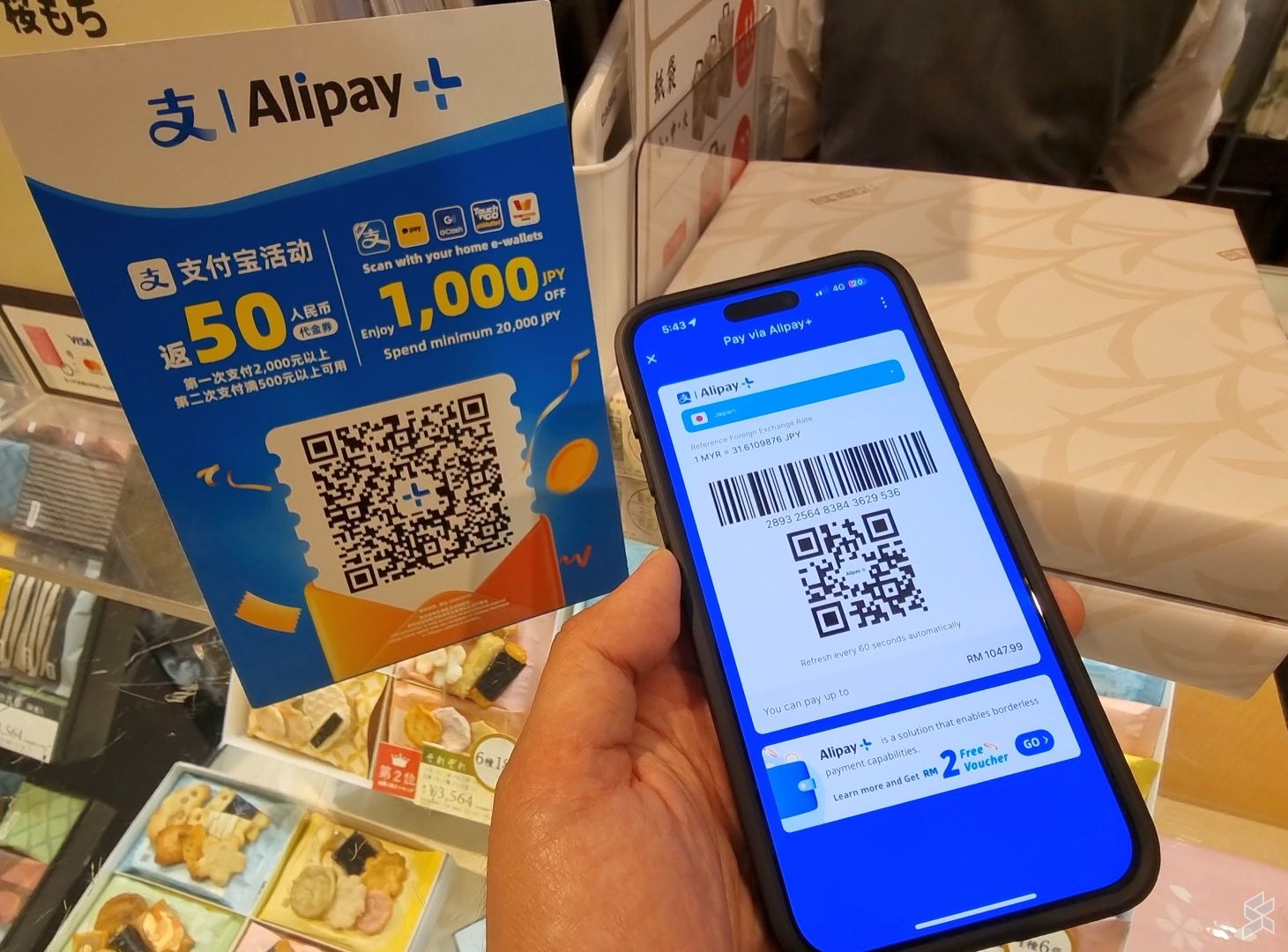
Leveraging the Alipay+ crossborder payment network, the experience of using TNG eWallet in Japan is quite similar to mainland China. Just look out for merchants with the Alipay+ sign or PayPay QR code.

TNG eWallet in Japan: Merchant scan user
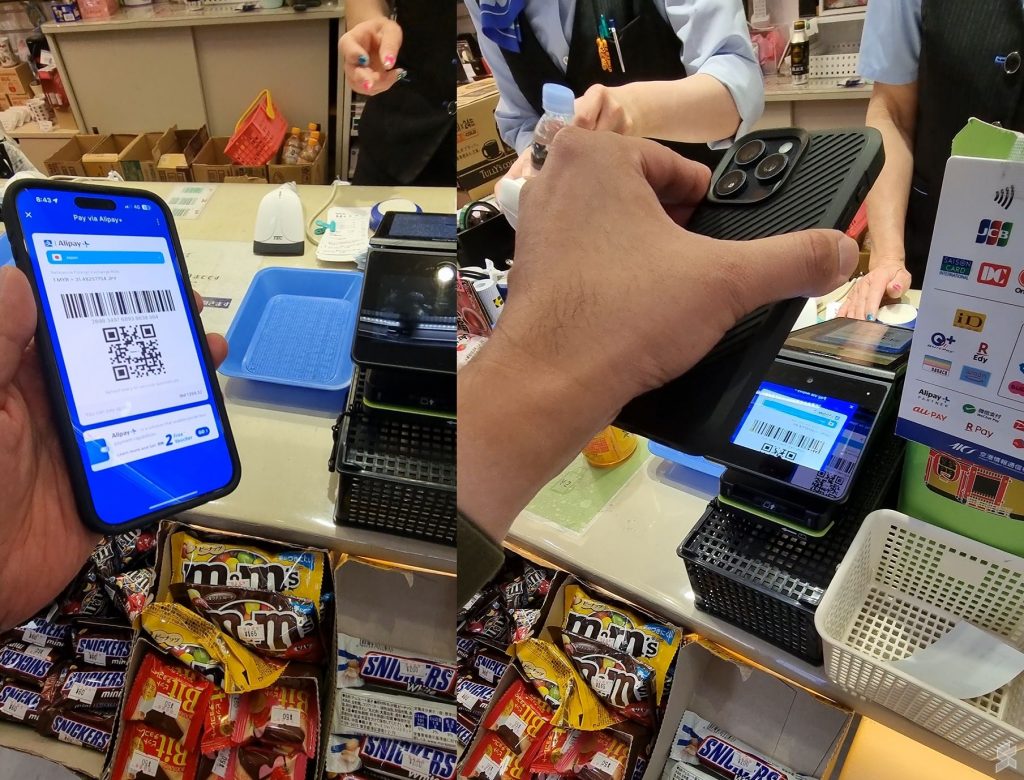
Just show your Alipay+ QR code in the TNG eWallet to the merchant

The majority of merchants in Japan including department stores and convenience stores in Japan are using the Merchant Scan User method. Here’s how to use your TNG eWallet at these merchants.

  1. Inform the cashier you’re using Alipay+
  2. Launch the TNG eWallet app
  3. Tap on Pay
  4. The Alipay+ QR and barcode will be displayed automatically together with the current foreign exchange rate
  5. Show the Alipay+ QR and barcode to the cashier or the scanner
  6. Once the transaction is completed, you will see a confirmation page containing the Ringgit Malaysia amount and foreign exchange rate.

TNG eWallet in Japan: User scans PayPay QR code
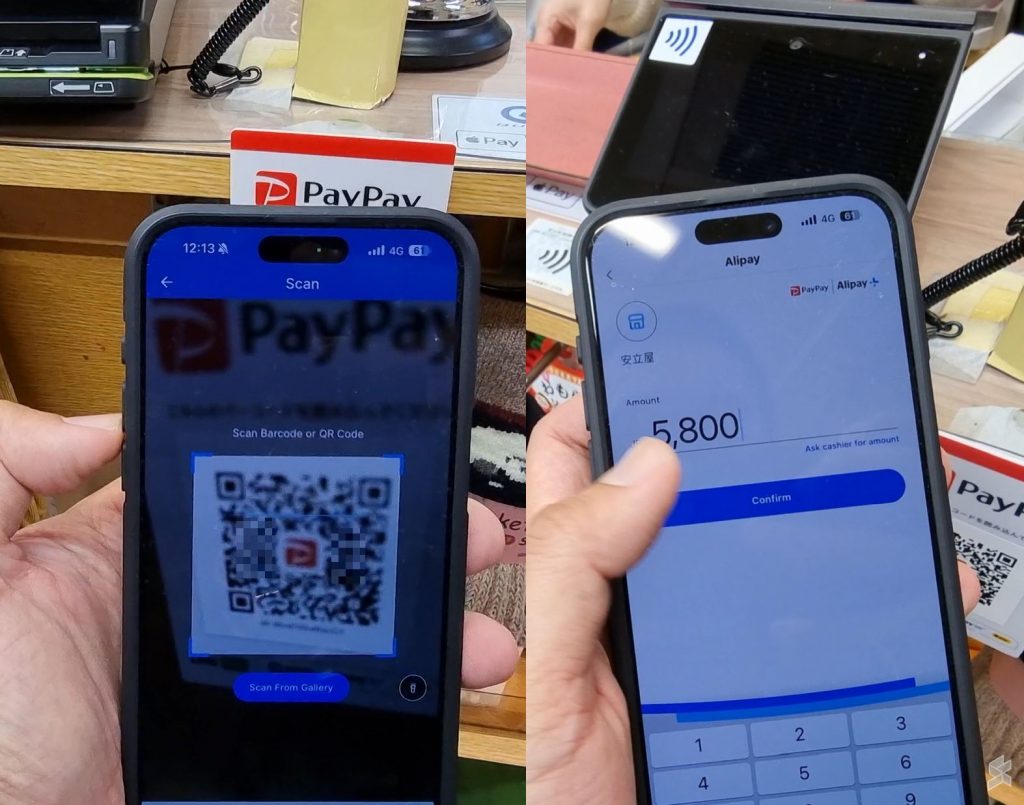
Scan PayPay QR code using TNG eWallet and then enter the amount in local currency

For merchants in Japan that use PayPay, you’ll have to scan the Merchant’s QR code instead. The experience is similar to scanning a DuitNow QR code in Malaysia. Here’s how to pay using TNG eWallet at a PayPay merchant in Japan:

  1. Inform the cashier you’re using Alipay+
  2. Launch the TNG eWallet app
  3. Tap on Scan
  4. Scan the PayPay QR code at the counter
  5. Enter the transaction amount in the local currency (JPY), then tap Confirm
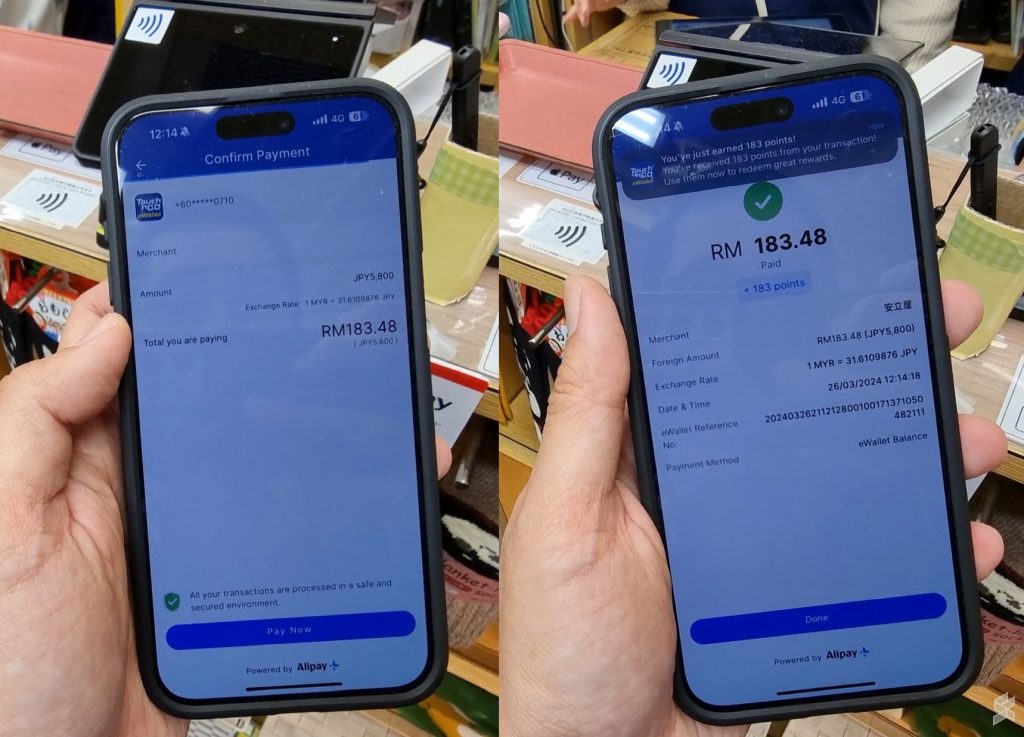
  6. A Confirm Payment page will appear which displays the transaction amount in both currencies (JPY and MYR), then tap Pay Now.
  7. Enter your TNG eWallet 6-digit PIN to authorise payment
  8. Once the transaction is completed, you will see a confirmation page containing the Ringgit Malaysia amount and foreign exchange rate.
Extra rewards under A+ Rewards
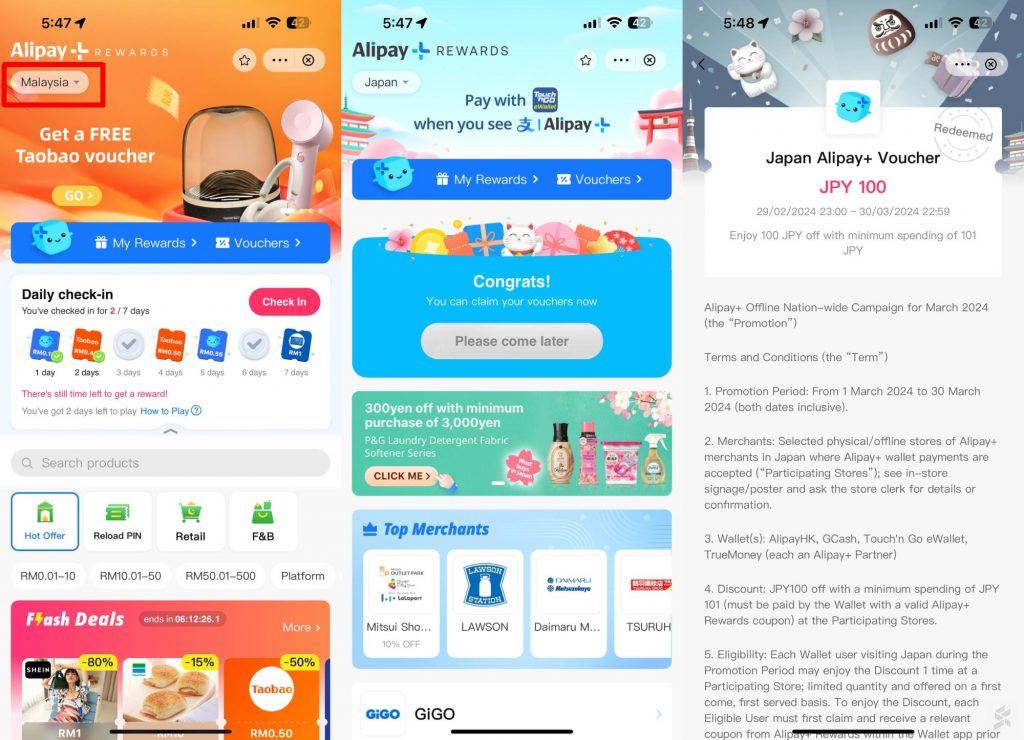
Collected vouchers from A+ Rewards > Japan section

Touch ‘n Go eWallet and Alipay+ are offering extra rewards and discounts via Alipay+ Rewards. For first-time users in Japan, Alipay+ is offering JPY 100 with a minimum spending of JPY 101. You can discover and collect deals for each supported country with the following steps:

  1. Launch the TNG eWallet app
  2. Tap on A+ Rewards
  3. From the top left corner, change the country from Malaysia to Japan
  4. Browse and download vouchers
  5. The vouchers will be applied automatically when you make an eligible payment.
Tags: alipayAliPay PlusAnt GroupewalletJapanPayPayPayPay QRTNG eWalletTokyoTouch n go eWallet
Alexander Wong

Alexander Wong

POPULAR

Upgraded To a New Phone? Cool. But When Was the Last Time you Upgraded your Shaver?

November 10, 2025

How to use Touch ‘n Go eWallet in Japan?

March 28, 2024

5 Reasons Every Home Should Have a Smart Security System

November 11, 2025

Solar ATAP: The new solar programme for consumers will only start in 2026

December 2, 2025
Perodua QV-E EV

Perodua QV-E is now official: Electric sportback with 201hp, 445km NEDC range, priced at RM80k not inclusive of battery subscription

December 1, 2025

GrabRewards is now GrabCoins: Now with even more ways to earn and save

November 17, 2025

Copyright © 2025 · SoyaCincau.com
Mind Blow Sdn Bhd (1076827-P)

  • ADVERTISE
  • DISCLAIMER

Copyright © 2025 · SoyaCincau.com – Mind Blow Sdn Bhd (1076827-P)

  • ADVERTISE
  • DISCLAIMER