• 中文版
  • BM
  • News
  • Deals
  • Reviews
    • First Impressions
    • Hands-on
    • Comparisons
  • Tech
    • Mobile
    • Computers
    • Cameras
    • Wearables
    • Audio
    • Drones
  • Telco
    • Celcom
    • Digi
    • Maxis
    • Time
    • Tune Talk
    • U Mobile
    • Unifi
    • Yes
  • Cars
  • Contribute
  • Jobs
Menu
  • 中文版
  • BM
  • News
  • Deals
  • Reviews
    • First Impressions
    • Hands-on
    • Comparisons
  • Tech
    • Mobile
    • Computers
    • Cameras
    • Wearables
    • Audio
    • Drones
  • Telco
    • Celcom
    • Digi
    • Maxis
    • Time
    • Tune Talk
    • U Mobile
    • Unifi
    • Yes
  • Cars
  • Contribute
  • Jobs
Search
  • Tech
    • News
    • Mobile
    • Computers
    • Cameras
    • Wearables
    • Audio
    • Drones
  • Telco
    • Celcom
    • Digi
    • Maxis
    • Time
    • U Mobile
    • Unifi
    • Yes
  • Reviews
    • First Impressions
    • Hands-on
    • Comparisons
  • Buyer’s Guide
  • Opinions
  • Digital Life
  • Video
  • Deals
  • How-To
  • Cars
  • Bahasa Melayu
  • EV
  • Contribute
  • Advertise
Menu
  • Tech
    • News
    • Mobile
    • Computers
    • Cameras
    • Wearables
    • Audio
    • Drones
  • Telco
    • Celcom
    • Digi
    • Maxis
    • Time
    • U Mobile
    • Unifi
    • Yes
  • Reviews
    • First Impressions
    • Hands-on
    • Comparisons
  • Buyer’s Guide
  • Opinions
  • Digital Life
  • Video
  • Deals
  • How-To
  • Cars
  • Bahasa Melayu
  • EV
  • Contribute
  • Advertise
Search
Close
Home Digital Life Apps

Google is (finally) making Chrome use less battery and less memory

  • BY Raymond Saw
  • 9 December 2022
  • 6:32 pm
  • Comment
Share on FacebookShare on Twitter

It’s been a running joke on the internet for years now that Google Chrome uses an incredible amount of memory on your computer. No matter how much RAM you have on your device, Chrome somehow always seems to manage eating up more and more of it.

Well, Google is finally taking steps to rectifying this issue with the new Memory Saver feature. Memory Save mode basically frees up the memory used from tabs you aren’t actively on, ensuring that you still have a smooth experience on Chrome. This is perhaps most beneficial when you’re using Chrome together with another resource intensive program such as games or content editing software.
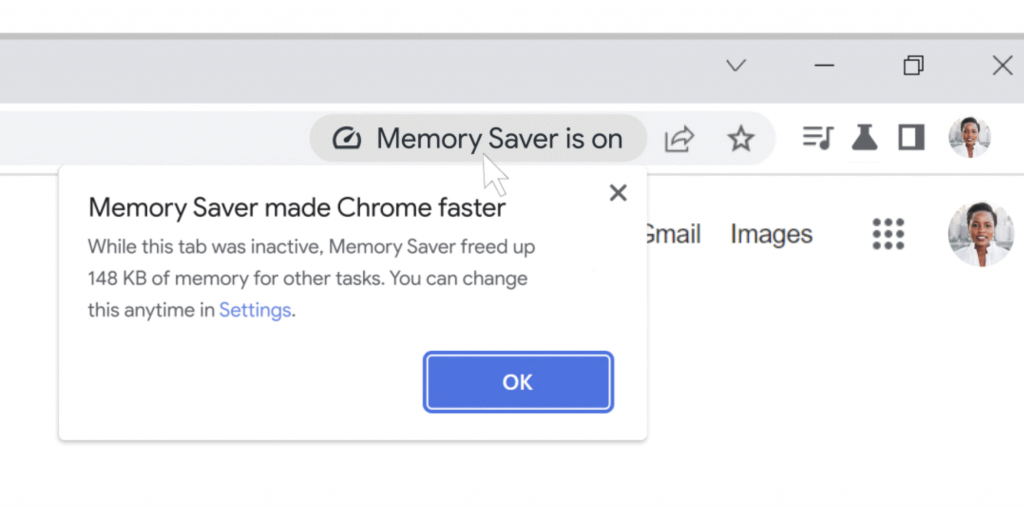
When you then revisit these inactive tabs, Chrome will reload these tabs back in, similar to the current Chrome experience you might have if you have a lot of tabs open and your device doesn’t have a lot of RAM to begin with. However, with Memory Saver, Google says that Chrome can now use up to 10GB less memory when you’re browsing online.
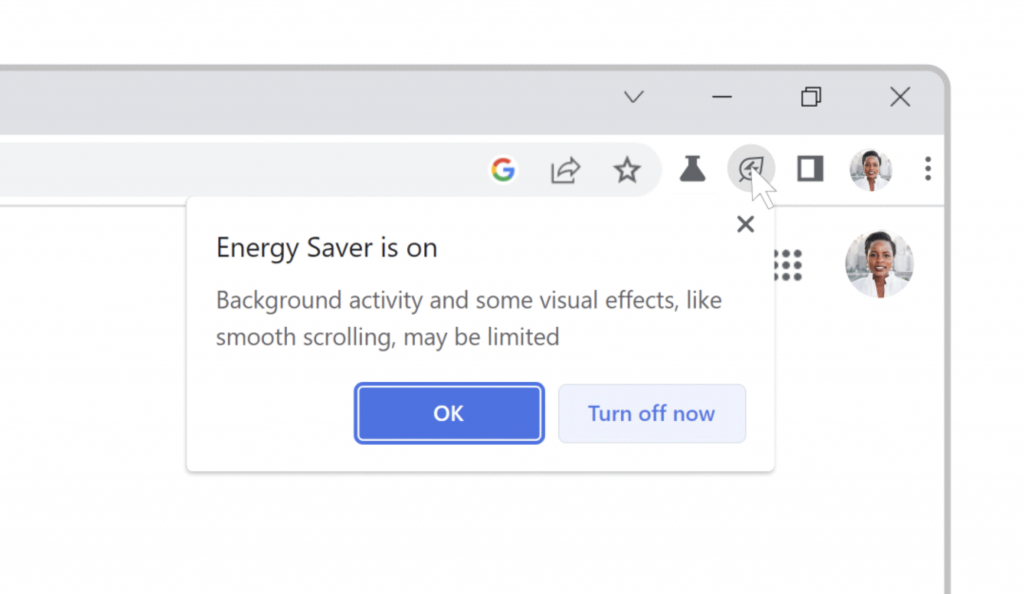
On top of that, there’s going to be a new Energy Saver mode too. With Energy Saver, Chrome will automatically start saving your laptop’s battery life by reducing background activity and limiting visual effects on websites with animations whenever your device battery hits 20%.
These new features will be rolling out onto the next version of Google Chrome for Windows, MacOS and ChromeOS in the coming weeks. However, you won’t be forced into using it; if you prefer the best performance all the time, you can opt to turn off these two features in the Chrome settings. You can also choose to turn on Memory Saver but tell Chrome to not kill your most important websites even if it’s in the background.

[ SOURCE ]

Tags: googleGoogle Chrome
Raymond Saw

Raymond Saw

POPULAR

Image by Gerd Altmann from Pixabay.

AEON Bank’s Personal Financing-i (PF-i): Flexible Funds to Help Ease Budget Constraints

December 24, 2025
Home Rooftop Solar System with EV Charger

Solar ATAP Guidelines are here: Offset is limited to Energy Charge, no more credit roll over

December 30, 2025

SoyaCincau Awards 2025: Best Telcos of the Year

January 2, 2026

SoyaCincau Awards 2025: The Best Phones of the Year

December 31, 2025

AEON Bank Turns One: 8x AEON Points, Cashback, Prizes and New Debit Card-i

May 28, 2025

Google is (finally) making Chrome use less battery and less memory

December 9, 2022

Copyright © 2025 · SoyaCincau.com
Mind Blow Sdn Bhd (1076827-P)

  • ADVERTISE
  • DISCLAIMER

Copyright © 2025 · SoyaCincau.com – Mind Blow Sdn Bhd (1076827-P)

  • ADVERTISE
  • DISCLAIMER