• 中文版
  • BM
  • News
  • Deals
  • Reviews
    • First Impressions
    • Hands-on
    • Comparisons
  • Tech
    • Mobile
    • Computers
    • Cameras
    • Wearables
    • Audio
    • Drones
  • Telco
    • Celcom
    • Digi
    • Maxis
    • Time
    • Tune Talk
    • U Mobile
    • Unifi
    • Yes
  • Cars
  • Contribute
  • Jobs
Menu
  • 中文版
  • BM
  • News
  • Deals
  • Reviews
    • First Impressions
    • Hands-on
    • Comparisons
  • Tech
    • Mobile
    • Computers
    • Cameras
    • Wearables
    • Audio
    • Drones
  • Telco
    • Celcom
    • Digi
    • Maxis
    • Time
    • Tune Talk
    • U Mobile
    • Unifi
    • Yes
  • Cars
  • Contribute
  • Jobs
Search
  • Tech
    • News
    • Mobile
    • Computers
    • Cameras
    • Wearables
    • Audio
    • Drones
  • Telco
    • Celcom
    • Digi
    • Maxis
    • Time
    • U Mobile
    • Unifi
    • Yes
  • Reviews
    • First Impressions
    • Hands-on
    • Comparisons
  • Buyer’s Guide
  • Opinions
  • Digital Life
  • Video
  • Deals
  • How-To
  • Cars
  • Bahasa Melayu
  • EV
  • Contribute
  • Advertise
Menu
  • Tech
    • News
    • Mobile
    • Computers
    • Cameras
    • Wearables
    • Audio
    • Drones
  • Telco
    • Celcom
    • Digi
    • Maxis
    • Time
    • U Mobile
    • Unifi
    • Yes
  • Reviews
    • First Impressions
    • Hands-on
    • Comparisons
  • Buyer’s Guide
  • Opinions
  • Digital Life
  • Video
  • Deals
  • How-To
  • Cars
  • Bahasa Melayu
  • EV
  • Contribute
  • Advertise
Search
Close
Home Digital Life Apps

WhatsApp finally improves its desktop experience, but only on Windows

  • BY Raymond Saw
  • 17 August 2022
  • 2:28 pm
  • Comment
Share on FacebookShare on Twitter

Almost anyone and everyone using WhatsApp has probably heard of its desktop ‘app’, which lets you send and receive texts by syncing your phone’s WhatsApp with the WhatsApp for desktop app. Alternatively, you could also use WhatsApp Web via a browser that also needs you to connect your phone. A new update from WhatsApp though brings a huge change to the former, evolving it from just a web-based desktop app to a full-fledged native app—but only on Windows for now.

As WhatsApp explains, shifting the WhatsApp desktop app from a web-based desktop app to a native one brings a host of advantages to the overall user experience. For one, it brings with it increased reliability and speed when texting your friends and family, while also coming with a fresh design that’s optimised for a desktop environment. The biggest change though is that you’ll still be able to continue and receive notifications and messages even when your phone is offline.
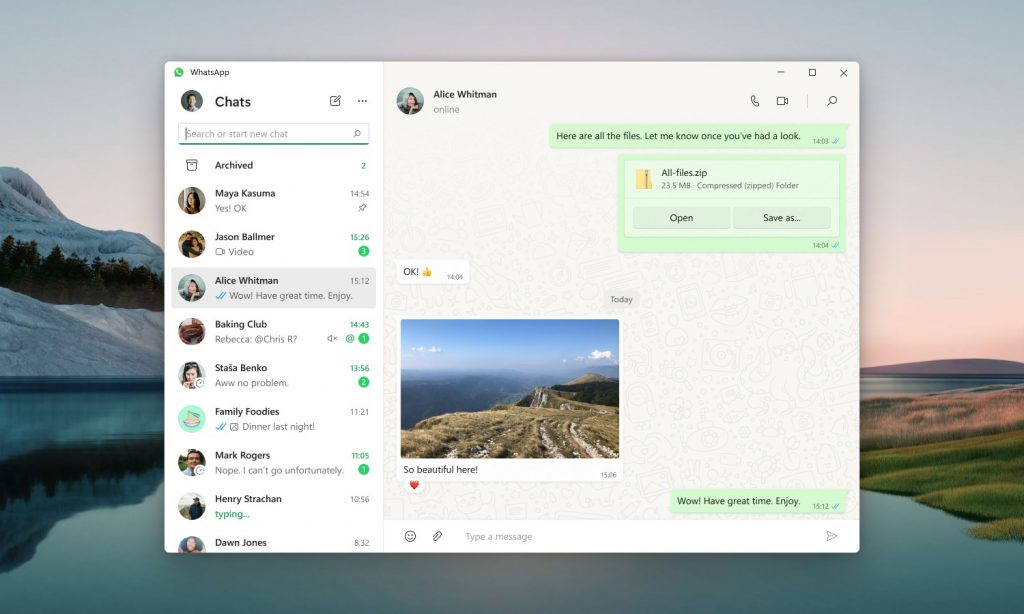
If you want to check out the new WhatsApp for desktop app, you can simply click here to head over to its product page on the Microsoft Windows store. Once you have it installed, you’ll still need to log in by scanning the QR code on it using your smartphone, but once that’s done you’ll be able to use it no problem, even when your phone is down. Do note though that if your phone hasn’t been used for over two weeks, all devices linked to that WhatsApp account will be logged out.

On top of that, you also won’t be able to clear or delete chats on your linked devices if your smartphone with WhatsApp on it is an iPhone. You won’t be able to view anyone’s live locations on linked devices either, nor can you send messages with link previews from WhatsApp Web. Texting someone using a very outdated version of WhatsApp on their phone is also unsupported by WhatsApp now.

Unfortunately for Mac users, the native WhatsApp app for MacOS is still in development. You can join their beta for early access to their native MacOS app, or simply continue to use either WhatsApp Web or their web-based WhatsApp for desktop app in the meantime.


[ SOURCE. VIA ]

Tags: Microsoft WindowsWhatsappWindows
Raymond Saw

Raymond Saw

POPULAR

Upgraded To a New Phone? Cool. But When Was the Last Time you Upgraded your Shaver?

November 10, 2025

5 Reasons Every Home Should Have a Smart Security System

November 11, 2025

Solar ATAP: The new solar programme for consumers will only start in 2026

December 2, 2025

WhatsApp finally improves its desktop experience, but only on Windows

August 17, 2022
Perodua QV-E EV

Perodua QV-E is now official: Electric sportback with 201hp, 445km NEDC range, priced at RM80k not inclusive of battery subscription

December 1, 2025

GrabRewards is now GrabCoins: Now with even more ways to earn and save

November 17, 2025

Copyright © 2025 · SoyaCincau.com
Mind Blow Sdn Bhd (1076827-P)

  • ADVERTISE
  • DISCLAIMER

Copyright © 2025 · SoyaCincau.com – Mind Blow Sdn Bhd (1076827-P)

  • ADVERTISE
  • DISCLAIMER