• 中文版
  • BM
  • News
  • Deals
  • Reviews
    • First Impressions
    • Hands-on
    • Comparisons
  • Tech
    • Mobile
    • Computers
    • Cameras
    • Wearables
    • Audio
    • Drones
  • Telco
    • Celcom
    • Digi
    • Maxis
    • Time
    • Tune Talk
    • U Mobile
    • Unifi
    • Yes
  • Cars
  • Contribute
  • Jobs
Menu
  • 中文版
  • BM
  • News
  • Deals
  • Reviews
    • First Impressions
    • Hands-on
    • Comparisons
  • Tech
    • Mobile
    • Computers
    • Cameras
    • Wearables
    • Audio
    • Drones
  • Telco
    • Celcom
    • Digi
    • Maxis
    • Time
    • Tune Talk
    • U Mobile
    • Unifi
    • Yes
  • Cars
  • Contribute
  • Jobs
Search
  • Tech
    • News
    • Mobile
    • Computers
    • Cameras
    • Wearables
    • Audio
    • Drones
  • Telco
    • Celcom
    • Digi
    • Maxis
    • Time
    • U Mobile
    • Unifi
    • Yes
  • Reviews
    • First Impressions
    • Hands-on
    • Comparisons
  • Buyer’s Guide
  • Opinions
  • Digital Life
  • Video
  • Deals
  • How-To
  • Cars
  • Bahasa Melayu
  • EV
  • Contribute
  • Advertise
Menu
  • Tech
    • News
    • Mobile
    • Computers
    • Cameras
    • Wearables
    • Audio
    • Drones
  • Telco
    • Celcom
    • Digi
    • Maxis
    • Time
    • U Mobile
    • Unifi
    • Yes
  • Reviews
    • First Impressions
    • Hands-on
    • Comparisons
  • Buyer’s Guide
  • Opinions
  • Digital Life
  • Video
  • Deals
  • How-To
  • Cars
  • Bahasa Melayu
  • EV
  • Contribute
  • Advertise
Search
Close
Home Digital Life

Microsoft Authenticator to double as a free password manager that works across multiple devices

  • BY Jinn Xiung
  • 18 December 2020
  • 6:47 pm
  • Comment
Share on FacebookShare on Twitter

Microsoft has announced it is developing a new password manager that sync and manages passwords from across multiple platforms including Microsoft’s Edge and Google’s Chrome browser as well as iOS and Android. Microsoft said in a blog entry that the password manager is being built into its Authenticator mobile app.

In case you haven’t heard, Microsoft Authenticator is a free app available for iOS and Android that is used for multi-factor authentication.

Once users make Authenticator their default autofill provider, the app will offer to save your username and password when you are prompted to enter them on a website or an app’s login page. According to the Redmond company, all synced passwords are protected with multi-factor authentication.
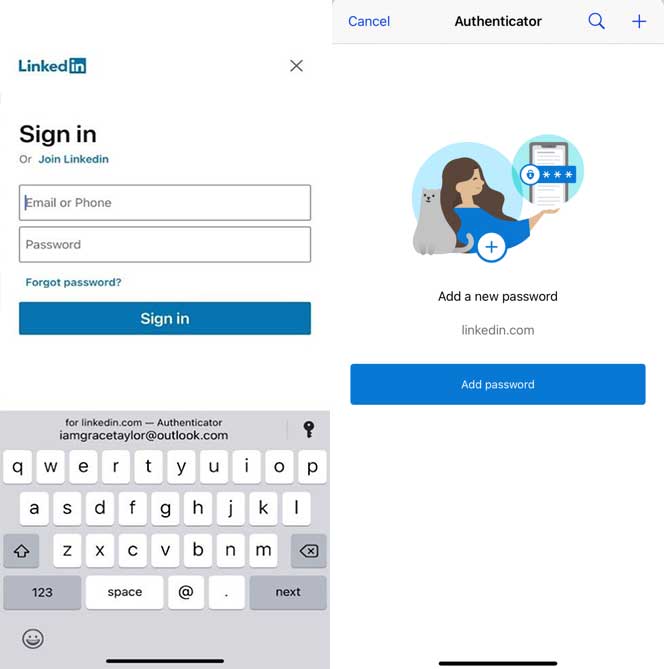
In addition, all the passwords are synced using your Microsoft account, making them available on your desktop when you browse using the Microsoft Edge browser or via their Google Chrome extension.

At the moment, it is not clear when the new feature will be offered to all Microsoft Authenticator users but it has been on trial since November. It is currently only available as part of a public preview, but it is expected to make its way to more users soon.

Microsoft said the autofill feature that is rolling out to Authenticator will be supported by devices running on iOS 12 and above or Android 6 and above. Currently, it only works for consumer Microsoft accounts and disabled for enterprise users.

The tech giant has warned users that no human-generated password can be unique enough to beat hackers. Hence, it is important to take all the steps needed to keep your information as safe as possible.

To learn more about the autofill feature in Authenticator, visit Microsoft’s FAQs page.

[SOURCE]

Related reading

Windows ARM64 on M1 Mac said to outperform Microsoft Surface Pro X
Here’s a sneak peek at the Microsoft Surface Pro 8 and Surface Laptop 4
Microsoft Surface Laptop Go is now available in Malaysia
Tags: microsoftMicrosoft Authenticatorpassword manager
Jinn Xiung

Jinn Xiung

POPULAR

Image by Gerd Altmann from Pixabay.

AEON Bank’s Personal Financing-i (PF-i): Flexible Funds to Help Ease Budget Constraints

December 24, 2025

AEON Bank Turns One: 8x AEON Points, Cashback, Prizes and New Debit Card-i

May 28, 2025
Home Rooftop Solar System with EV Charger

Solar ATAP Guidelines are here: Offset is limited to Energy Charge, no more credit roll over

December 30, 2025

Microsoft Authenticator to double as a free password manager that works across multiple devices

December 18, 2020

SoyaCincau Awards 2025: Best Telcos of the Year

January 2, 2026

SoyaCincau Awards 2025: The Best Phones of the Year

December 31, 2025

Copyright © 2025 · SoyaCincau.com
Mind Blow Sdn Bhd (1076827-P)

  • ADVERTISE
  • DISCLAIMER

Copyright © 2025 · SoyaCincau.com – Mind Blow Sdn Bhd (1076827-P)

  • ADVERTISE
  • DISCLAIMER