• 中文版
  • BM
  • News
  • Deals
  • Reviews
    • First Impressions
    • Hands-on
    • Comparisons
  • Tech
    • Mobile
    • Computers
    • Cameras
    • Wearables
    • Audio
    • Drones
  • Telco
    • Celcom
    • Digi
    • Maxis
    • Time
    • Tune Talk
    • U Mobile
    • Unifi
    • Yes
  • Cars
  • Contribute
  • Jobs
Menu
  • 中文版
  • BM
  • News
  • Deals
  • Reviews
    • First Impressions
    • Hands-on
    • Comparisons
  • Tech
    • Mobile
    • Computers
    • Cameras
    • Wearables
    • Audio
    • Drones
  • Telco
    • Celcom
    • Digi
    • Maxis
    • Time
    • Tune Talk
    • U Mobile
    • Unifi
    • Yes
  • Cars
  • Contribute
  • Jobs
Search
  • Tech
    • News
    • Mobile
    • Computers
    • Cameras
    • Wearables
    • Audio
    • Drones
  • Telco
    • Celcom
    • Digi
    • Maxis
    • Time
    • U Mobile
    • Unifi
    • Yes
  • Reviews
    • First Impressions
    • Hands-on
    • Comparisons
  • Buyer’s Guide
  • Opinions
  • Digital Life
  • Video
  • Deals
  • How-To
  • Cars
  • Bahasa Melayu
  • EV
  • Contribute
  • Advertise
Menu
  • Tech
    • News
    • Mobile
    • Computers
    • Cameras
    • Wearables
    • Audio
    • Drones
  • Telco
    • Celcom
    • Digi
    • Maxis
    • Time
    • U Mobile
    • Unifi
    • Yes
  • Reviews
    • First Impressions
    • Hands-on
    • Comparisons
  • Buyer’s Guide
  • Opinions
  • Digital Life
  • Video
  • Deals
  • How-To
  • Cars
  • Bahasa Melayu
  • EV
  • Contribute
  • Advertise
Search
Close
Home Digital Life

YouTube on Android will not let you tap on the video’s progress bar to skip, similar to iOS

  • BY Dzamira Dzafri
  • 20 October 2020
  • 2:32 pm
  • Comment
Share on FacebookShare on Twitter

If you’re an Android user, and you’ve gotten used to the YouTube app, you might have noticed a change in its video player progress bar. You can no longer just tap on the progress bar to skip to another part of a video—similar to iOS’s YouTube app.

Previously when users try to tap the progress bar to skip to another part of a video, it was easy to miss the fullscreen button. Users would instead hit the end of the seek bar just below it, making for a frustrating experience. 

However, this was only ever really a problem if you watch YouTube videos on portrait mode. Watching videos on landscape mode would mean that you aren’t likely to have the same problem.
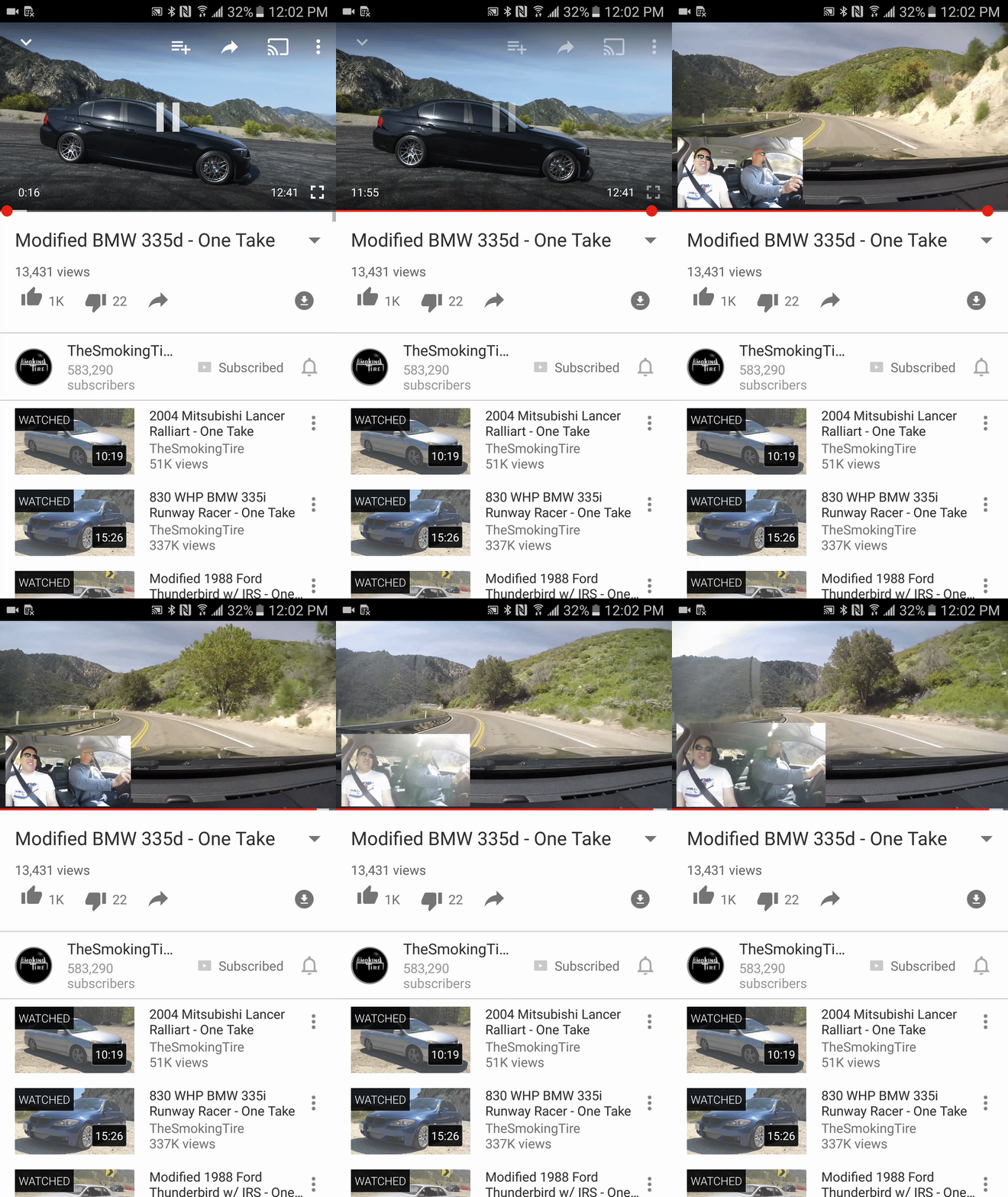
Source: Android Police

In the new update, Android users will only be allowed to hold and slide your finger to seek for your chosen part of a YouTube video. Besides being the default on the iOS app, this feature was previously seen on Android in 2018 before YouTube “fixed” it.
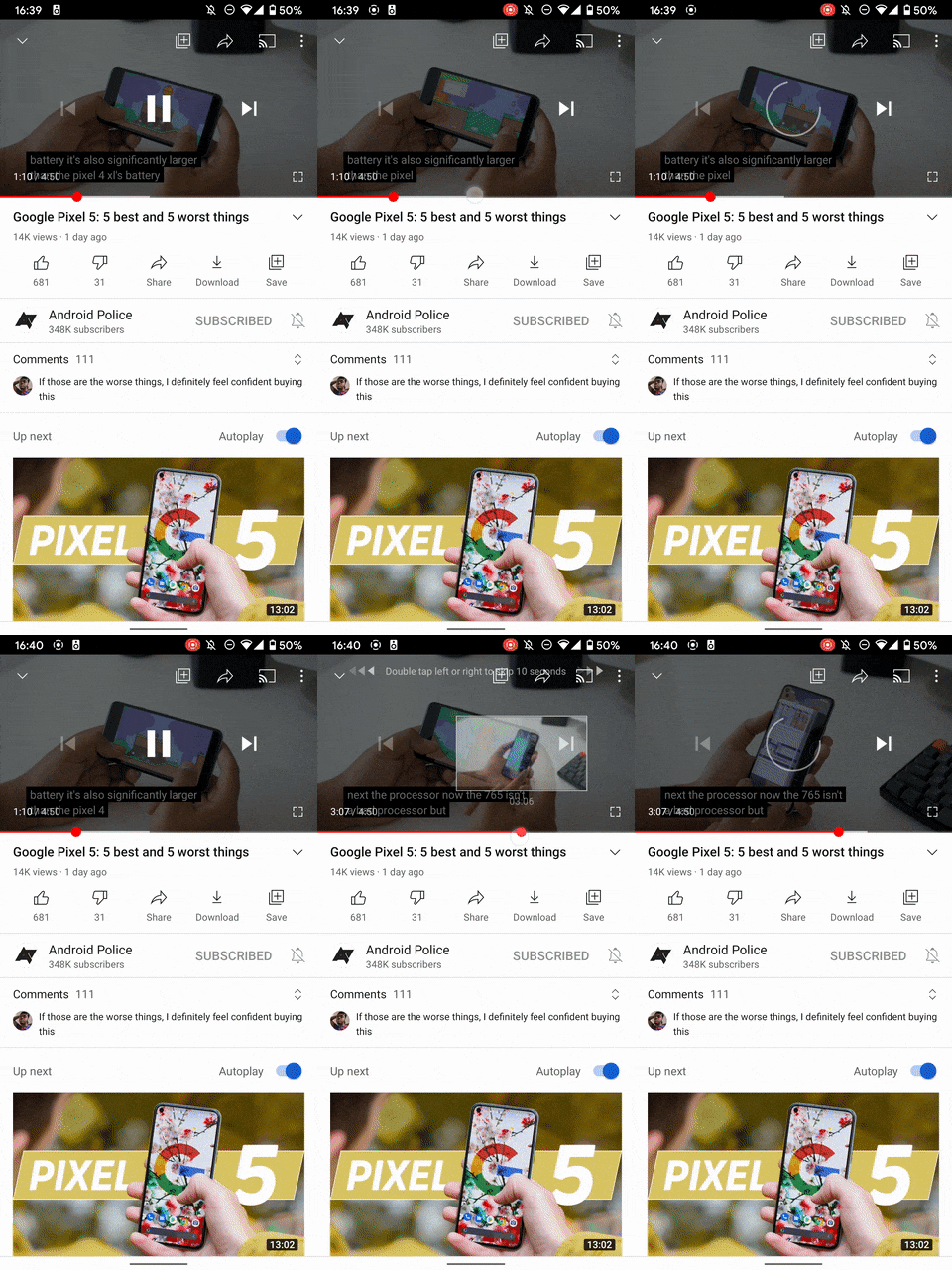
Source: Android Police

“We heard that a single tap to move the progress bar caused a lot of frustration with accidental taps. Now you can tap, hold, and slide the progress bar—the red dot will track your movement and once you lift your finger, the video will jump to that point in the video,” said Google Support, according to Product Expert rjlefty96 in a few Google Support threads.

The change, however, was sudden and wasn’t announced. Android users wrote that they were at first confused and thought that it was a bug. They also didn’t hold back on saying how much they hated the new update.

“This was driving me crazy! I restarted my phone, force closed YouTube, cleared the cache, etc. I could not figure out what was going on! Thank you for the clarification. Also…I hate it,” said user ki77erb in Android Police’s comments section.

“Google has to stop implementing user facing changes silently through server side updates, it’s stupid and confusing, every user facing change that could disrupt the way an app works should only come through an app update with a clear indication about the change, otherwise people will waste time understanding wtf is going on with the app or their devices,” wrote user Max.

If you really hate it, you can always try to revert to the pre-installed version of YouTube on your phone by uninstalling all updates. But if you do so, you would miss out on new features. Older versions could also stop functioning at some point.

[ SOURCE ]

Related reading

iOS 14: YouTube blocks picture-in-picture mode, but here’s a hack to make it work
Tags: AndroidiOSyoutubeYouTube for Android
Dzamira Dzafri

Dzamira Dzafri

POPULAR

Upgraded To a New Phone? Cool. But When Was the Last Time you Upgraded your Shaver?

November 10, 2025

5 Reasons Every Home Should Have a Smart Security System

November 11, 2025

Solar ATAP: The new solar programme for consumers will only start in 2026

December 2, 2025

YouTube on Android will not let you tap on the video’s progress bar to skip, similar to iOS

October 20, 2020
Perodua QV-E EV

Perodua QV-E is now official: Electric sportback with 201hp, 445km NEDC range, priced at RM80k not inclusive of battery subscription

December 1, 2025

GrabRewards is now GrabCoins: Now with even more ways to earn and save

November 17, 2025

Copyright © 2025 · SoyaCincau.com
Mind Blow Sdn Bhd (1076827-P)

  • ADVERTISE
  • DISCLAIMER

Copyright © 2025 · SoyaCincau.com – Mind Blow Sdn Bhd (1076827-P)

  • ADVERTISE
  • DISCLAIMER