• 中文版
  • BM
  • News
  • Deals
  • Reviews
    • First Impressions
    • Hands-on
    • Comparisons
  • Tech
    • Mobile
    • Computers
    • Cameras
    • Wearables
    • Audio
    • Drones
  • Telco
    • Celcom
    • Digi
    • Maxis
    • Time
    • Tune Talk
    • U Mobile
    • Unifi
    • Yes
  • Cars
  • Contribute
  • Jobs
Menu
  • 中文版
  • BM
  • News
  • Deals
  • Reviews
    • First Impressions
    • Hands-on
    • Comparisons
  • Tech
    • Mobile
    • Computers
    • Cameras
    • Wearables
    • Audio
    • Drones
  • Telco
    • Celcom
    • Digi
    • Maxis
    • Time
    • Tune Talk
    • U Mobile
    • Unifi
    • Yes
  • Cars
  • Contribute
  • Jobs
Search
  • Tech
    • News
    • Mobile
    • Computers
    • Cameras
    • Wearables
    • Audio
    • Drones
  • Telco
    • Celcom
    • Digi
    • Maxis
    • Time
    • U Mobile
    • Unifi
    • Yes
  • Reviews
    • First Impressions
    • Hands-on
    • Comparisons
  • Buyer’s Guide
  • Opinions
  • Digital Life
  • Video
  • Deals
  • How-To
  • Cars
  • Bahasa Melayu
  • EV
  • Contribute
  • Advertise
Menu
  • Tech
    • News
    • Mobile
    • Computers
    • Cameras
    • Wearables
    • Audio
    • Drones
  • Telco
    • Celcom
    • Digi
    • Maxis
    • Time
    • U Mobile
    • Unifi
    • Yes
  • Reviews
    • First Impressions
    • Hands-on
    • Comparisons
  • Buyer’s Guide
  • Opinions
  • Digital Life
  • Video
  • Deals
  • How-To
  • Cars
  • Bahasa Melayu
  • EV
  • Contribute
  • Advertise
Search
Close
Home News

GoPro action cameras can now be used as a webcam on Windows PCs too

  • BY Dzamira Dzafri
  • 28 August 2020
  • 6:46 pm
  • Comment
Share on FacebookShare on Twitter

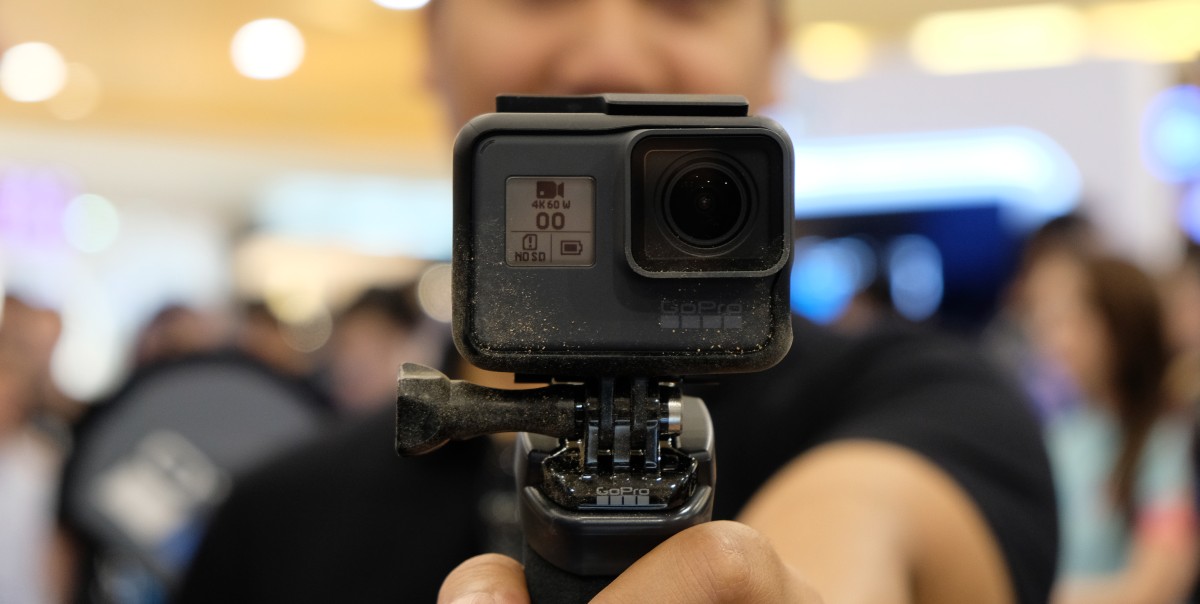
I’ve previously reported of how the GoPro could be used as a webcam, but only for MacOS users. However, GoPro will now let people on Windows PCs use GoPros as a webcam, but it’s only in beta for now.

As a webcam, the GoPro camera can give you better quality images of yourself for video conferences—as opposed to the webcams built on your laptops. According to GoPro, video conferencing services also already support the beta software on Windows, including Zoom, Slack, Google Meet, Microsoft Teams, and Discord.

What you’ll need

  • GoPro
  • A USB-C cable (like the one that comes with a GoPro)
  • Your Windows computer
  • A GoPro mount (optional)

Make sure that your GoPro is up to date with the latest camera firmware. Then, follow these steps to connect the GoPro with your computer.

While it is compatible with the video conferencing platforms mentioned above, you can also use Zoom, YouTube Live, and Webex via a Google Chrome browser. To ensure Chrome recognises your GoPro webcam, click the Chrome’s menu button (top-right corner) then navigate to Settings > Privacy and Security > Site Settings > Camera to approve GoPro as a camera input source.

Previously, the macOS version of the webcam utility was in beta as well when it was launched in July. But GoPro has officially dropped the beta tag, just as they launched the beta version for Windows.

GoPro suggests a Hero 8 Black as you would only need to update the camera using their GoPro app (iOS, Android). But GoPros that precede Hero 8 Black can also be used as webcams—including Hero 7 Black, Hero 6 Black, Hero 5 Black or Hero 4 Black.

Video conferencing is becoming more of a common solution for meetings during the COVID-19 pandemic. Doubling the GoPro—which is more of an ‘outside camera’—as something you can use at home is a more convenient option for a high quality camera for web meetings if you need it.

[ SOURCE ]

Related reading

Make use of the GoPro during the pandemic by turning it into a webcam
Tags: GoProGoPro Hero 8Windows
Dzamira Dzafri

Dzamira Dzafri

POPULAR

Upgraded To a New Phone? Cool. But When Was the Last Time you Upgraded your Shaver?

November 10, 2025

5 Reasons Every Home Should Have a Smart Security System

November 11, 2025

Solar ATAP: The new solar programme for consumers will only start in 2026

December 2, 2025

GoPro action cameras can now be used as a webcam on Windows PCs too

August 28, 2020
Perodua QV-E EV

Perodua QV-E is now official: Electric sportback with 201hp, 445km NEDC range, priced at RM80k not inclusive of battery subscription

December 1, 2025

GrabRewards is now GrabCoins: Now with even more ways to earn and save

November 17, 2025

Copyright © 2025 · SoyaCincau.com
Mind Blow Sdn Bhd (1076827-P)

  • ADVERTISE
  • DISCLAIMER

Copyright © 2025 · SoyaCincau.com – Mind Blow Sdn Bhd (1076827-P)

  • ADVERTISE
  • DISCLAIMER