• 中文版
  • BM
  • News
  • Deals
  • Reviews
    • First Impressions
    • Hands-on
    • Comparisons
  • Tech
    • Mobile
    • Computers
    • Cameras
    • Wearables
    • Audio
    • Drones
  • Telco
    • Celcom
    • Digi
    • Maxis
    • Time
    • Tune Talk
    • U Mobile
    • Unifi
    • Yes
  • Cars
  • Contribute
  • Jobs
Menu
  • 中文版
  • BM
  • News
  • Deals
  • Reviews
    • First Impressions
    • Hands-on
    • Comparisons
  • Tech
    • Mobile
    • Computers
    • Cameras
    • Wearables
    • Audio
    • Drones
  • Telco
    • Celcom
    • Digi
    • Maxis
    • Time
    • Tune Talk
    • U Mobile
    • Unifi
    • Yes
  • Cars
  • Contribute
  • Jobs
Search
  • Tech
    • News
    • Mobile
    • Computers
    • Cameras
    • Wearables
    • Audio
    • Drones
  • Telco
    • Celcom
    • Digi
    • Maxis
    • Time
    • U Mobile
    • Unifi
    • Yes
  • Reviews
    • First Impressions
    • Hands-on
    • Comparisons
  • Buyer’s Guide
  • Opinions
  • Digital Life
  • Video
  • Deals
  • How-To
  • Cars
  • Bahasa Melayu
  • EV
  • Contribute
  • Advertise
Menu
  • Tech
    • News
    • Mobile
    • Computers
    • Cameras
    • Wearables
    • Audio
    • Drones
  • Telco
    • Celcom
    • Digi
    • Maxis
    • Time
    • U Mobile
    • Unifi
    • Yes
  • Reviews
    • First Impressions
    • Hands-on
    • Comparisons
  • Buyer’s Guide
  • Opinions
  • Digital Life
  • Video
  • Deals
  • How-To
  • Cars
  • Bahasa Melayu
  • EV
  • Contribute
  • Advertise
Search
Close
Home News

This is how the Samsung Galaxy S8’s home button prevents screen burn-in

  • BY Alexander Wong
  • 26 April 2017
  • 11:48 am
  • Comment
Share on FacebookShare on Twitter

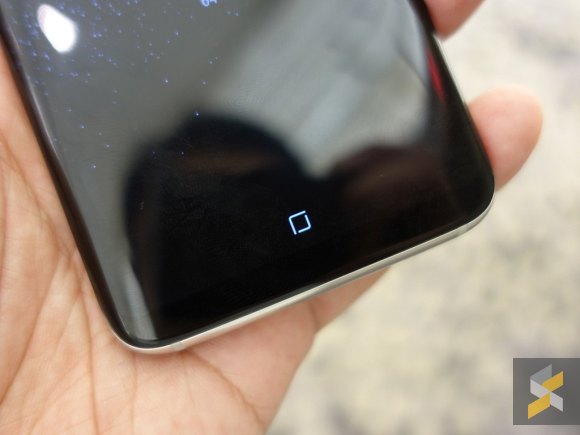
The front of the Galaxy S8/S8+ is virtually all display and Samsung has replaced the traditional home button for an always-on virtual key. Even when the screen is off, the home button is always visible which you can press to wake/unlock.

On most displays, there’s always a problem of screen burn-in where you’ll get a visible ghost image or discolouration as a result of showing a static object for too long. To prevent its virtual home button from damaging its gorgeous Infinity Display, Samsung has implemented a tiny but functional feature which is rather interesting.
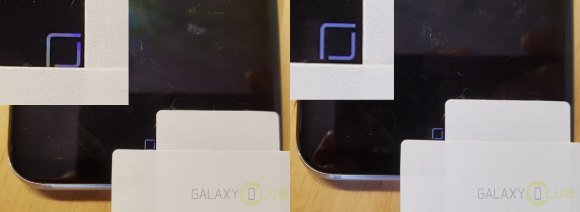
As tested by GalaxyClub.NL, the home button will periodically shift in position to avoid itself from burning in. You can think of it as a traditional screen saver but it is barely noticeable since it moves by a few pixels at a time.

This isn’t the first time Samsung has done this as they have implemented the same shifting feature with its Always-on display that was introduced with the Galaxy S7/S7 edge. If you leave it idle long enough, you’ll notice that the clock and your notifications will shift in position around the screen to prevent itself from leaving a permanent burn-in of the clock on its AMOLED display.
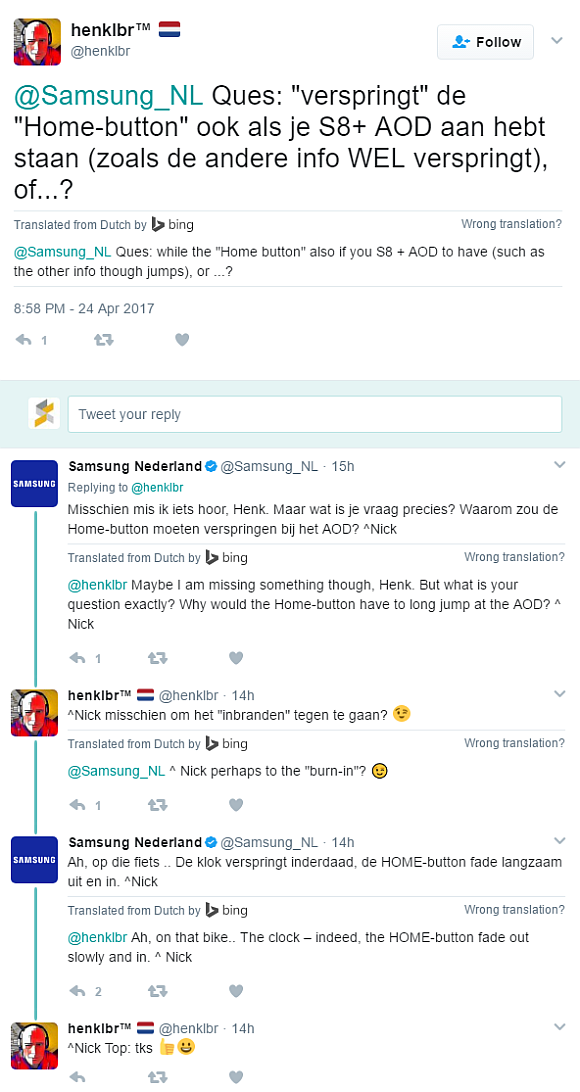
Samsung Netherlands have confirmed this in a tweet and they added that the home button will also fade-in and out slowly to reduce burn-in.

In case you missed it, check out our full review of the Samsung Galaxy S8.

[ SOURCE, VIA ]

Tags: Burn-inOn-screen buttonsSamsung Galaxy S8Samsung Galaxy S8 Home buttonSamsung Galaxy S8 PlusVirtual Home button
Alexander Wong

Alexander Wong

POPULAR

sooka’s Gilerrr Streaming Challenge Draws 273 Participants, Clinches Malaysia Book of Records Title

December 5, 2025

JPJePlate: Is the Malaysian flag printed wrongly on EV plates?

December 12, 2025

BOMBA investigating fire involving two EVs parked at home

December 19, 2025

This is how the Samsung Galaxy S8’s home button prevents screen burn-in

April 26, 2017

U Mobile Unbeatable Phone Sale: Travel with FREE Global Roaming Across 60+ Destinations

December 10, 2025

Perodua Traz: B-segment SUV with 1.5L engine and 471L boot, priced from RM76,100

December 17, 2025

Copyright © 2025 · SoyaCincau.com
Mind Blow Sdn Bhd (1076827-P)

  • ADVERTISE
  • DISCLAIMER

Copyright © 2025 · SoyaCincau.com – Mind Blow Sdn Bhd (1076827-P)

  • ADVERTISE
  • DISCLAIMER