• 中文版
  • BM
  • News
  • Deals
  • Reviews
    • First Impressions
    • Hands-on
    • Comparisons
  • Tech
    • Mobile
    • Computers
    • Cameras
    • Wearables
    • Audio
    • Drones
  • Telco
    • Celcom
    • Digi
    • Maxis
    • Time
    • Tune Talk
    • U Mobile
    • Unifi
    • Yes
  • Cars
  • Contribute
  • Jobs
Menu
  • 中文版
  • BM
  • News
  • Deals
  • Reviews
    • First Impressions
    • Hands-on
    • Comparisons
  • Tech
    • Mobile
    • Computers
    • Cameras
    • Wearables
    • Audio
    • Drones
  • Telco
    • Celcom
    • Digi
    • Maxis
    • Time
    • Tune Talk
    • U Mobile
    • Unifi
    • Yes
  • Cars
  • Contribute
  • Jobs
Search
  • Tech
    • News
    • Mobile
    • Computers
    • Cameras
    • Wearables
    • Audio
    • Drones
  • Telco
    • Celcom
    • Digi
    • Maxis
    • Time
    • U Mobile
    • Unifi
    • Yes
  • Reviews
    • First Impressions
    • Hands-on
    • Comparisons
  • Buyer’s Guide
  • Opinions
  • Digital Life
  • Video
  • Deals
  • How-To
  • Cars
  • Bahasa Melayu
  • EV
  • Contribute
  • Advertise
Menu
  • Tech
    • News
    • Mobile
    • Computers
    • Cameras
    • Wearables
    • Audio
    • Drones
  • Telco
    • Celcom
    • Digi
    • Maxis
    • Time
    • U Mobile
    • Unifi
    • Yes
  • Reviews
    • First Impressions
    • Hands-on
    • Comparisons
  • Buyer’s Guide
  • Opinions
  • Digital Life
  • Video
  • Deals
  • How-To
  • Cars
  • Bahasa Melayu
  • EV
  • Contribute
  • Advertise
Search
Close
Home Digital Life

Google is converting your old photos into digital images with PhotoScan

  • BY Rory Lee
  • 16 November 2016
  • 7:34 pm
  • Comment
Share on FacebookShare on Twitter

161116-google-photoscan-app

Remember a time before digital photographs were invented? Me neither. But not everyone is a bean sprout like I am. If you happen to have a box of old photographs lying around in “archive” (that’s the dusty corner in your house) storage somewhere, Google’s got a new app to help you convert that into digital photographs. Meet PhotoScan.

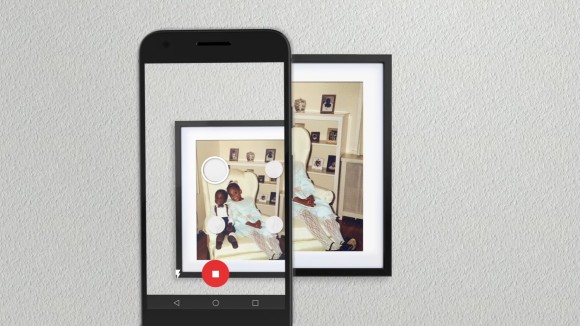
It’s an application that lets you easily scan existing photographs and convert them into high-resolution digital images “without any glare”. If you have Google Photos, it will even automatically organise the photos by face or by place. If you don’t have old physical photographs, you can also convert those silly Instax photos you thought was cool to take but now hate because it’s not on your phone.

For those who can’t watch the video because YouTube is blocked, images are scanned by hitting the big white button in the middle of the app, then hovering your phone over four white circles. Once done, PhotoScan will process the image and theoretically convert it into a high-resolution digital image.

In our experience, though, it’s a little hit or miss. But it’s still one of the easiest ways to convert a physical photo into a digital one that we’ve come across. Definitely give it a try — the free app is available on both Android and iOS.

Oh and props to Google for the great ad btw.

Know any other easier ways to scan images? Drop a comment down below and let us know!

Tags: Androidgooglegoogle photosGoogle PhotoScaniOSPhotoScanscan old photosscan photosscan physical pictures
Rory Lee

Rory Lee

POPULAR

Upgraded To a New Phone? Cool. But When Was the Last Time you Upgraded your Shaver?

November 10, 2025

5 Reasons Every Home Should Have a Smart Security System

November 11, 2025

Solar ATAP: The new solar programme for consumers will only start in 2026

December 2, 2025

Google is converting your old photos into digital images with PhotoScan

November 16, 2016
Perodua QV-E EV

Perodua QV-E is now official: Electric sportback with 201hp, 445km NEDC range, priced at RM80k not inclusive of battery subscription

December 1, 2025

GrabRewards is now GrabCoins: Now with even more ways to earn and save

November 17, 2025

Copyright © 2025 · SoyaCincau.com
Mind Blow Sdn Bhd (1076827-P)

  • ADVERTISE
  • DISCLAIMER

Copyright © 2025 · SoyaCincau.com – Mind Blow Sdn Bhd (1076827-P)

  • ADVERTISE
  • DISCLAIMER