• 中文版
  • BM
  • News
  • Deals
  • Reviews
    • First Impressions
    • Hands-on
    • Comparisons
  • Tech
    • Mobile
    • Computers
    • Cameras
    • Wearables
    • Audio
    • Drones
  • Telco
    • Celcom
    • Digi
    • Maxis
    • Time
    • Tune Talk
    • U Mobile
    • Unifi
    • Yes
  • Cars
  • Contribute
  • Jobs
Menu
  • 中文版
  • BM
  • News
  • Deals
  • Reviews
    • First Impressions
    • Hands-on
    • Comparisons
  • Tech
    • Mobile
    • Computers
    • Cameras
    • Wearables
    • Audio
    • Drones
  • Telco
    • Celcom
    • Digi
    • Maxis
    • Time
    • Tune Talk
    • U Mobile
    • Unifi
    • Yes
  • Cars
  • Contribute
  • Jobs
Search
  • Tech
    • News
    • Mobile
    • Computers
    • Cameras
    • Wearables
    • Audio
    • Drones
  • Telco
    • Celcom
    • Digi
    • Maxis
    • Time
    • U Mobile
    • Unifi
    • Yes
  • Reviews
    • First Impressions
    • Hands-on
    • Comparisons
  • Buyer’s Guide
  • Opinions
  • Digital Life
  • Video
  • Deals
  • How-To
  • Cars
  • Bahasa Melayu
  • EV
  • Contribute
  • Advertise
Menu
  • Tech
    • News
    • Mobile
    • Computers
    • Cameras
    • Wearables
    • Audio
    • Drones
  • Telco
    • Celcom
    • Digi
    • Maxis
    • Time
    • U Mobile
    • Unifi
    • Yes
  • Reviews
    • First Impressions
    • Hands-on
    • Comparisons
  • Buyer’s Guide
  • Opinions
  • Digital Life
  • Video
  • Deals
  • How-To
  • Cars
  • Bahasa Melayu
  • EV
  • Contribute
  • Advertise
Search
Close
Home Digital Life

Here’s how you can try U Mobile WiFi Calling on Android

  • BY Alexander Wong
  • 29 September 2016
  • 11:54 am
  • Comment
Share on FacebookShare on Twitter

160929-u-mobile-wifi-calling-android

UPDATE: U Mobile WiFi Calling for Android is strictly under testing mode for internal staff. U Mobile will update its customers as soon as the service is available for general use.

U Mobile is the first telco to offer WiFi Calling in Malaysia however it is limited only for iPhone users. WiFi Calling lets you make and receive calls over WiFi connectivity which helps you to stay connected even when your mobile signal is low or unavailable.

They have yet to roll out this feature for Android users but someone has tipped us a link of a purported beta version for WiFi Calling. If you’re interested to try, read on to find out more.
160929-umobile-wifi-calling-android-beta

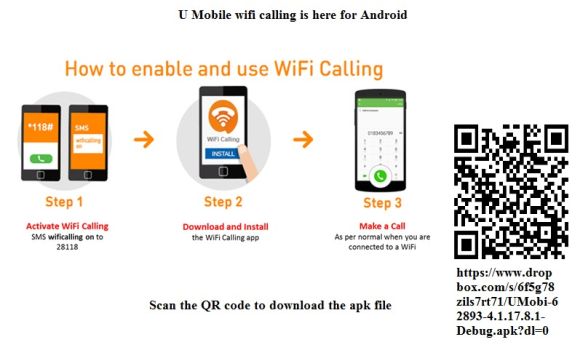
Before you start, you’ll need to activate WiFi Calling by sending an sms “wificalling on” to 28118. You will then receive an SMS to confirm your activation. Next, download the APK file and install the app.

UPDATE: Here’s a copy for the APK.

Since this isn’t from the official Google Play Store, you’ll need to grant persmission before you can install the app. Take note that this isn’t an official release so proceed only at your own risk.
160929-u-mobile-wifi-calling-android-screen-1

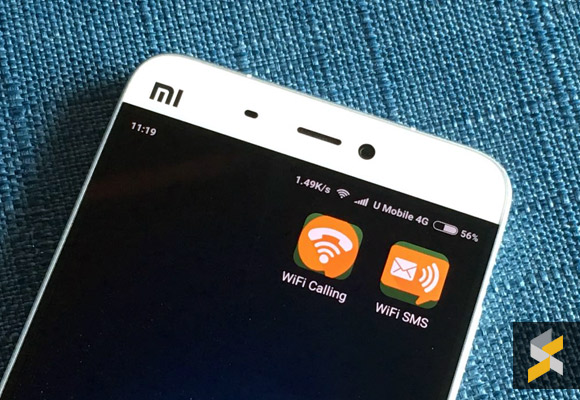
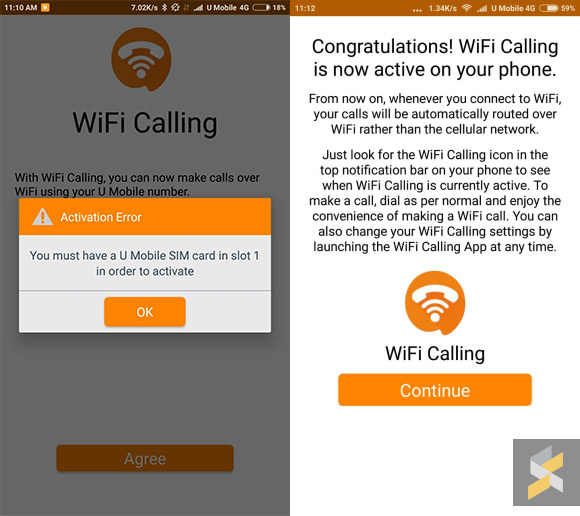
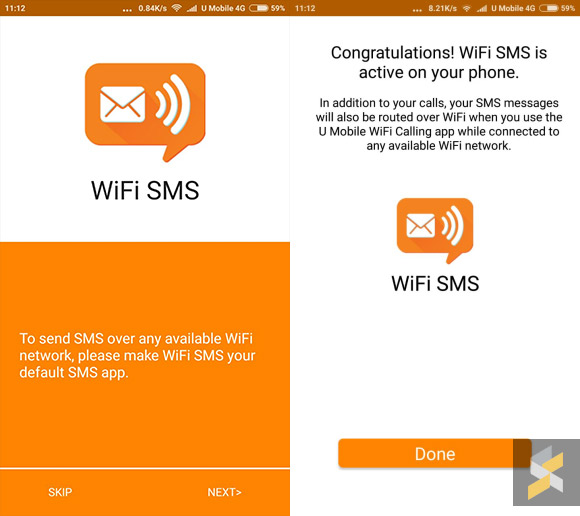
The APK file will install two apps – WiFi Calling and WiFi SMS. If you’re using a dual-SIM device, you would need to ensure that U Mobile is on the first SIM slot. Setting up is pretty seamless and you are able to pick which WiFi access points that you would like to enable WiFi Calling. Once that’s done, you can start making WiFi calls as long as you’re connected to WiFi. The WiFi Calling status can be found in the notification bar.

When we tested using the Mi 5, the experience is quite wonky. After hitting the dial button, the default dialler shows that the call has ended but it is still ringing in the background. That’s when we noticed that the WiFi Calling app has taken over the call on a separate stock-looking dialer. Calls are clear as you would expect and U Mobile would definitely need to iron out these issue before releasing it to the public.
160929-u-mobile-wifi-calling-android-screen-2

For SMS, there’s a separate app for this and for it to work, you’ll need to set it as the default app for SMS. We don’t have details on the official release but U Mobile had previously shared that it will be rolled out by Q3 2016.

Special thanks to our anonymous tipster for the info!

Tags: AndroidU MobileU Mobile VoWiFiU Mobile WiFi CallingWiFi CallingWiFI SMS
Alexander Wong

Alexander Wong

POPULAR

Image by Gerd Altmann from Pixabay.

AEON Bank’s Personal Financing-i (PF-i): Flexible Funds to Help Ease Budget Constraints

December 24, 2025
Home Rooftop Solar System with EV Charger

Solar ATAP Guidelines are here: Offset is limited to Energy Charge, no more credit roll over

December 30, 2025

SoyaCincau Awards 2025: Best Telcos of the Year

January 2, 2026

SoyaCincau Awards 2025: The Best Phones of the Year

December 31, 2025

Here’s how you can try U Mobile WiFi Calling on Android

September 29, 2016

AEON Bank Turns One: 8x AEON Points, Cashback, Prizes and New Debit Card-i

May 28, 2025

Copyright © 2025 · SoyaCincau.com
Mind Blow Sdn Bhd (1076827-P)

  • ADVERTISE
  • DISCLAIMER

Copyright © 2025 · SoyaCincau.com – Mind Blow Sdn Bhd (1076827-P)

  • ADVERTISE
  • DISCLAIMER