• 中文版
  • BM
  • News
  • Deals
  • Reviews
    • First Impressions
    • Hands-on
    • Comparisons
  • Tech
    • Mobile
    • Computers
    • Cameras
    • Wearables
    • Audio
    • Drones
  • Telco
    • Celcom
    • Digi
    • Maxis
    • Time
    • Tune Talk
    • U Mobile
    • Unifi
    • Yes
  • Cars
  • Contribute
  • Jobs
Menu
  • 中文版
  • BM
  • News
  • Deals
  • Reviews
    • First Impressions
    • Hands-on
    • Comparisons
  • Tech
    • Mobile
    • Computers
    • Cameras
    • Wearables
    • Audio
    • Drones
  • Telco
    • Celcom
    • Digi
    • Maxis
    • Time
    • Tune Talk
    • U Mobile
    • Unifi
    • Yes
  • Cars
  • Contribute
  • Jobs
Search
  • Tech
    • News
    • Mobile
    • Computers
    • Cameras
    • Wearables
    • Audio
    • Drones
  • Telco
    • Celcom
    • Digi
    • Maxis
    • Time
    • U Mobile
    • Unifi
    • Yes
  • Reviews
    • First Impressions
    • Hands-on
    • Comparisons
  • Buyer’s Guide
  • Opinions
  • Digital Life
  • Video
  • Deals
  • How-To
  • Cars
  • Bahasa Melayu
  • EV
  • Contribute
  • Advertise
Menu
  • Tech
    • News
    • Mobile
    • Computers
    • Cameras
    • Wearables
    • Audio
    • Drones
  • Telco
    • Celcom
    • Digi
    • Maxis
    • Time
    • U Mobile
    • Unifi
    • Yes
  • Reviews
    • First Impressions
    • Hands-on
    • Comparisons
  • Buyer’s Guide
  • Opinions
  • Digital Life
  • Video
  • Deals
  • How-To
  • Cars
  • Bahasa Melayu
  • EV
  • Contribute
  • Advertise
Search
Close
Home Digital Life

Samsung’s Keyboard Cover wants you to type like a BlackBerry user

  • BY Arif Lee
  • 14 August 2015
  • 6:10 pm
  • Comment
Share on FacebookShare on Twitter

150813-samsung-galaxy-note-5-s6-edge-plus-official-launch-09

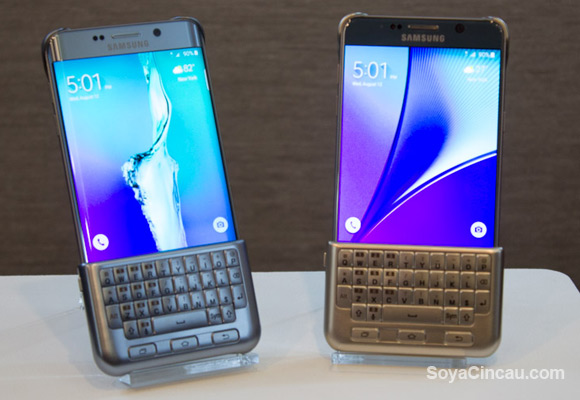
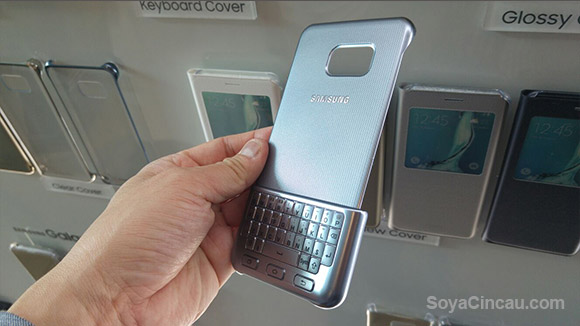
Rumours from the great @evleaks seemed to be true as Samsung actually released a proprietary snap on keyboard during its unpacked event in New York. Coming in two parts the back cover that holds on to the back of either the S6 edge+ or the Note 5, the Keyboard Cover can be snapped on and off easily in either orientation (front for typing, back for utilising the whole screen).
150814-Samsung-Keyboard-Cover-01i

Samsung has had a history of venturing to a wide range of stuff so this doesn’t really surprise anyone (just to spoil it for you, it includes a toilet seat, helicopter, and hospital). Typing will be supported by the QWERTY style keyboard that has 3 Android buttons – Recent Apps, Home and Back button. One could assume that the Keyboard Cover would benefit to those who felt that the typing experience on the two said phablets wouldn’t be a great experience when one-handed.
150814-Samsung-Keyboard-Cover-02i

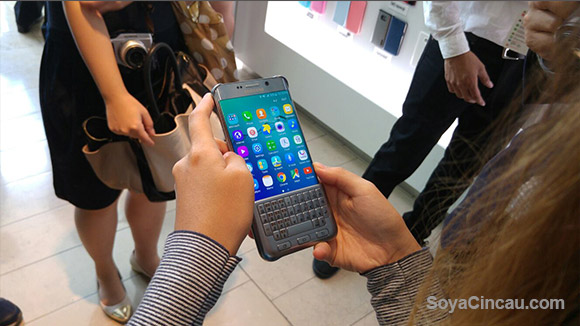
We spent a short time with the Keyboard Cover attached to the edge+: describing the keys akin to a soft resin-like texture and it felt flimsy at best. A lackluster solution but tries to appeal to those who like tactility when typing on the capacitive screen. These tactile inclinded typist that prefer BlackBerry’s signature typing experience might just consider jumping ship given the option to add this US  $80 extension. The keyboard itself doesn’t have any special technology, merely the keys will touch the screen as if your fingertips would but it does move up the UI when the keyboard is in place.

Now the real question comes about; would you buy it?

Tags: Android QWERTY KeyboardevleaksKeyboard CoverSamsungsamsung galaxy note 5Samsung Galaxy S6 edge PlusSamsung Galaxy S6 edge plus keyboardSamsung Galaxy S6 edge plus MalaysiaSamsung keyboard coverSamsung QWERTY Keyboard coverSamsung Unpacked 2015
Arif Lee

Arif Lee

POPULAR

Samsung’s Keyboard Cover wants you to type like a BlackBerry user

August 14, 2015

SoyaCincau Awards 2025: The Best Tablets of the Year

January 5, 2026

HUAWEI MatePad 12 X 2026: The Best Productivity Tablet with PC-Level WPS and the All-New HUAWEI M-Pencil Pro

January 6, 2026

Max Out Your Samsung Galaxy S25’s Camera Potential with These Must-Try Features

December 23, 2025

SARA: All Malaysian adults to receive RM100 credit from 9 February

January 5, 2026
Maybank Google Pay - May 2024

Maybank on Google Pay: No PIN required for transactions above RM250, transactions limited to RM2,500

January 5, 2026

Copyright © 2025 · SoyaCincau.com
Mind Blow Sdn Bhd (1076827-P)

  • ADVERTISE
  • DISCLAIMER

Copyright © 2026 · SoyaCincau.com – Mind Blow Sdn Bhd (1076827-P)

  • ADVERTISE
  • DISCLAIMER