• 中文版
  • BM
  • News
  • Deals
  • Reviews
    • First Impressions
    • Hands-on
    • Comparisons
  • Tech
    • Mobile
    • Computers
    • Cameras
    • Wearables
    • Audio
    • Drones
  • Telco
    • Celcom
    • Digi
    • Maxis
    • Time
    • Tune Talk
    • U Mobile
    • Unifi
    • Yes
  • Cars
  • Contribute
  • Jobs
Menu
  • 中文版
  • BM
  • News
  • Deals
  • Reviews
    • First Impressions
    • Hands-on
    • Comparisons
  • Tech
    • Mobile
    • Computers
    • Cameras
    • Wearables
    • Audio
    • Drones
  • Telco
    • Celcom
    • Digi
    • Maxis
    • Time
    • Tune Talk
    • U Mobile
    • Unifi
    • Yes
  • Cars
  • Contribute
  • Jobs
Search
  • Tech
    • News
    • Mobile
    • Computers
    • Cameras
    • Wearables
    • Audio
    • Drones
  • Telco
    • Celcom
    • Digi
    • Maxis
    • Time
    • U Mobile
    • Unifi
    • Yes
  • Reviews
    • First Impressions
    • Hands-on
    • Comparisons
  • Buyer’s Guide
  • Opinions
  • Digital Life
  • Video
  • Deals
  • How-To
  • Cars
  • Bahasa Melayu
  • EV
  • Contribute
  • Advertise
Menu
  • Tech
    • News
    • Mobile
    • Computers
    • Cameras
    • Wearables
    • Audio
    • Drones
  • Telco
    • Celcom
    • Digi
    • Maxis
    • Time
    • U Mobile
    • Unifi
    • Yes
  • Reviews
    • First Impressions
    • Hands-on
    • Comparisons
  • Buyer’s Guide
  • Opinions
  • Digital Life
  • Video
  • Deals
  • How-To
  • Cars
  • Bahasa Melayu
  • EV
  • Contribute
  • Advertise
Search
Close
Home News

Pebble just got better with Android Wear Notification

  • BY soyacincau
  • 17 February 2015
  • 10:39 am
  • Comment
Share on FacebookShare on Twitter

150217-pebble-2.3-android-wear-support

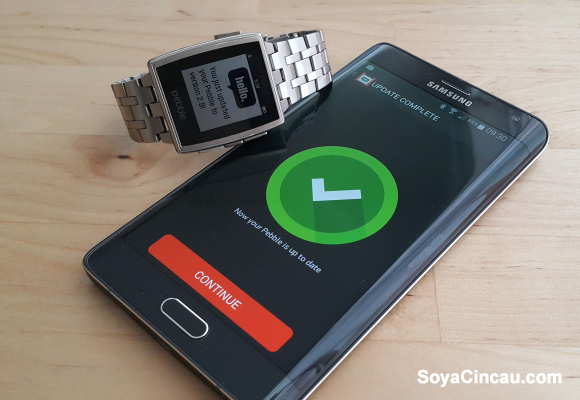
The Pebble smart watch, which started as a Kickstarter project has doing pretty well. It has sold over a million units, even in the face of more capable competition like Android Wear. With Google’s open approach for their smart wearable platform, Pebble has successfully integrated Android Wear notification and interaction with their latest software update that’s out of Beta.

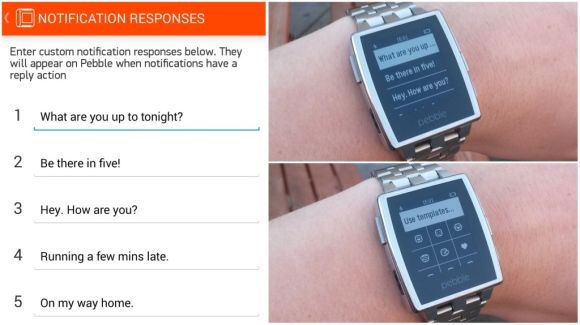
The biggest change is the way it handles incoming messages which you now can reply straightaway from your wrist. You can do so with preset messages or alternatively with an emoji. If the message is urgent, you can trigger it to open on your smart phone directly from your Pebble. This works with the latest Pebble 2.3 Android App with the Pebble Watch’s v2.9 firmware.
150217-pebble-2.3-android-wear-support-2

For the notification response, you’ll be given 5 slots to enter your preset messages, and this is easily accessed when an incoming message is shown. For iOS users, you can dismiss notifications from your watch but it lacks the interaction portion that comes with Android. If you haven’t updated your Pebble Android app yet, you can do so over here. This time, the latest version will work on older Android versions with at least Ice Cream Sandwich (Android 4.0+).


[ SOURCE, VIA ]

Tags: Android WearEmojiPebblePebble 2.3Pebble Android AppPebble Android NotificationPebble Smart WatchPebble Smart Watch InteractionSmart Watch
soyacincau

soyacincau

POPULAR

Pebble just got better with Android Wear Notification

February 17, 2015

SoyaCincau Awards 2025: The Best Tablets of the Year

January 5, 2026

HUAWEI MatePad 12 X 2026: The Best Productivity Tablet with PC-Level WPS and the All-New HUAWEI M-Pencil Pro

January 6, 2026

Max Out Your Samsung Galaxy S25’s Camera Potential with These Must-Try Features

December 23, 2025

SARA: All Malaysian adults to receive RM100 credit from 9 February

January 5, 2026
Maybank Google Pay - May 2024

Maybank on Google Pay: No PIN required for transactions above RM250, transactions limited to RM2,500

January 5, 2026

Copyright © 2025 · SoyaCincau.com
Mind Blow Sdn Bhd (1076827-P)

  • ADVERTISE
  • DISCLAIMER

Copyright © 2026 · SoyaCincau.com – Mind Blow Sdn Bhd (1076827-P)

  • ADVERTISE
  • DISCLAIMER