
• 中文版
  • BM
  • News
  • Deals
  • Reviews
    • First Impressions
    • Hands-on
    • Comparisons
  • Tech
    • Mobile
    • Computers
    • Cameras
    • Wearables
    • Audio
    • Drones
  • Telco
    • Celcom
    • Digi
    • Maxis
    • Time
    • Tune Talk
    • U Mobile
    • Unifi
    • Yes
  • Cars
  • Contribute
  • Jobs
Menu
  • 中文版
  • BM
  • News
  • Deals
  • Reviews
    • First Impressions
    • Hands-on
    • Comparisons
  • Tech
    • Mobile
    • Computers
    • Cameras
    • Wearables
    • Audio
    • Drones
  • Telco
    • Celcom
    • Digi
    • Maxis
    • Time
    • Tune Talk
    • U Mobile
    • Unifi
    • Yes
  • Cars
  • Contribute
  • Jobs
Search
  • Tech
    • News
    • Mobile
    • Computers
    • Cameras
    • Wearables
    • Audio
    • Drones
  • Telco
    • Celcom
    • Digi
    • Maxis
    • Time
    • U Mobile
    • Unifi
    • Yes
  • Reviews
    • First Impressions
    • Hands-on
    • Comparisons
  • Buyer’s Guide
  • Opinions
  • Digital Life
  • Video
  • Deals
  • How-To
  • Cars
  • Bahasa Melayu
  • EV
  • Contribute
  • Advertise
Menu
  • Tech
    • News
    • Mobile
    • Computers
    • Cameras
    • Wearables
    • Audio
    • Drones
  • Telco
    • Celcom
    • Digi
    • Maxis
    • Time
    • U Mobile
    • Unifi
    • Yes
  • Reviews
    • First Impressions
    • Hands-on
    • Comparisons
  • Buyer’s Guide
  • Opinions
  • Digital Life
  • Video
  • Deals
  • How-To
  • Cars
  • Bahasa Melayu
  • EV
  • Contribute
  • Advertise
Search
Close
Home News

Pebble now offers full notification support on Android

  • BY soyacincau
  • 22 November 2014
  • 11:05 pm
  • Comment
Share on FacebookShare on Twitter

141122-pebble-android-full-notification-support-2

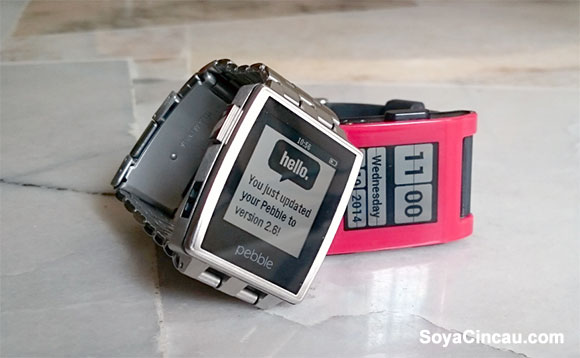
The Pebble smart watch might be too simple for today’s standards but it just gets better with every update. For Android users, Pebble has finally introduced full notification support.

Before this, notifications for Android could only work with a handful of popular apps, unlike iOS which supports Notification Centre fully on iOS 7.
141122-pebble-android-full-notification-support

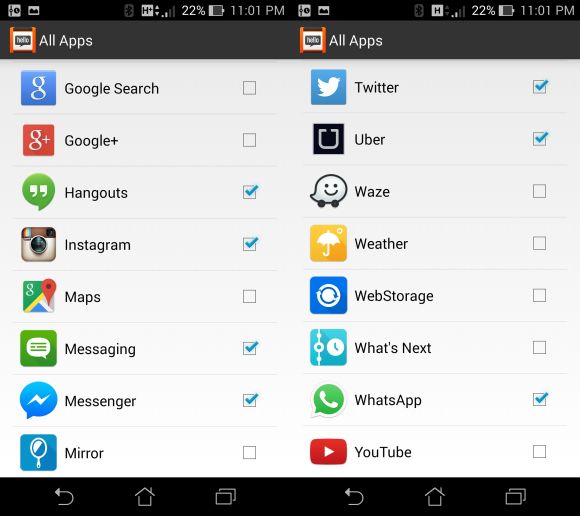
According to Pebble, they have overhauled the app from scratch and it is now much faster and reliable than before. By default, notifications would be enabled for popular apps and you can select more under its settings. To do this, tap on the top left corner of the Pebble App, enter into Notifications and then tap on All Apps at the bottom of the list.

The notification support is available with the latest 2.1.0 Pebble App which has started to roll out on Google Play Store. Take note that this only supports Android devices that are running on 4.3 and above. On top of that, Pebble has released its latest V2.8 firmware for that watch that brings additional character support for multiple languages. Unfortunately it still doesn’t support Chinese, Japanese and Korean characters officially.

If you’re interested to get a Pebble watch, you can get it directly online from as low as US$99 (about RM331).


[ SOURCE, VIA ]

Tags: PebblePebble Android AppPebble Android NotificationPebble Smart WatchSmart Watch
soyacincau

soyacincau

POPULAR

Pebble now offers full notification support on Android

November 22, 2014

HUAWEI MatePad 12 X 2026: The Best Productivity Tablet with PC-Level WPS and the All-New HUAWEI M-Pencil Pro

January 6, 2026

SoyaCincau Awards 2025: The Best Tablets of the Year

January 5, 2026

Max Out Your Samsung Galaxy S25’s Camera Potential with These Must-Try Features

December 23, 2025

Samsung Galaxy A26 5G for Just RM1,099: The Most A-mazing Deal in Town?

December 22, 2025

Instagram “Reset your Password” Email: Is there a Data Breach at Meta?

January 11, 2026

Copyright © 2025 · SoyaCincau.com
Mind Blow Sdn Bhd (1076827-P)

  • ADVERTISE
  • DISCLAIMER

Copyright © 2026 · SoyaCincau.com – Mind Blow Sdn Bhd (1076827-P)

  • ADVERTISE
  • DISCLAIMER




