
• 中文版
  • BM
  • News
  • Deals
  • Reviews
    • First Impressions
    • Hands-on
    • Comparisons
  • Tech
    • Mobile
    • Computers
    • Cameras
    • Wearables
    • Audio
    • Drones
  • Telco
    • Celcom
    • Digi
    • Maxis
    • Time
    • Tune Talk
    • U Mobile
    • Unifi
    • Yes
  • Cars
  • Contribute
  • Jobs
Menu
  • 中文版
  • BM
  • News
  • Deals
  • Reviews
    • First Impressions
    • Hands-on
    • Comparisons
  • Tech
    • Mobile
    • Computers
    • Cameras
    • Wearables
    • Audio
    • Drones
  • Telco
    • Celcom
    • Digi
    • Maxis
    • Time
    • Tune Talk
    • U Mobile
    • Unifi
    • Yes
  • Cars
  • Contribute
  • Jobs
Search
  • Tech
    • News
    • Mobile
    • Computers
    • Cameras
    • Wearables
    • Audio
    • Drones
  • Telco
    • Celcom
    • Digi
    • Maxis
    • Time
    • U Mobile
    • Unifi
    • Yes
  • Reviews
    • First Impressions
    • Hands-on
    • Comparisons
  • Buyer’s Guide
  • Opinions
  • Digital Life
  • Video
  • Deals
  • How-To
  • Cars
  • Bahasa Melayu
  • EV
  • Contribute
  • Advertise
Menu
  • Tech
    • News
    • Mobile
    • Computers
    • Cameras
    • Wearables
    • Audio
    • Drones
  • Telco
    • Celcom
    • Digi
    • Maxis
    • Time
    • U Mobile
    • Unifi
    • Yes
  • Reviews
    • First Impressions
    • Hands-on
    • Comparisons
  • Buyer’s Guide
  • Opinions
  • Digital Life
  • Video
  • Deals
  • How-To
  • Cars
  • Bahasa Melayu
  • EV
  • Contribute
  • Advertise
Search
Close
Home News

Hands-on: Samsung KNOX 2.0 Walkthrough

  • BY soyacincau
  • 17 March 2014
  • 5:51 pm
  • Comment
Share on FacebookShare on Twitter

140317-samsung-knox

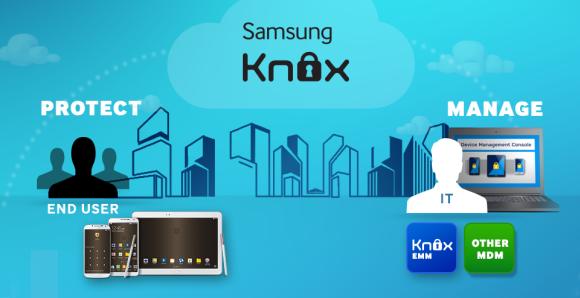
Samsung KNOX is an enterprise solution where you can have a secured environment for Samsung Galaxy smart phones. This caters for employees that prefer to carry a single device for both work and play instead of carrying another business phone. Similar to BlackBerry’s Balance, Samsung KNOX comes with a secured container which is basically a separate session to keep your confidential work emails, contacts and even documents encrypted. Once set up, it is pretty easy to switch between work and personal using either the KNOX shortcut or through the pull-down notification menu.

For Samsung KNOX 2.0 which was announced at Mobile World Congress, users can now get to enjoy more flexibility with the option of downloading apps from Google Play. Previously users are restricted to pre-approved KNOX apps under Samsung Appstore. For more demanding scenarios where you deal with 2 conflicting clients, the new KNOX 2.0 now offers 2 secured containers to keep both business dealings separated.

While this draws a clean line between personal and work, KNOX also allows you to copy certain items such as Contacts and Photos across different containers. However this would depend on your company’s IT administrator if they would restrict such rights. For some companies, they could go for the highest security where you can’t transfer or copy anything out of the work containers. So whatever happens in the work container, stays within the container.

From what was briefed, KNOX for personal use is free however enterprise users which IT Administrator access will be a paid subscription. The new KNOX 2.0 will be rolled out to the current high-end Galaxy smart phones including the Galaxy S4, Galaxy Note 3 and even the Galaxy Note II. For added security on the Galaxy S5, KNOX could also add a layer of biometric security using the finger print scanner on the home button.

Watch our hands-on video after the break for a quick walk through of KNOX 2.0.

If you would like to know more about KNOX, you can head over to their website.

Tags: MWCSamsungsamsung KNOXSamsung Knox 2.0Samsung KNOX PlatformSecured Mobile Enterprise Solution
soyacincau

soyacincau

POPULAR

Hands-on: Samsung KNOX 2.0 Walkthrough

March 17, 2014

The Xiaomi 17 Proves You Don’t Need a Giant Phone for Pro-Level Photos

February 28, 2026
Image source: Jakub Zerdzicki on Pexels

AEON Bank’s Personal Financing-i (PF-i): Flexible Funds to Help Ease Budget Constraints

December 24, 2025

Malaysia now spending over RM4 billion monthly on fuel subsidies. It’s time to accelerate EV shift

March 29, 2026
Tesla Model Y L Malaysia

Tesla Model Y L 3-row electric SUV to launch in Malaysia on 1 April: 681km range, supports V2L

March 30, 2026

Maybank MAE users: Update your app by 11 April or risk losing access

April 4, 2026

Copyright © 2025 · SoyaCincau.com
Mind Blow Sdn Bhd (1076827-P)

  • ADVERTISE
  • DISCLAIMER

Copyright © 2026 · SoyaCincau.com – Mind Blow Sdn Bhd (1076827-P)

  • ADVERTISE
  • DISCLAIMER





