
• 中文版
  • BM
  • News
  • Deals
  • Reviews
    • First Impressions
    • Hands-on
    • Comparisons
  • Tech
    • Mobile
    • Computers
    • Cameras
    • Wearables
    • Audio
    • Drones
  • Telco
    • Celcom
    • Digi
    • Maxis
    • Time
    • Tune Talk
    • U Mobile
    • Unifi
    • Yes
  • Cars
  • Contribute
  • Jobs
Menu
  • 中文版
  • BM
  • News
  • Deals
  • Reviews
    • First Impressions
    • Hands-on
    • Comparisons
  • Tech
    • Mobile
    • Computers
    • Cameras
    • Wearables
    • Audio
    • Drones
  • Telco
    • Celcom
    • Digi
    • Maxis
    • Time
    • Tune Talk
    • U Mobile
    • Unifi
    • Yes
  • Cars
  • Contribute
  • Jobs
Search
  • Tech
    • News
    • Mobile
    • Computers
    • Cameras
    • Wearables
    • Audio
    • Drones
  • Telco
    • Celcom
    • Digi
    • Maxis
    • Time
    • U Mobile
    • Unifi
    • Yes
  • Reviews
    • First Impressions
    • Hands-on
    • Comparisons
  • Buyer’s Guide
  • Opinions
  • Digital Life
  • Video
  • Deals
  • How-To
  • Cars
  • Bahasa Melayu
  • EV
  • Contribute
  • Advertise
Menu
  • Tech
    • News
    • Mobile
    • Computers
    • Cameras
    • Wearables
    • Audio
    • Drones
  • Telco
    • Celcom
    • Digi
    • Maxis
    • Time
    • U Mobile
    • Unifi
    • Yes
  • Reviews
    • First Impressions
    • Hands-on
    • Comparisons
  • Buyer’s Guide
  • Opinions
  • Digital Life
  • Video
  • Deals
  • How-To
  • Cars
  • Bahasa Melayu
  • EV
  • Contribute
  • Advertise
Search
Close
Home News

All new HTC One Sense 6.0 UI reveals new gesture features

  • BY soyacincau
  • 17 March 2014
  • 10:26 pm
  • Comment
Share on FacebookShare on Twitter

140317-all-new-htc-one-m8-sense-6.0-walkthrough

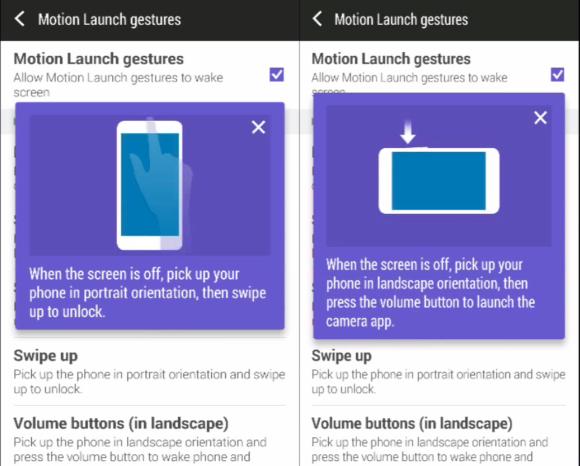
The all new HTC One is not just getting an upgrade in hardware as the new HTC Sense 6.0 user interface reveals a number of new software features as well. Firstly you’ll be able to double tap on the screen to wake the device up and there’s also a couple of swipe gestures which can be activated while the screen is off. For example on portrait mode, you can pick up the device and swipe upwards to immediately unlock the device. To take photos immediately, the camera app can be launched by simply holding the device in landscape mode while pressing the volume button.

To get a better idea on the new features of HTC Sense 6.0, watch the video after the break. You better be quick before the video gets pulled down.

[ SOURCE ]

Tags: HTCHTC M8HTC m8 launchHTC M8 MalaysiaHTC OneHTC One 2014HTC One 2014 MalaysiaHTC One Malaysiahtc sensenew HTC oneSense 6.0
soyacincau

soyacincau

POPULAR

BOMBA investigating fire involving two EVs parked at home

December 19, 2025

sooka’s Gilerrr Streaming Challenge Draws 273 Participants, Clinches Malaysia Book of Records Title

December 5, 2025

All new HTC One Sense 6.0 UI reveals new gesture features

March 17, 2014

U Mobile Unbeatable Phone Sale: Travel with FREE Global Roaming Across 60+ Destinations

December 10, 2025

Perodua Traz: B-segment SUV with 1.5L engine and 471L boot, priced from RM76,100

December 17, 2025

Why have Malaysia’s 5G download speeds declined?

December 16, 2025

Copyright © 2025 · SoyaCincau.com
Mind Blow Sdn Bhd (1076827-P)

  • ADVERTISE
  • DISCLAIMER

Copyright © 2025 · SoyaCincau.com – Mind Blow Sdn Bhd (1076827-P)

  • ADVERTISE
  • DISCLAIMER





