
• 中文版
  • BM
  • News
  • Deals
  • Reviews
    • First Impressions
    • Hands-on
    • Comparisons
  • Tech
    • Mobile
    • Computers
    • Cameras
    • Wearables
    • Audio
    • Drones
  • Telco
    • Celcom
    • Digi
    • Maxis
    • Time
    • Tune Talk
    • U Mobile
    • Unifi
    • Yes
  • Cars
  • Contribute
  • Jobs
Menu
  • 中文版
  • BM
  • News
  • Deals
  • Reviews
    • First Impressions
    • Hands-on
    • Comparisons
  • Tech
    • Mobile
    • Computers
    • Cameras
    • Wearables
    • Audio
    • Drones
  • Telco
    • Celcom
    • Digi
    • Maxis
    • Time
    • Tune Talk
    • U Mobile
    • Unifi
    • Yes
  • Cars
  • Contribute
  • Jobs
Search
  • Tech
    • News
    • Mobile
    • Computers
    • Cameras
    • Wearables
    • Audio
    • Drones
  • Telco
    • Celcom
    • Digi
    • Maxis
    • Time
    • U Mobile
    • Unifi
    • Yes
  • Reviews
    • First Impressions
    • Hands-on
    • Comparisons
  • Buyer’s Guide
  • Opinions
  • Digital Life
  • Video
  • Deals
  • How-To
  • Cars
  • Bahasa Melayu
  • EV
  • Contribute
  • Advertise
Menu
  • Tech
    • News
    • Mobile
    • Computers
    • Cameras
    • Wearables
    • Audio
    • Drones
  • Telco
    • Celcom
    • Digi
    • Maxis
    • Time
    • U Mobile
    • Unifi
    • Yes
  • Reviews
    • First Impressions
    • Hands-on
    • Comparisons
  • Buyer’s Guide
  • Opinions
  • Digital Life
  • Video
  • Deals
  • How-To
  • Cars
  • Bahasa Melayu
  • EV
  • Contribute
  • Advertise
Search
Close
Home Digital Life

Samsung Galaxy S5: How Finger Scanner Works

  • BY ccsoya
  • 25 February 2014
  • 7:04 pm
  • Comment
Share on FacebookShare on Twitter

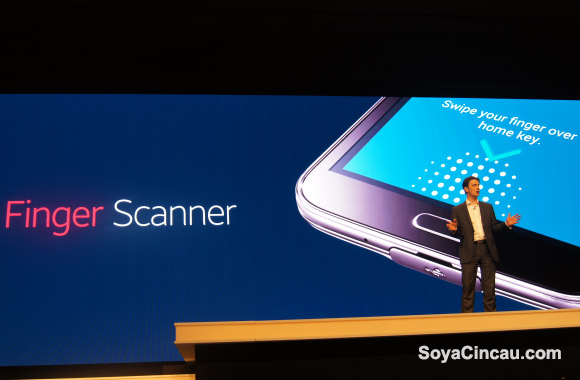
Among the many new features of the Samsung Galaxy S5 is a fingerprint scanner embedded in the home button. In implementation, the scanner is much like the one on the iPhone 5S but in use the new feature is not as seamless as Apple’s execution.

With the iPhone 5S, the fingerprint scanner is activated with one simple push and hold action. With the Galaxy S5 you have to push the home button and then swipe your finger to unlock the device. It’s not as seamless as the on the iPhone but it gets the job done and the Galaxy S5 is unlocked just as quickly. Overall, it’s good first attempt from Samsung and it is much, much better than the clumsy back panel fingerprint scanner on the HTC One Max.

In addition to unlocking the phone, the Galaxy S5 Finger Scanner can be use in conjunction with the devices Privacy Mode private date like sensitive picture and documents are made inaccessible to other people that might be using your phone. It is also secure enough to authenticate online purchases using PayPal.

Head on over to after the jump to see how easy it is to setup and use the Finger Scanner feature on the Galaxy S5

What do you think about the Galaxy S5? Share your thoughts in the comments below.

Tags: Finger Scannerfingerprintfingerprint scannerMobile World CongressMobile World Congress 2014MWCSamsungSamsung Galaxy S5Samsung Galaxy S5 Finger ScannerVideo
ccsoya

ccsoya

POPULAR

Upgraded To a New Phone? Cool. But When Was the Last Time you Upgraded your Shaver?

November 10, 2025

5 Reasons Every Home Should Have a Smart Security System

November 11, 2025

Solar ATAP: The new solar programme for consumers will only start in 2026

December 2, 2025

Samsung Galaxy S5: How Finger Scanner Works

February 25, 2014
Perodua QV-E EV

Perodua QV-E is now official: Electric sportback with 201hp, 445km NEDC range, priced at RM80k not inclusive of battery subscription

December 1, 2025

GrabRewards is now GrabCoins: Now with even more ways to earn and save

November 17, 2025

Copyright © 2025 · SoyaCincau.com
Mind Blow Sdn Bhd (1076827-P)

  • ADVERTISE
  • DISCLAIMER

Copyright © 2025 · SoyaCincau.com – Mind Blow Sdn Bhd (1076827-P)

  • ADVERTISE
  • DISCLAIMER





