
• 中文版
  • BM
  • News
  • Deals
  • Reviews
    • First Impressions
    • Hands-on
    • Comparisons
  • Tech
    • Mobile
    • Computers
    • Cameras
    • Wearables
    • Audio
    • Drones
  • Telco
    • Celcom
    • Digi
    • Maxis
    • Time
    • Tune Talk
    • U Mobile
    • Unifi
    • Yes
  • Cars
  • Contribute
  • Jobs
Menu
  • 中文版
  • BM
  • News
  • Deals
  • Reviews
    • First Impressions
    • Hands-on
    • Comparisons
  • Tech
    • Mobile
    • Computers
    • Cameras
    • Wearables
    • Audio
    • Drones
  • Telco
    • Celcom
    • Digi
    • Maxis
    • Time
    • Tune Talk
    • U Mobile
    • Unifi
    • Yes
  • Cars
  • Contribute
  • Jobs
Search
  • Tech
    • News
    • Mobile
    • Computers
    • Cameras
    • Wearables
    • Audio
    • Drones
  • Telco
    • Celcom
    • Digi
    • Maxis
    • Time
    • U Mobile
    • Unifi
    • Yes
  • Reviews
    • First Impressions
    • Hands-on
    • Comparisons
  • Buyer’s Guide
  • Opinions
  • Digital Life
  • Video
  • Deals
  • How-To
  • Cars
  • Bahasa Melayu
  • EV
  • Contribute
  • Advertise
Menu
  • Tech
    • News
    • Mobile
    • Computers
    • Cameras
    • Wearables
    • Audio
    • Drones
  • Telco
    • Celcom
    • Digi
    • Maxis
    • Time
    • U Mobile
    • Unifi
    • Yes
  • Reviews
    • First Impressions
    • Hands-on
    • Comparisons
  • Buyer’s Guide
  • Opinions
  • Digital Life
  • Video
  • Deals
  • How-To
  • Cars
  • Bahasa Melayu
  • EV
  • Contribute
  • Advertise
Search
Close
Home News

Bring GPS capabilities to your WiFi iPad with your iPhone

  • BY ccsoya
  • 17 March 2011
  • 12:17 pm
  • Comment
Share on FacebookShare on Twitter

Update: GPS tethering doesn’t work with the original iPad.

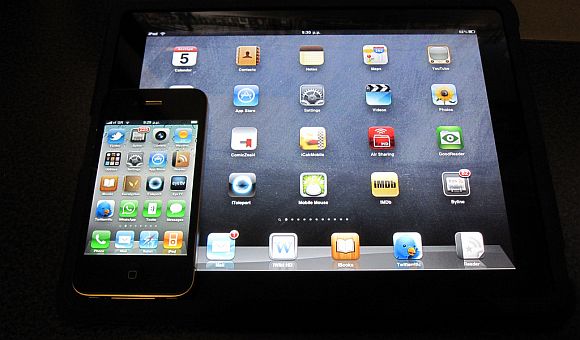
Its no secret that Apple omits GPS in the WiFi iPad. With no GPS, you can’t use the WiFi iPad for navigation, not accurately anyway. But it seems that someone has discovered that there is a way to bring GPS capabilities to the WiFi iPad. All you need to do is tether the iPad with an iPhone via the Personal Hotspot function.

Head on over to after the jump to watch a video of how tethered GPS works on the WiFi iPad but it is now without its downsides. One of the biggest gripe is that the location doesn’t update in real time, you’ll have to wait for about a minute or so to get an update on your location when you’re moving about.

The video also shows the iPad 2 tethered to the iPhone 4. We’re not sure if you’ll get the same results if you use an iPhone 3GS with the iPad 2 or if this tethered GPS thing works on the original iPad.


[source, via]
[Picture credit]

Tags: AppleGPSiPadiPad 2iPhoneiPhone 4iPhone tetheringtethered GPStetheringWiF iPad GPSWiFi iPad
ccsoya

ccsoya

POPULAR

Upgraded To a New Phone? Cool. But When Was the Last Time you Upgraded your Shaver?

November 10, 2025

5 Reasons Every Home Should Have a Smart Security System

November 11, 2025

Solar ATAP: The new solar programme for consumers will only start in 2026

December 2, 2025

Bring GPS capabilities to your WiFi iPad with your iPhone

March 17, 2011
Perodua QV-E EV

Perodua QV-E is now official: Electric sportback with 201hp, 445km NEDC range, priced at RM80k not inclusive of battery subscription

December 1, 2025

GrabRewards is now GrabCoins: Now with even more ways to earn and save

November 17, 2025

Copyright © 2025 · SoyaCincau.com
Mind Blow Sdn Bhd (1076827-P)

  • ADVERTISE
  • DISCLAIMER

Copyright © 2025 · SoyaCincau.com – Mind Blow Sdn Bhd (1076827-P)

  • ADVERTISE
  • DISCLAIMER





