• 中文版
  • BM
  • News
  • Deals
  • Reviews
    • First Impressions
    • Hands-on
    • Comparisons
  • Tech
    • Mobile
    • Computers
    • Cameras
    • Wearables
    • Audio
    • Drones
  • Telco
    • Celcom
    • Digi
    • Maxis
    • Time
    • Tune Talk
    • U Mobile
    • Unifi
    • Yes
  • Cars
  • Contribute
  • Jobs
Menu
  • 中文版
  • BM
  • News
  • Deals
  • Reviews
    • First Impressions
    • Hands-on
    • Comparisons
  • Tech
    • Mobile
    • Computers
    • Cameras
    • Wearables
    • Audio
    • Drones
  • Telco
    • Celcom
    • Digi
    • Maxis
    • Time
    • Tune Talk
    • U Mobile
    • Unifi
    • Yes
  • Cars
  • Contribute
  • Jobs
Search
  • Tech
    • News
    • Mobile
    • Computers
    • Cameras
    • Wearables
    • Audio
    • Drones
  • Telco
    • Celcom
    • Digi
    • Maxis
    • Time
    • U Mobile
    • Unifi
    • Yes
  • Reviews
    • First Impressions
    • Hands-on
    • Comparisons
  • Buyer’s Guide
  • Opinions
  • Digital Life
  • Video
  • Deals
  • How-To
  • Cars
  • Bahasa Melayu
  • EV
  • Contribute
  • Advertise
Menu
  • Tech
    • News
    • Mobile
    • Computers
    • Cameras
    • Wearables
    • Audio
    • Drones
  • Telco
    • Celcom
    • Digi
    • Maxis
    • Time
    • U Mobile
    • Unifi
    • Yes
  • Reviews
    • First Impressions
    • Hands-on
    • Comparisons
  • Buyer’s Guide
  • Opinions
  • Digital Life
  • Video
  • Deals
  • How-To
  • Cars
  • Bahasa Melayu
  • EV
  • Contribute
  • Advertise
Search
Close
Home Digital Life

Junkyard Jumbtron: Turn multiple screens into one big one

  • BY ccsoya
  • 14 March 2011
  • 11:31 pm
  • Comment
Share on FacebookShare on Twitter

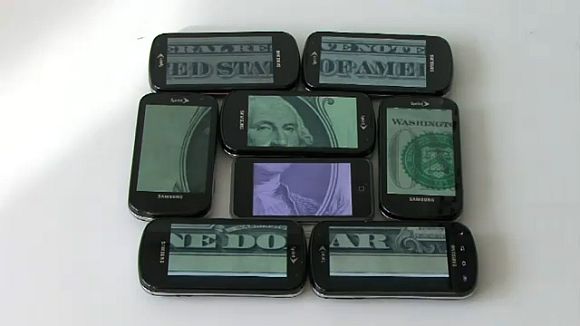
Here’s an app that allows you to virtually join together multiple screens of any kind on any device running any OS and make those screens sync to display one single large image. It’s called Junkyard Jumbotron

Created by Rick Borovoy at MIT’s Center for Future Civic Media, Junkyard Jumbotron is a super cool tool as it requires no software installation and you can make a large display almost instantly anywhere. All you need is a web browser.

To setup the Junkyard Jumbotron, you arrange the screens as desired and then display a web-page with a QR code on each of them; snap a picture and send it back to the server and the server takes any image you feed it and splits it across the screens.

Hit the jump for a video demo of how Junkyard Jumbotron works. It’s just awesome!

[via]

Tags: big screen cheapcool appcool applicationdisplayJunkyard Jumbotronlarge screenMITMIT Center for Future Civic Mediamultiple screensRick Borovoy
ccsoya

ccsoya

POPULAR

Upgraded To a New Phone? Cool. But When Was the Last Time you Upgraded your Shaver?

November 10, 2025

Solar ATAP: The new solar programme for consumers will only start in 2026

December 2, 2025

5 Reasons Every Home Should Have a Smart Security System

November 11, 2025

Junkyard Jumbtron: Turn multiple screens into one big one

March 14, 2011
Perodua QV-E EV

Perodua QV-E is now official: Electric sportback with 201hp, 445km NEDC range, priced at RM80k not inclusive of battery subscription

December 1, 2025

GrabRewards is now GrabCoins: Now with even more ways to earn and save

November 17, 2025

Copyright © 2025 · SoyaCincau.com
Mind Blow Sdn Bhd (1076827-P)

  • ADVERTISE
  • DISCLAIMER

Copyright © 2025 · SoyaCincau.com – Mind Blow Sdn Bhd (1076827-P)

  • ADVERTISE
  • DISCLAIMER